


HyperWrite vs Jasper is a tale of two AI writing tools with two very different philosophies - one wants to be your everyday assistant, the other wants to be your marketing department.
Introduction
Choosing between HyperWrite and Jasper feels less like picking software and more like picking a workflow. Both promise faster, smarter writing with leading large language models - OpenAI GPT-class and Anthropic Claude - under the hood, yet they aim at different users entirely. HyperWrite leans into the idea of a personal ai writing assistant that lives in your browser and tackles broad tasks. Jasper positions itself as a marketing platform built for teams shipping campaigns, blog content, and ad copy at scale. This comparison breaks down pricing, features, output quality, and workflows so you can match the right tool to your actual work in 2026.
HyperWrite vs Jasper comes down to scope and audience: HyperWrite is the affordable, general-purpose writing assistant with agent features and a free tier, while Jasper is the premium marketing-focused platform with brand voice training, campaigns, and team collaboration designed for content marketers and agencies running structured content programs.
TL;DR: Who Should Pick Which
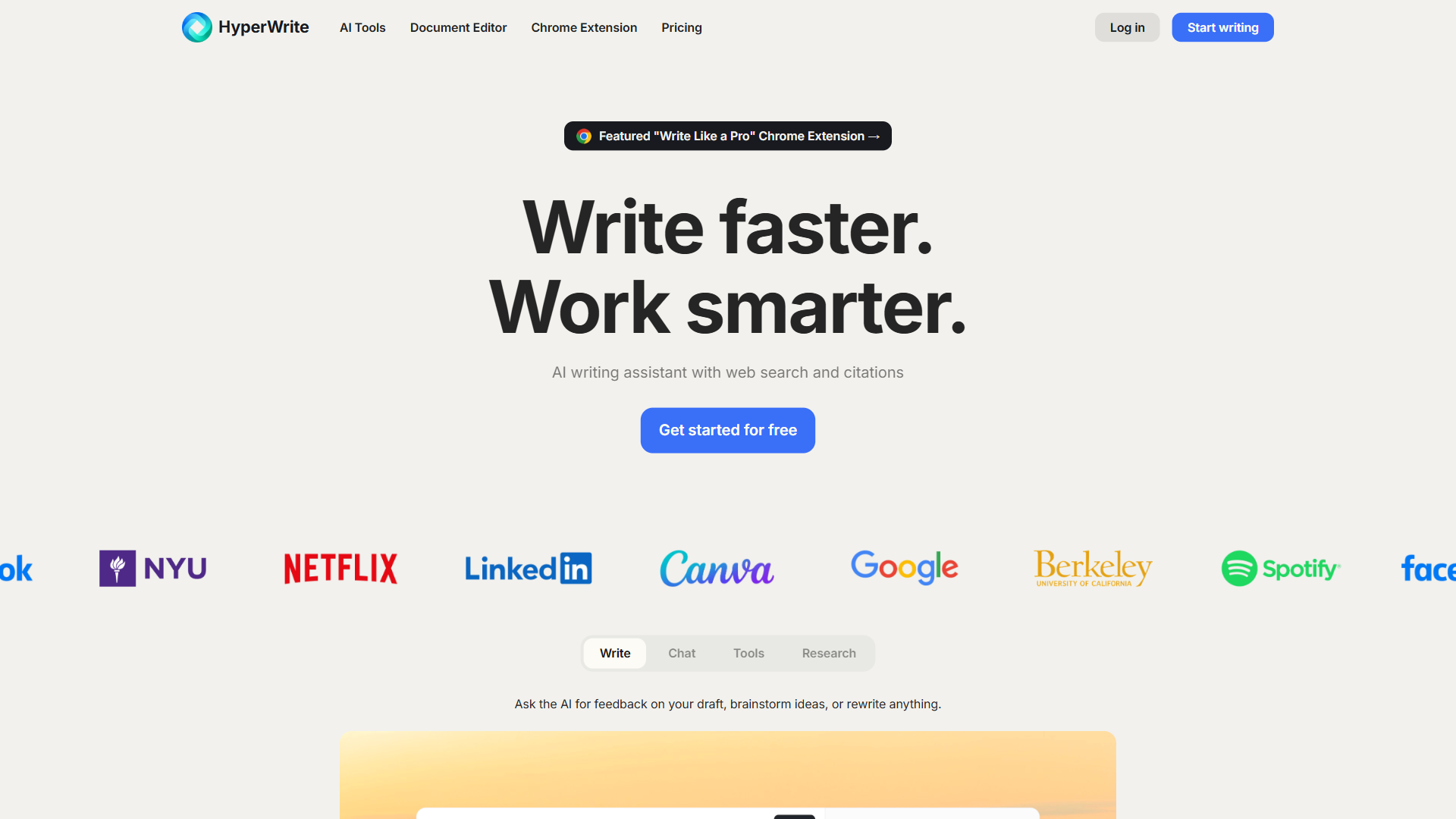
If you write for yourself, run a small business, or want a flexible ai writing assistant that handles emails, research, drafts, and quick tasks across the open web, HyperWrite is the better fit. The free tier removes the entry barrier, the Chrome Web Store extension keeps it within reach inside Gmail, Google Docs, and LinkedIn, and the personal agent mode can actually take actions on your behalf - a category of feature Jasper does not really compete in.
If you run a marketing team, manage a content calendar, or need brand voice consistency across dozens of writers and assets, Jasper is engineered for that exact use case. Its templates library is deeper for marketing copy, its brand voice training is more refined, and its campaign workflows tie blog posts, social copy, and emails together in ways HyperWrite does not attempt.
The middle ground - solo content creators who want both writing flexibility and marketing polish - can lean either direction. Writers comparing each option against a dedicated AI story writer or the best AI story generator will notice both handle narrative and creative drafts competently rather than excelling at fiction. Budget-conscious creators usually pick HyperWrite for the price. Creators who treat their content as a structured marketing pipeline usually pick Jasper despite the cost.
What Are the Key Differences Between HyperWrite and Jasper?
| Feature | HyperWrite | Jasper |
|---|---|---|
| Starting price | Free tier, paid from around $19.99/mo | No free tier, Creator around $49/mo |
| Free trial | Free tier with limited generations | 7-day free trial |
| Primary use case | General-purpose writing assistant | Marketing content platform |
| Brand voice | Basic style controls | Advanced brand voice training |
| Templates | Smaller library | Extensive marketing templates |
| Browser extension | Yes (Chrome, Edge, Safari) | Yes (Chrome) |
| AI agents | Personal agent + autopilot | Limited agent features |
| Team collaboration | Basic | Advanced (roles, workspaces) |
| SEO integration | Limited | Surfer SEO integration |
| Best for | Solo writers, students, professionals | Marketing teams, agencies |
| User rating | See ToolRating below | See ToolRating below |
Both products score the same in aggregate user ratings, which says something important: neither one is objectively better. They are optimized for different jobs. The table above should help you spot which set of tradeoffs aligns with how you actually work.
How Do HyperWrite and Jasper Compare on Pricing?
In a HyperWrite vs Jasper comparison, pricing is where the two products diverge most sharply. HyperWrite has a free tier suitable for casual users and a paid plan that starts around twenty dollars a month. Jasper has no free tier, only a seven-day free trial, and its entry-level paid plan sits closer to fifty dollars a month.
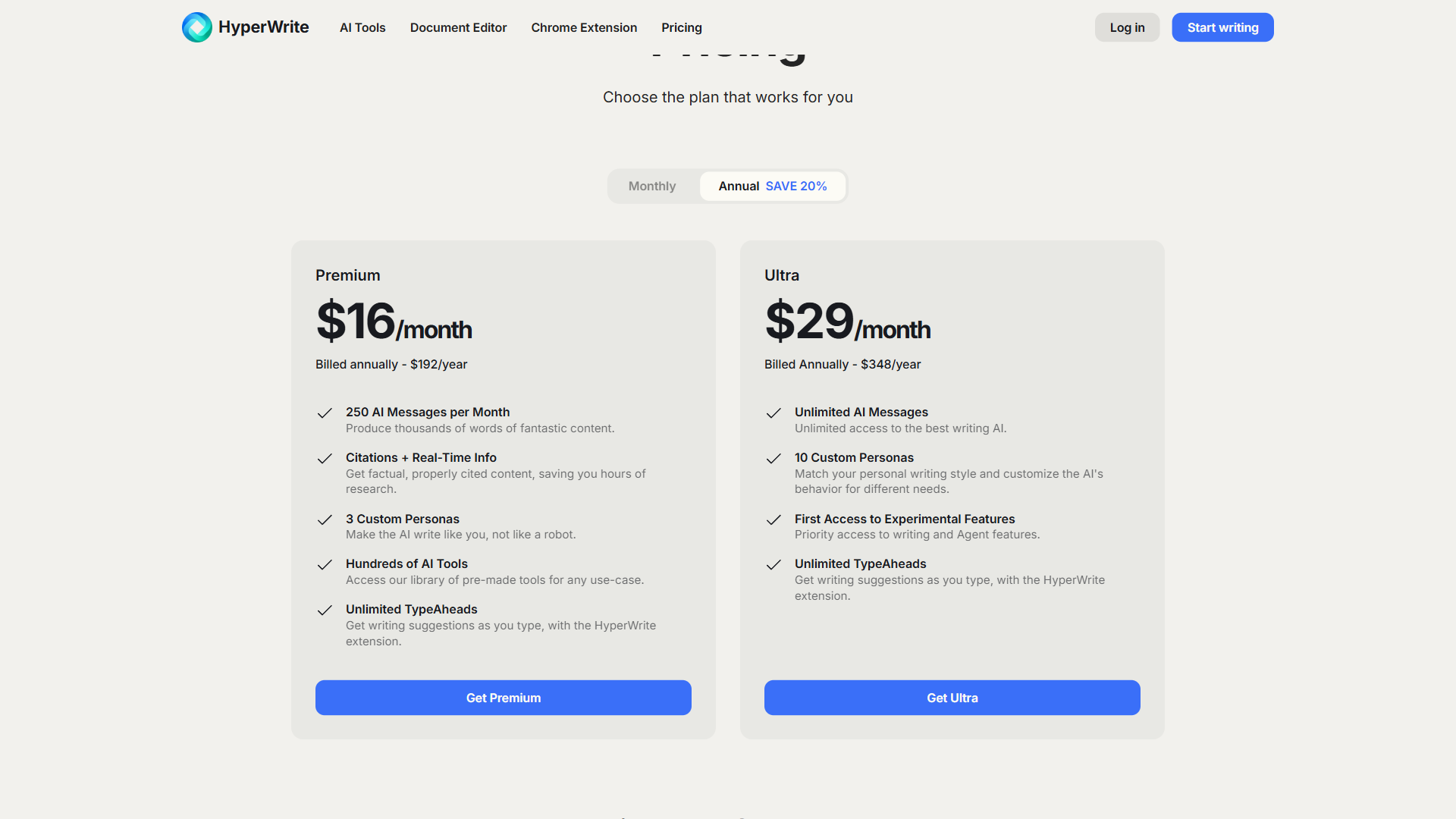
Pricing verified April 2026 from HyperWrite's pricing page:
- Starter: $0/mo
- Limited AI messages per month
- Limited TypeAheads
- Chrome extension
- Premium: $16/user/mo annual ($19.99 monthly)
- 250 AI messages per month
- 3 custom personas
- Unlimited TypeAheads
- Ultra: $29/user/mo annual ($44.99 monthly)
- Unlimited AI messages
- 10 custom personas
- Unlimited TypeAheads
HyperWrite’s pricing structure favors individuals and light users. The free tier covers basic writing assistance and a limited number of generations per month, which is enough to evaluate the product - or even use it as an occasional AI story generator free of charge - without a credit card. Premium unlocks higher usage limits, the personal agent, and more advanced features. For solo creators or small business owners, this curve is friendly.
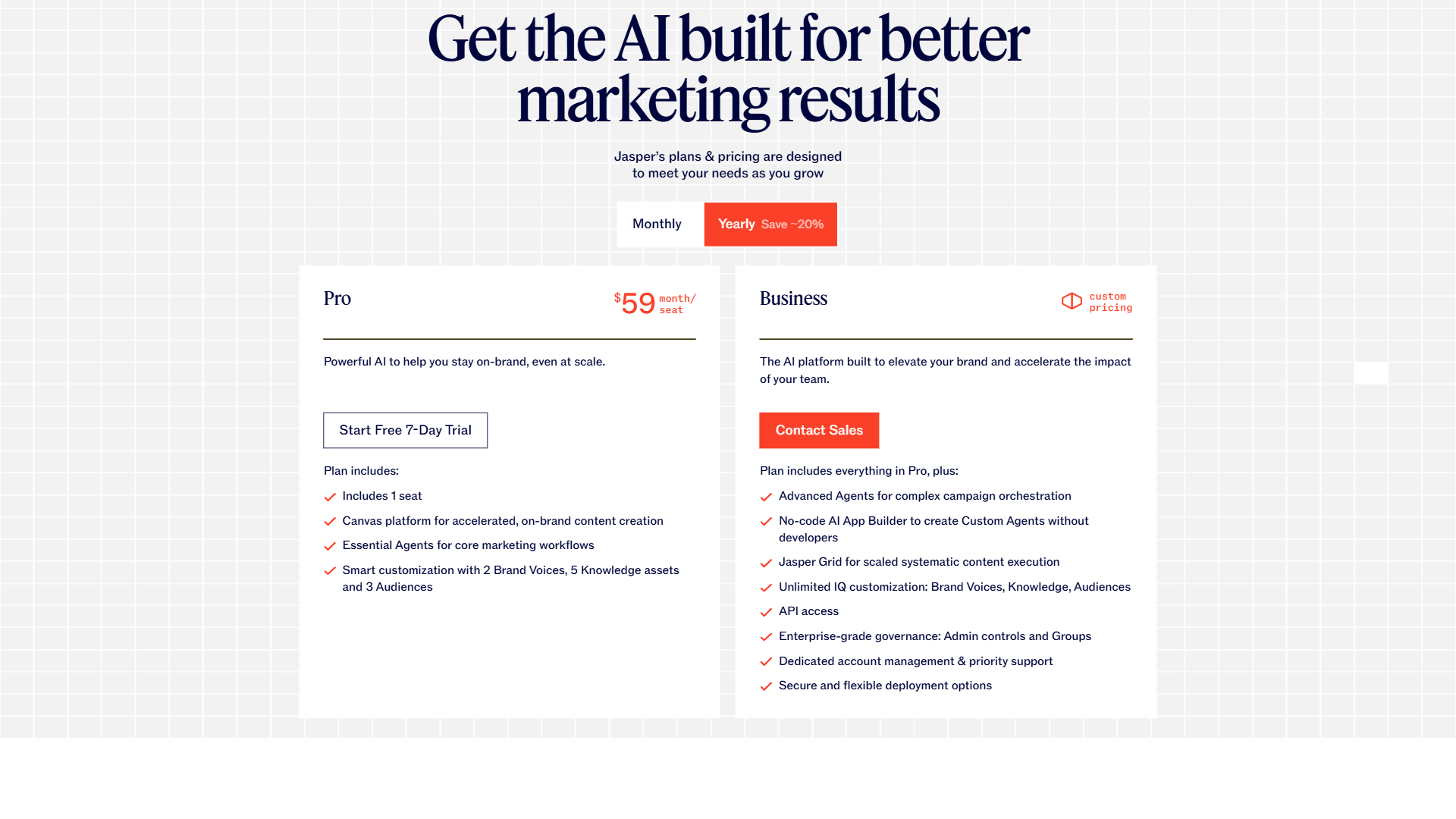
Pricing verified April 2026 from Jasper's pricing page:
- Pro: $59/user/mo annual ($69 monthly)
- Canvas platform
- Essential Agents
- 2 Brand Voices
- Business: Contact sales
- Everything in Pro
- Advanced Agents
- No-code AI App Builder
Jasper’s pricing assumes you are buying it as part of a marketing budget rather than a personal subscription. The Creator tier is aimed at individual marketers and freelancers, the Pro tier adds brand voice training and more advanced collaboration, and the Business tier handles larger teams with custom pricing. There is no permanent free tier, only a seven-day trial - which means you cannot keep using it long-term without paying.
The honest takeaway: if cost matters at all, HyperWrite wins this category cleanly. If you have a marketing budget already and need the features Jasper offers, the price gap matters less.
Writing Quality & Output
Both tools rely on leading large language models in the GPT-4-class family. In practice, this means the raw writing quality of either tool is comparable for general tasks - blog drafts, emails, summaries, rewrites. You will not find one consistently producing better prose than the other in side-by-side tests for typical content.
Where they differ is in how each tool packages and steers that model. Jasper has spent years tuning its prompts and templates specifically for marketing output, so its first-draft outputs for ad copy, product descriptions, and landing-page sections tend to need less editing in that lane. HyperWrite’s strength is conversational fluency and adapting to whatever context you give it, which makes it feel more like a flexible assistant and less like a content factory.
For long-form blog drafts, both can produce 1500 to 2500 words of usable content from a brief, but they will sound different. Jasper output trends toward marketing-conversion voice. HyperWrite output trends toward neutral, helpful, and more conversational. Both still need a human editor.
Not for: Jasper has a clear drawback if your writing needs are not marketing - the conversion-leaning voice can feel pushy in editorial, research, or technical writing contexts. HyperWrite has a real limitation for high-volume marketing teams: the more neutral default means more steering work per asset. Skip Jasper if your output is mostly long-form journalism or documentation; skip HyperWrite if you need ad-copy punch with zero prompt engineering.
Templates & Use Cases: Marketing-First vs General-Purpose
The Jasper templates library is the larger and more polished of the two. You will find dedicated workflows for blog post intros, Facebook ad copy, Google ad headlines, product descriptions, sales emails, video scripts, press releases, and dozens of other formats. Each template is tuned with prompt structure designed to elicit a specific kind of output. If you write the same five types of marketing assets repeatedly, the template library alone can justify the cost.
HyperWrite’s template library is smaller but covers the most common writing tasks - emails, blog outlines, summaries, rewrites, translation, and a growing set of community-contributed templates. The difference is philosophical: Jasper assumes you want a template for every situation, while HyperWrite assumes you mostly want to type what you need in plain language and have the assistant figure it out.
For content marketers, Jasper’s structured approach is a productivity multiplier. For generalists, students, professionals writing emails and proposals, or anyone whose writing tasks vary day to day, HyperWrite’s free-form approach is faster and less rigid.
Not for: Jasper’s template-heavy model has a clear limitation if your writing varies wildly - flipping templates becomes drag rather than help. HyperWrite has a real drawback for teams that want predictable, repeatable outputs for the same five asset types every week. Skip Jasper if your writing is rarely marketing copy; skip HyperWrite if structured campaigns are the spine of your job.

Brand Voice & Style Consistency
Brand voice is one of Jasper’s defining advantages. The brand voice feature lets you upload existing brand materials - past blog posts, web copy, brand guidelines - and trains a voice model that informs every subsequent generation. You can save multiple brand voices for different products or clients, switch between them, and enforce voice consistency across an entire team of writers. For agencies juggling several accounts or in-house teams keeping a single voice across many channels, this feature is hard to replicate. The principles behind brand voice modeling are well-documented; Jasper translates them into a configurable product.
HyperWrite offers basic style controls and writing personas, but does not match Jasper’s depth here. You can guide its tone through prompts and saved snippets, but it does not have a dedicated brand voice training workflow. For a solo creator or small business with a single voice, the difference matters less. For a marketing team, the difference is significant.
This is one of the clearest decision points: if maintaining a tight, repeatable brand voice across writers is core to your work, Jasper is the better tool. If you write in your own voice and rely on editing rather than training, HyperWrite is fine.
Not for: Jasper’s brand voice feature has a real drawback for solo creators - the training overhead does not pay off when you are the only writer. HyperWrite has a clear limitation for agencies and in-house teams juggling multiple client voices; the lack of dedicated training workflow becomes a bottleneck. Skip Jasper brand voice if you write in one personal voice; skip HyperWrite if you maintain three or more distinct brand identities.
AI Agent Features: HyperWrite’s Edge
HyperWrite invests heavily in agent capabilities - features where the AI does not just write text but takes actions. Its personal agent can browse the web, fill out forms, research a topic across multiple sources, and return summarized findings. Its autopilot feature can execute tasks like drafting and sending emails based on natural-language instructions. These features push HyperWrite beyond pure writing assistance into the broader assistant category.
Jasper has been slower to add agent-style features. It is fundamentally a content generation platform, not a general-purpose assistant. There are workflow automations inside Jasper for chaining content tasks, but it does not browse the web on your behalf or execute external actions in the way HyperWrite’s agent does.
For users who want their AI to do things beyond writing - schedule research, take browser actions, return real-time information - HyperWrite is clearly ahead. For users who simply want to generate high-quality marketing copy, this category is not relevant to the decision.
Not for: HyperWrite’s agent surface has a real drawback for security-conscious teams uncomfortable with autonomous browser actions on logged-in accounts. Jasper’s lack of agent features is a clear limitation if your workflow includes “go research X and summarize” tasks. Skip HyperWrite agents if you do not want AI taking actions on your behalf; skip Jasper if research-and-action loops are part of your daily writing.
Browser & Workflow Integration
HyperWrite’s Chrome Web Store extension is one of its most useful day-to-day features. Once installed, it works inside Gmail, Google Docs, LinkedIn, Twitter, Notion, Slack, and most rich-text fields across the web. You can rewrite a sentence, draft an email, or expand a bullet point without leaving the page you are on. For users whose work spans many web apps, this ambient availability matters more than any single feature in the main app.
Jasper also offers a Chrome extension that brings its generation capabilities into Google Docs and similar surfaces. It is functional, but Jasper still leans toward being its own dedicated workspace where you draft content. The browser extension is more of a companion than the primary experience.
If you want AI writing to follow you across the web wherever you happen to be typing, HyperWrite has the better integration story. If you prefer to draft inside a dedicated content platform and then export, Jasper’s workspace-centric model fits.
Not for: HyperWrite’s ambient extension has a clear limitation for teams that want their final assets stored, versioned, and tracked centrally - the across-the-web model fragments outputs. Jasper’s workspace-first model has a real drawback for users who hate context-switching to a separate app every time they need a quick rewrite. Skip HyperWrite if asset management matters more than ambient access; skip Jasper if the extra trip to a separate workspace kills the impulse to use AI in the first place.
Team Collaboration & Content Workflows
Jasper is built for teams. The Jasper Business plan offers user roles, workspaces, shared brand voices, content libraries, and approval workflows that make sense when multiple writers are producing content under one brand umbrella. The Business tier adds even more team features along with custom onboarding and security controls. Agencies and in-house marketing teams will find Jasper feels like it was designed with their org chart in mind.
HyperWrite has collaboration features but they are lighter. The product is fundamentally aimed at individual users, with teams as an add-on rather than the core use case. You can share content and workspaces via the HyperWrite Teams tier, but you will not find the same depth of role management or content governance.
For a single writer or a duo, HyperWrite’s lighter collaboration is fine and even preferable. For a team of five or more producing content under shared brand standards, Jasper is the more appropriate choice.
Not for: Jasper’s team-first design has a real drawback for solopreneurs - you pay for collaboration features you never touch. HyperWrite has a clear limitation for any team that needs role permissions, approval workflows, or shared content libraries. Skip Jasper if you are a team of one or two; skip HyperWrite the moment your workflow requires editor-to-approver handoffs.
SEO & Long-Form Content
For SEO-driven content marketing, Jasper has an edge through its native integrations - particularly with Surfer SEO, which lets writers see real-time SEO scoring and keyword recommendations alongside their draft. This integration tightens the loop between writing and ranking, which matters for teams measured on organic traffic.
HyperWrite does not have a comparable native SEO integration. You can write SEO content with it, but you will need separate tools - Surfer SEO, Clearscope, Frase - to handle keyword optimization. For solo bloggers, this might not matter. For a content team chasing rankings, the lack of integration is friction.
For long-form output, both tools can produce 2000-plus-word drafts, but Jasper’s structured workflows around brief, outline, and section generation are better suited to longer pieces. HyperWrite handles long content but feels more natural for short and medium-length tasks.
Not for: Jasper’s SEO integration has a real limitation if you do not pay separately for Surfer SEO - the value disappears without that stack. HyperWrite has a clear drawback for SEO teams who depend on inline keyword scoring in their writing tool rather than a separate tab. Skip Jasper-plus-Surfer if your SEO motion is lighter; skip HyperWrite if real-time SEO scoring is non-negotiable.
User Reviews & Ratings
The HyperWrite vs Jasper rating split is unusually even. Both products score similarly in aggregate user reviews - strong but not identical sentiment - and the praise and complaints differ. HyperWrite users tend to love its flexibility, value, and browser availability while wanting more polish in specific verticals. Jasper users praise its marketing-specific quality and brand voice but consistently flag the price as a barrier.
HyperWrite reviewers consistently call out flexibility, the free tier, and ambient cross-web availability as the biggest strengths. The most common gripe is polish in specific verticals - outputs feel general rather than tuned for a given format.
Jasper reviewers praise marketing-output quality, brand voice training, and team workflows as the standout features, while consistently flagging price and the lack of a permanent free tier as the biggest drawbacks for evaluation.
The ratings convergence is interesting. It suggests both products meet user expectations for their respective audiences. A marketer using Jasper is rating it against other marketing platforms. A solo writer using HyperWrite is rating it against other personal assistants. Each succeeds in its lane.
Not for: the matched headline ratings hide real limitations - HyperWrite reviewers consistently flag the rough edges in specific verticals, Jasper reviewers consistently flag the price as the drawback. Skip HyperWrite if you need polished output in a niche domain where flexibility is not enough; skip Jasper if the seven-day-trial-then-pay model rules out evaluation by your buying team.
When to Choose HyperWrite
Pick HyperWrite if you write for yourself most of the time, want a free tier to test before committing, value cross-web availability through a browser extension, want a personal AI agent that can take actions, and care about cost. It is the right tool for students, professionals managing email and proposals, solopreneurs, and anyone who treats AI as a personal productivity tool rather than a content factory.
You can start with the HyperWrite free tier and upgrade only when you hit the generation limits.
Not for: HyperWrite has a clear drawback for marketing teams that need brand voice consistency across multiple writers, deep ad-copy templates, or native SEO scoring inside the editor. Skip HyperWrite if you are running structured content campaigns where every asset needs to fit a brand-voice model and a campaign workflow.
When to Choose Jasper
Pick Jasper if your work is marketing content at scale, you need brand voice training that travels across writers, you manage a content calendar with team members, you write SEO-optimized blog content as a primary deliverable, and your budget assumes professional-grade tools. It is the right tool for marketing teams, content agencies, e-commerce brands shipping product descriptions at scale, and growth teams running content campaigns.
You can try Jasper for content marketing with the free trial and evaluate it against your actual workflow before committing to a monthly plan.
Not for: Jasper has a real limitation for casual writers and solopreneurs - the price and template-heavy interface are drawbacks if you are not running structured marketing campaigns. Skip Jasper if your writing is mostly emails, proposals, or research drafts, and skip it if you need ambient AI inside Gmail and LinkedIn more than a dedicated workspace.
The Bottom Line
The HyperWrite vs Jasper decision is rarely about which tool is “better” - it is about which tool matches your daily workflow. HyperWrite and Jasper solve different problems with similar underlying AI. HyperWrite is the better personal ai writing assistant - flexible, affordable, available everywhere, with genuine agent features. Jasper is the better marketing platform - polished, team-ready, brand-aware, and built around structured content workflows. The matching aggregate ratings on both are not a coincidence; both serve their audiences well. Choose based on who you are and what you actually write, not on feature counts or model claims.
Frequently Asked Questions
Is HyperWrite cheaper than Jasper?
Yes, HyperWrite is significantly cheaper. HyperWrite offers a free tier and paid plans starting around twenty dollars per month, while Jasper has no free tier and starts at roughly fifty dollars per month for its Creator plan. For budget-conscious users, the price gap is substantial.
Is Jasper better than HyperWrite for marketing?
For dedicated marketing teams, yes. Jasper is purpose-built for marketing content with deeper templates, brand voice training, campaign workflows, and SEO integration. HyperWrite is a strong general writing assistant but does not match Jasper’s marketing-specific depth. Solo creators may still prefer HyperWrite for its flexibility and lower cost.
Does HyperWrite have a free plan?
Yes, HyperWrite offers a free tier with limited monthly generations and access to core features. The free tier is genuinely usable for occasional writing tasks and serves as an evaluation path before upgrading to Premium. Jasper, by contrast, only offers a seven-day free trial.
Can HyperWrite replace Jasper for content marketing?
For solo content creators or small teams, HyperWrite can handle most content marketing tasks acceptably. For larger marketing teams that depend on brand voice consistency, campaign workflows, and SEO integrations, HyperWrite is not a complete replacement for Jasper. Match the tool to the team size and workflow complexity.
Related Reading
- HyperWrite tool review and full feature breakdown
- Jasper tool review and pricing details
- Best AI Writing Tools 2026
- Writesonic vs Jasper comparison
- AI Writing Tools roundup
External Resources
- HyperWrite official website
- Jasper official website
- OpenAI model documentation - the underlying GPT-class models behind both tools