

A practical look at whether Zoho Mail free business email is usable as the email backbone of a real small business - or just a teaser pushing you toward paid tiers.
Introduction
Most “free email” claims for business fall apart within five minutes of reading the fine print. Either you cannot host business email with domain control, the storage is laughable, or the provider quietly funnels you into a trial that converts to billing without warning. Zoho Mail is one of the rare exceptions: a genuinely free email tier with a real custom domain, no auto-trial, and no surprise charges. But “free and real” does not automatically mean “enough for your team.”
Zoho Mail free business email gives small teams a forever-free plan with 5 users, 5GB storage per user, and 1 custom domain - but no IMAP, no Outlook support, and no upgrade path past 5 users without moving everyone to paid. It works for solo founders and 2-5 person teams comfortable with webmail.
Is Zoho Business Email Free? (Quick Answer)
Yes. Zoho Mail offers a forever-free plan for up to 5 users with 5GB mailbox storage each, 1 custom domain, and a 25MB attachment limit. There is no credit card required at sign up and no trial countdown. You get webmail access, calendar, Cliq (Zoho’s chat tool), the mobile app, and basic email security. What you do not get on the free plan: IMAP/POP, Active Sync, the Trident desktop client, Zia AI assistant, or any path to grow past the 5-user ceiling without upgrading the whole team to a paid plan.
What You Get on the Free Plan: Hard Numbers
The free plan is intentionally lean, but the numbers are concrete enough to plan around. Compare it against the paid Mail Lite, Mail Premium, and Workplace bundles below before you commit a domain to it.
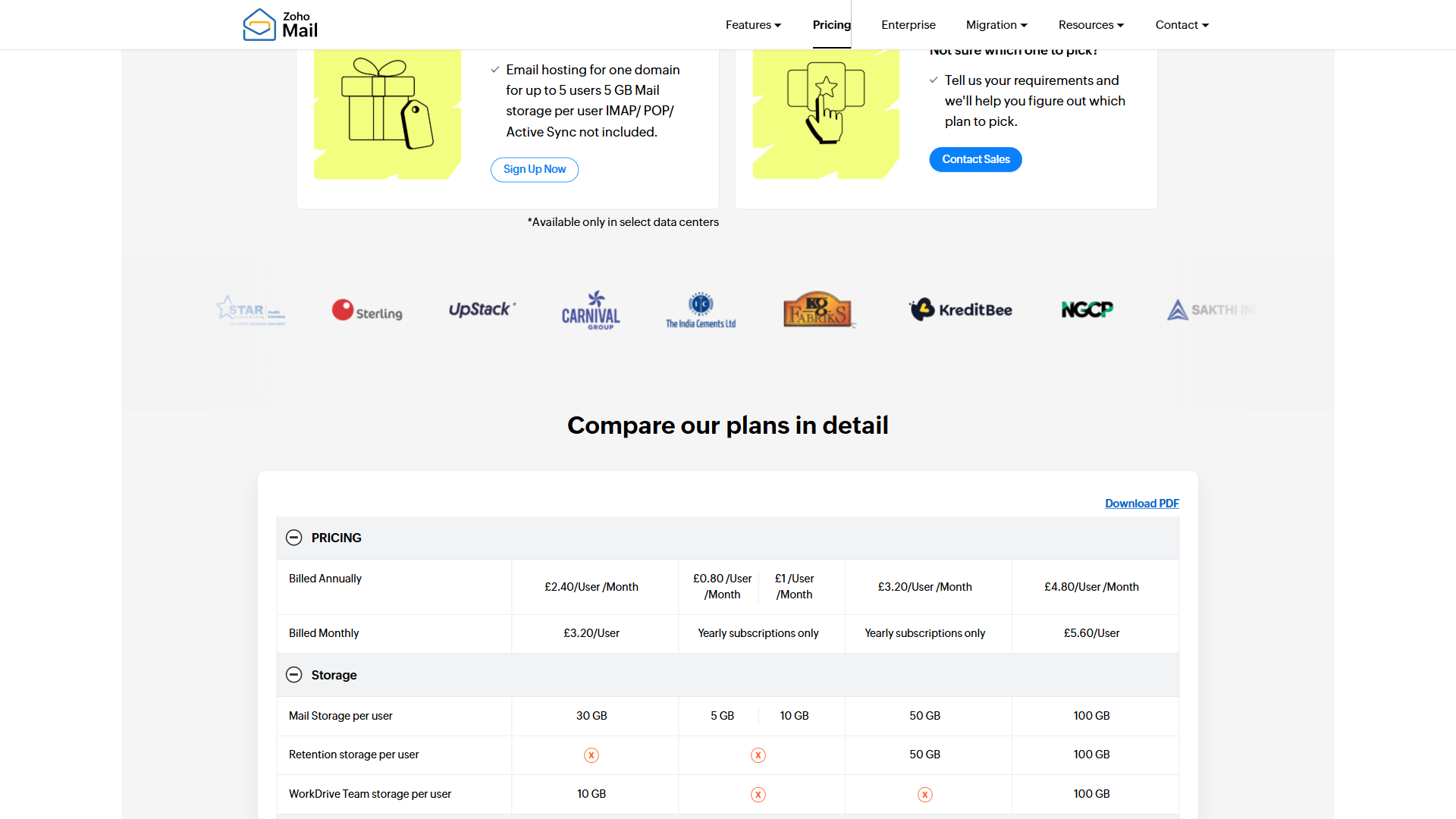
Pricing verified April 2026 from Zoho Mail's pricing page:
- Mail Free: $0/mo
- Up to 5 users
- 5 GB storage per user
- Web access only
- Mail Lite: $1/user/mo annual
- 5-10 GB storage per user
- Zia AI composition
- Custom domain hosting
- Mail Premium: $4/user/mo annual
- 50 GB mail storage per user
- 50 GB retention storage
- S/MIME encryption
- Workplace Standard: $3/user/mo annual
- Email plus online office suite
- 30 GB mail storage per user
- Zoho WorkDrive integration
- Workplace Professional: $6/user/mo annual
- 100 GB mail storage per user
- 100 GB retention storage
- 1 TB team storage
- Workplace Enterprise: Contact sales
- Custom storage limits
- Enterprise-grade security
- Dedicated support
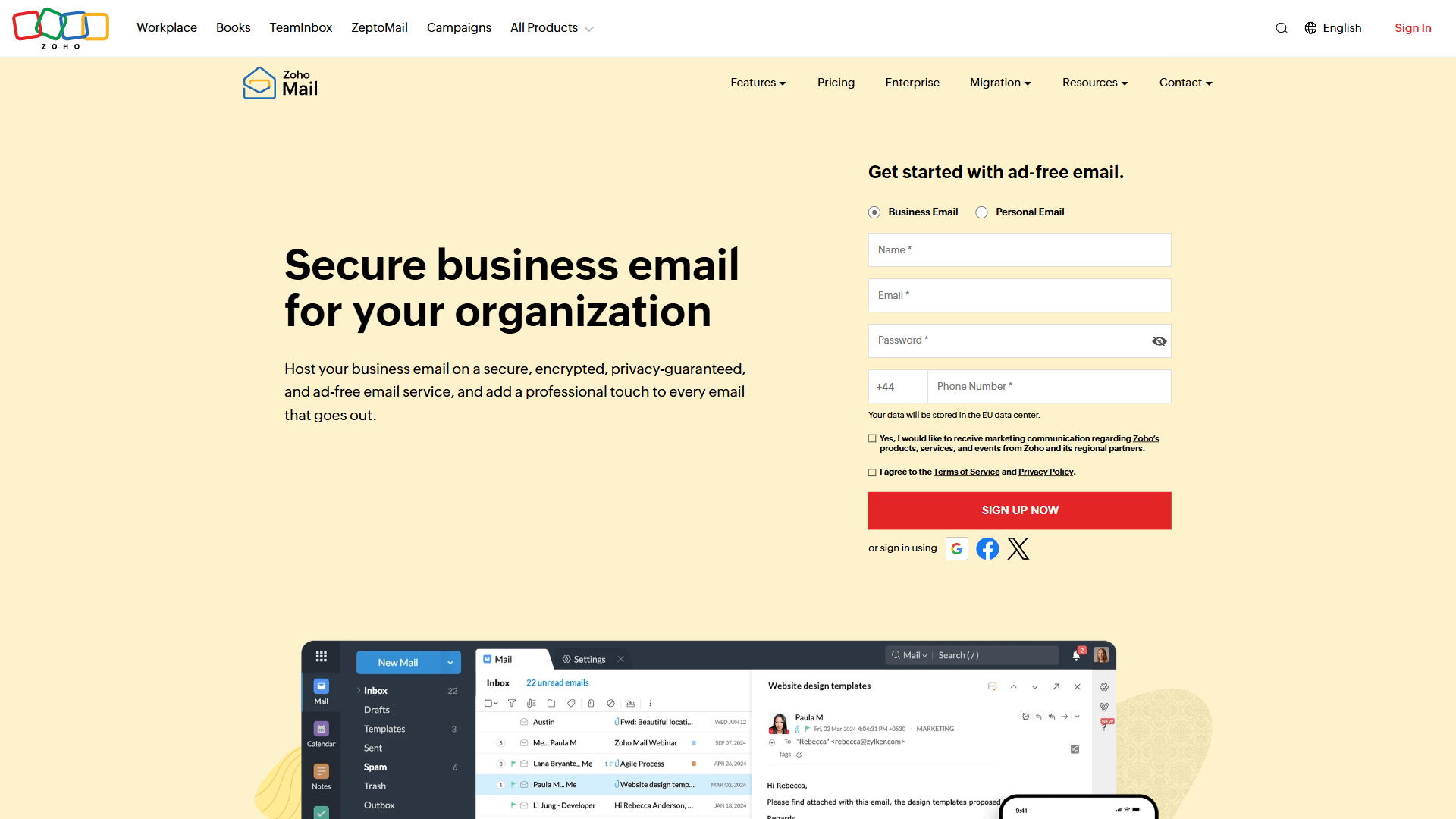
The headline numbers for the Forever Free plan, pulled directly from Zoho’s pricing page:
- Up to 5 users, no credit card
- 5GB mail storage per user
- 25MB attachment cap (matches Gmail’s free tier)
- 1 custom domain with full MX/SPF/DKIM control
- Webmail interface plus Zoho’s mobile app
- Calendar, ToDo, Cliq Free, and basic mail security included
- No IMAP, POP, or Active Sync - webmail is the only desktop access method
That last point is the single biggest gotcha. If your team lives in Apple Mail, Outlook, or Thunderbird, the free plan effectively does not work for them. There is no workaround short of upgrading to the cheapest paid step up.
How Do You Set Up a Free Zoho Mail Business Email?
Setting up Zoho Mail for business with domain control takes about 15-20 minutes if your DNS is already managed somewhere modern like Cloudflare or Namecheap. The setup walks through five steps after you sign up: claim your domain, verify ownership with a TXT or CNAME record, configure MX records, add SPF and DKIM for deliverability, and create your first mailbox. Zoho’s admin walks you through each DNS record with copy-paste values, and verification usually clears within minutes.
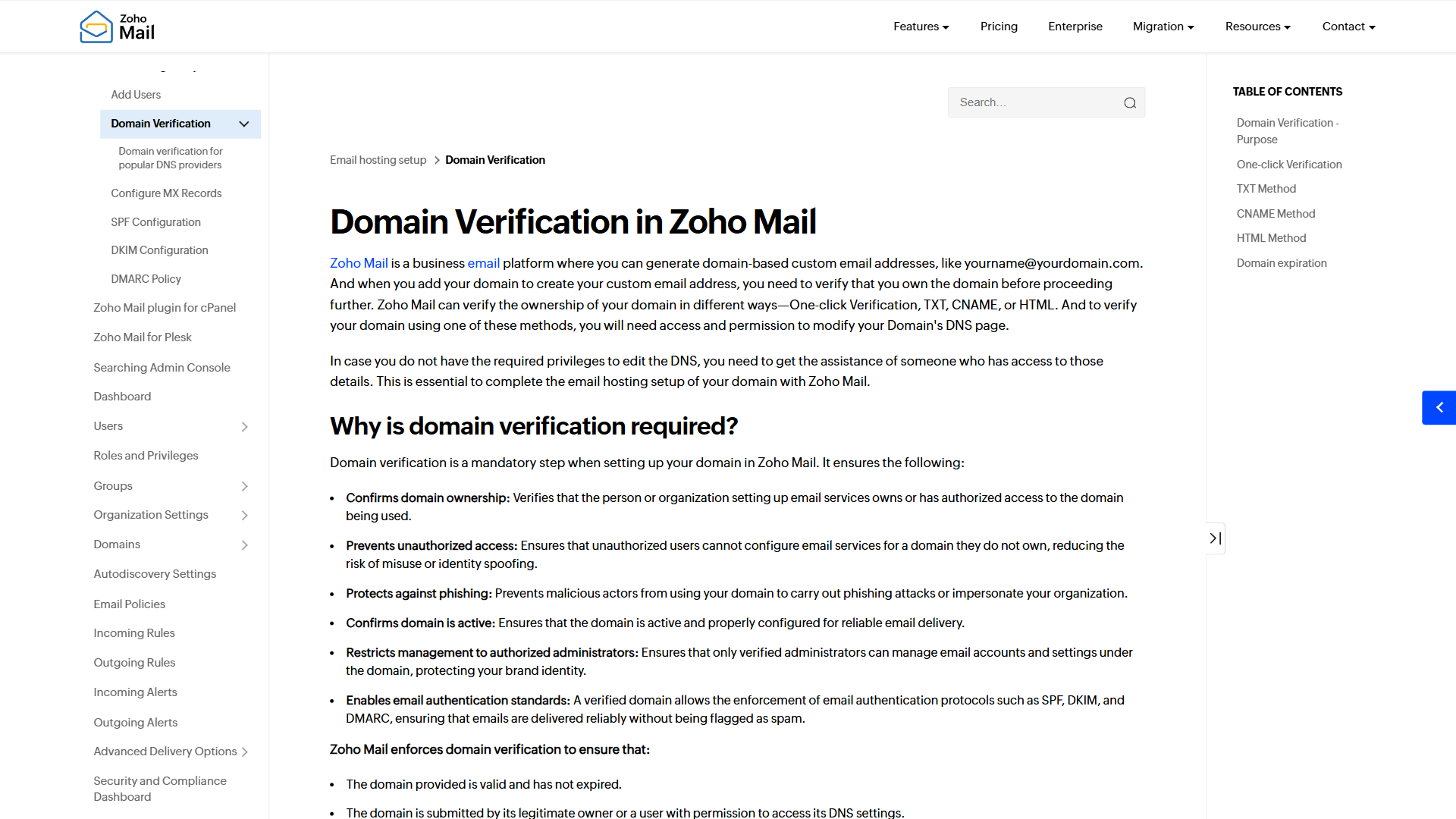
A few practical notes. First, your DNS provider matters more than the email host - Cloudflare’s DNS record documentation covers the syntax if you are unfamiliar with MX priorities. Second, add the DMARC record Zoho recommends; Gmail and Outlook increasingly downrank or reject mail from domains without one. Third, do the first mail login from a clean browser session so two-factor enrollment goes smoothly. Our Zoho Mail Custom Domain Setup Guide covers the DNS specifics in more depth.
If you want to migrate from Gmail or Outlook, Zoho’s import tool can pull existing mail over IMAP from your old provider - but the imported mail then lives inside Zoho’s webmail. There is no way to read it from a desktop client unless you upgrade to a paid plan.
Where the Free Plan Breaks: The Hidden Limits
The marketing copy emphasizes “forever free for 5 users.” What it does not emphasize is the four places where that free tier quietly fails real workflows.
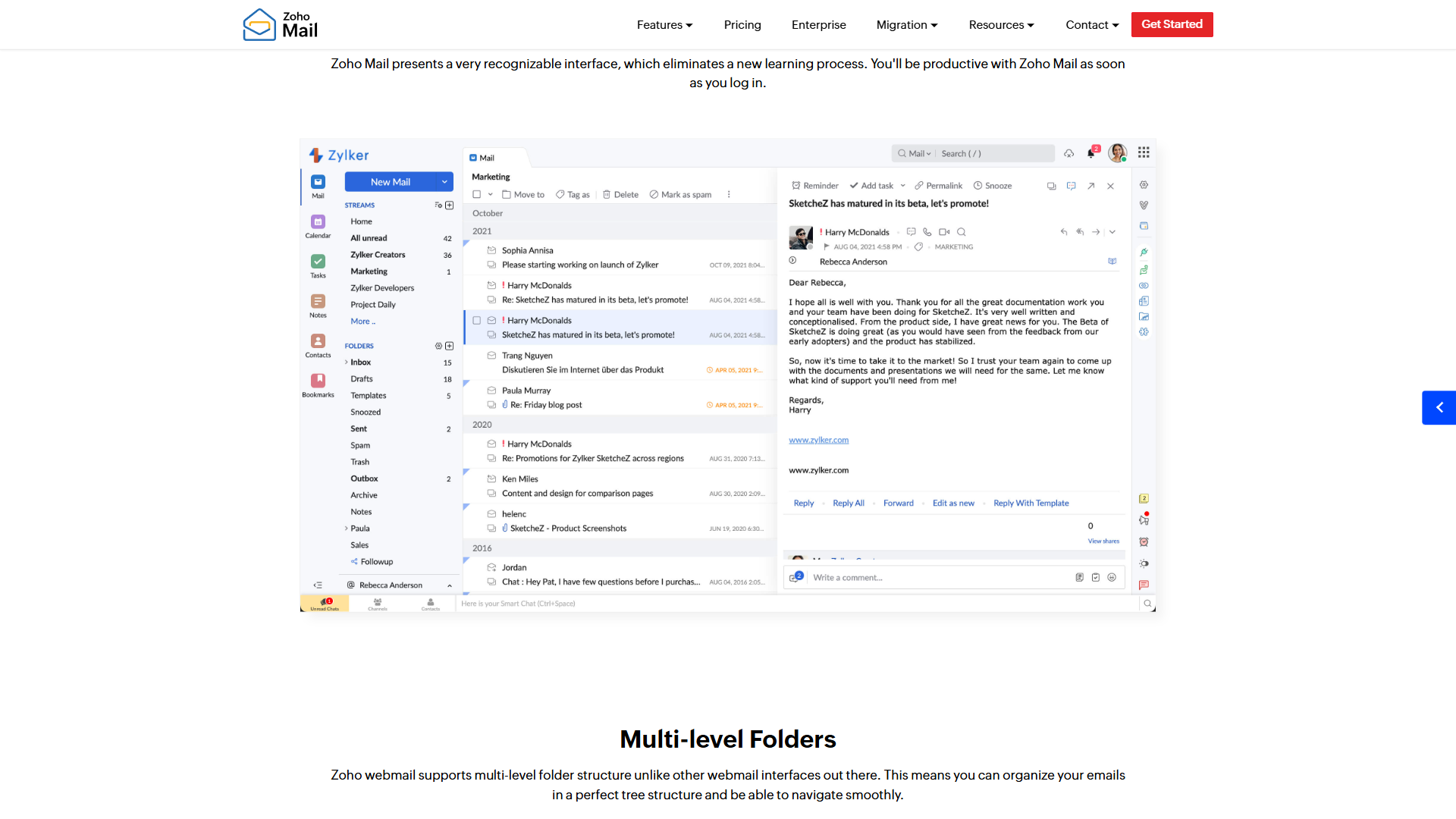
No IMAP, POP, or Active Sync. This is the headline limitation. Free plan users get webmail and Zoho’s own mobile app, period. Outlook, Apple Mail, Thunderbird, and even iOS Mail (which uses IMAP under the hood) cannot connect. Our Zoho Mail IMAP Setup Guide covers what changes once you upgrade to a tier that includes IMAP.
The 5-user cliff. Free supports up to 5 users. When you hire a 6th, you cannot upgrade that one person - everyone moves to paid. Plan for it: either commit to staying at or below 5 users long term, or budget for the full team upgrade from day one.
5GB per mailbox. For text-heavy workflows, generous. For anyone who receives PDFs, design files, or video attachments regularly, 5GB fills surprisingly fast. More on the math below.
25MB attachment ceiling. Matches Gmail’s free tier and is fine for documents, but blocks short video clips, raw photos, or larger design files. Workarounds (WorkDrive, Google Drive links, WeTransfer) are extra steps for the recipient.
No Zia AI, no Trident desktop client. Zoho’s Zia AI assistant and the new Trident desktop client are gated to Mail Lite and above. The AI summarization and reply features competitors highlight are not in the free tier.
Is Zoho Mail Cheaper Than Gmail?
For small teams, almost always yes. Google Workspace’s Business Starter charges per user per month with annual billing, while Zoho Mail’s free plan covers up to 5 users at $0. For a 5-person team, that is hundreds of dollars a year for Workspace versus nothing for Zoho Mail Free. Even Zoho’s cheapest paid step up (Mail Lite, annual billing only, pricing requires sign-up) undercuts Google Workspace per user. The trade-off is the IMAP and ecosystem gap: Gmail has near-universal client support, while Zoho’s free plan is webmail-only. If you can live in webmail, Zoho Mail free business email wins on price by a wide margin. If your team needs desktop clients, see our IMAP setup guide for what changes once you upgrade.
Storage Math: When 5GB Actually Fills Up
5GB per mailbox sounds tight by 2026 standards. In practice, how fast it fills depends entirely on your team’s attachment habits.
For a text-heavy team that mostly sends short emails with the occasional PDF, 5GB lasts years. A typical text email runs about 5-15KB. At an average of 10KB per email, 5GB holds roughly 500,000 messages - more than a typical small business inbox receives in five years.
For an attachment-heavy team, the math flips fast. If your role involves design files, video clips, scanned contracts, or large PDFs, the per-message size jumps from ~10KB to 1-10MB. At an average of 10MB per email, 5GB holds only about 500 messages. A busy account manager or designer can blow through that in 2-3 months.
The workarounds: archive aggressively (Zoho lets you download .eml files), use shared drives for file delivery, or move to Mail Lite for 10GB per mailbox plus IMAP. For teams that already route files through shared drives, the 5GB ceiling rarely binds. For teams that treat email as a file archive, it is the first thing that breaks.
The 5-User Cliff: When You’re Forced to Upgrade
The simplest decision tree for whether you have outgrown the free plan:
- 1-5 people, everyone uses webmail or Zoho’s app? Stay on free.
- 1-5 people, but someone needs Outlook or Apple Mail? Upgrading that one user is not possible - everyone moves to Mail Lite together.
- Hired (or about to hire) a 6th person? All users move to paid. There is no “free for the first 5, paid for the 6th+” model.
- Storage running low and no easy archive path? Mail Lite doubles per-user storage to 10GB.
- Need Zia AI summarization or the Trident desktop app? Mail Lite is the entry point.
The pattern is consistent: the cheapest way out of every free-tier friction is Mail Lite. If you also need shared file storage or Zoho’s office suite, the Workplace bundles deliver better value - but as the next step up from Free, Mail Lite is the obvious upgrade.
Zoho Mail Pricing Tiers Compared
Paid-tier dollar amounts are gated behind a sign-up form on Zoho’s pricing page. Here is what to expect at each tier:
| Plan | Best For | Storage | Key Unlock vs Free |
|---|---|---|---|
| Mail Free | 2-5 person teams in webmail | 5GB / user | (baseline) |
| Mail Lite | Teams needing IMAP and basic AI | 10GB / user | IMAP, POP, Active Sync, Zia AI, Trident desktop |
| Mail Premium | Compliance or security needs | 50GB + 50GB archive | eDiscovery, S-MIME, DLP (Beta), mobile management |
| Workplace Standard (Best Value) | Small businesses needing an office suite | 30GB mail + 100GB team drive | Adds WorkDrive, Writer, Sheet, Show, Meeting, Vault |
| Workplace Professional | Larger teams needing intranet | 100GB mail + 1TB WorkDrive | Adds Connect intranet, 100GB retention |
| Workplace Enterprise | 100K+ user organizations | Pooled storage | AD sync, VPC isolation, custom contracts |
For exact current pricing, check Zoho’s pricing page - the paid tiers reveal their per-user costs once you start a sign up flow.
Zoho Mail Free Business Email vs Paid Tiers
The decision between Zoho Mail’s free tier and any paid tier comes down to four questions: do you need IMAP, are you within 5 users, is 5GB per mailbox enough, and do you want Zia AI? If you answer “yes, yes, yes, no” - free is genuinely the right call. If any of those flip, the cheapest paid tier (Mail Lite, annual billing only, pricing requires sign-up) closes the gap.
Zoho Mail Free is one of the few “free business email” offerings genuinely usable for real production. It does not auto-convert to billing, throttle deliverability, or nag you to upgrade. The catch is structural: you cannot grow past it without moving the whole team. Plan for that day from the start.
When Free Isn’t Enough: Choosing the Right Paid Tier
For teams that need to upgrade, the question is “which Zoho tier matches what I am actually missing?”
If the only friction is IMAP support so your team can use desktop clients, Mail Lite is the answer. It doubles storage to 10GB per user, unlocks IMAP/POP/Active Sync, adds Zia AI, and includes the Trident desktop client. For most teams hitting a wall on the free plan, Mail Lite is the right step - not a Workplace bundle.
If you also want shared file storage, online docs, and video meetings, Workplace Standard (marked Best Value on Zoho’s pricing page) bundles Mail with WorkDrive, Writer, Sheet, Show, Cliq, Meeting, and Vault. For teams comparing Zoho Workplace to Google Workspace alternatives, this is the head-to-head tier.
For compliance needs - eDiscovery, S-MIME encryption, DLP, mobile device management - jump to Mail Premium or Workplace Professional. The free plan and Mail Lite do not include these controls.
A note on billing: every paid tier above Free is annual billing only on the pricing page. Budget for the full-year commitment when you upgrade.
The Bottom Line
Zoho Mail free business email is the rare “forever free” email offering that is actually usable for a real small business - if you fit inside its guardrails. For 1-5 person teams comfortable with webmail and Zoho’s mobile app, it is the best price-to-features ratio on the market, and the custom-domain support puts it ahead of competing free options. The friction is structural, not punitive: no IMAP, hard 5-user ceiling, 5GB per mailbox. When any of those binds, Mail Lite is the obvious next step and meaningfully cheaper than Google Workspace. Start on Free and plan the upgrade for the day you hire person number six. To start, head to Zoho Mail’s homepage and click sign up - the whole process takes 15-20 minutes if your DNS is fast.
Frequently Asked Questions
Is Zoho business email free?
Yes - Zoho Mail offers a Forever Free plan that supports up to 5 users with 5GB of storage each, 1 custom domain, and a 25MB attachment limit. No credit card is required at sign up, and there is no trial countdown. The free plan includes webmail, calendar, Cliq chat, the mobile app, and basic email security. It does not include IMAP/POP, Zia AI, or the Trident desktop client - those are reserved for paid tiers starting at Mail Lite.
How to create a business email for free Zoho Mail?
Visit Zoho Mail, click “Sign Up Now,” and select the Forever Free plan. Add your custom domain, verify ownership via a TXT or CNAME record at your DNS provider, then configure MX records, add SPF and DKIM for deliverability, and create your first mailbox. Setup takes 15-20 minutes if your DNS is fast. Our custom domain setup guide walks through the gotchas.
Is Zoho Mail cheaper than Gmail?
For small teams, almost always. Zoho Mail’s Forever Free plan covers up to 5 users at $0, while Google Workspace’s cheapest plan (Business Starter) charges per user per month. For a 5-person team, that is hundreds of dollars a year in Google’s favor versus $0 for Zoho. Even at the cheapest paid Zoho tier (Mail Lite, annual billing only, pricing requires sign-up), Zoho Mail free business email and its paid tiers undercut Google Workspace per user. The trade-off is ecosystem and client support: Gmail integrates with practically every mail client and third-party tool, while Zoho’s free plan is webmail-only.
What is the disadvantage of Zoho Mail?
The biggest disadvantage of the free plan is the lack of IMAP, POP, and Active Sync - Outlook, Apple Mail, and Thunderbird cannot connect. Second is the hard 5-user cap: when you hire a 6th person, every user must upgrade together. Third, 5GB per mailbox fills quickly for attachment-heavy roles. Beyond the free plan, Zoho Mail’s broader disadvantages include weaker third-party ecosystem integrations than Google Workspace and a webmail interface some long-time Outlook users find unfamiliar. Deliverability is solid as long as you configure SPF, DKIM, and DMARC correctly.
Related Reading
- Zoho Mail - Our full tool review with ratings, pricing breakdown, and feature analysis.
- Best AI Email Tools 2026 - Where Zoho Mail fits in the broader AI-enabled email landscape.
- Best AI Email Cleanup Tools - Inbox management options that pair well with a small Zoho Mail free plan.
- Google Workspace Alternatives - Adjacent comparison if you are weighing Zoho Workplace against Gmail and Microsoft 365.
- Zoho Mail Custom Domain Setup Guide - Step-by-step DNS configuration for verifying your domain.
- Zoho Mail IMAP Setup Guide - What changes once you upgrade to a tier that includes IMAP.
External Resources
Zoho Mail official pricing - the authoritative source for current plan tiers and per-user costs.
Zoho Mail help and DNS setup docs - copy-paste DNS record values for every major registrar.
Cloudflare DNS records guide - if you manage your DNS through Cloudflare, this is the reference for MX, SPF, and DKIM syntax.