

Surfer SEO tips are practical techniques for pushing Content Editor scores above 75 by aligning your article with top-ranking competitors. These strategies cover keyword priority, H2 structure, NLP term coverage, content length, and image optimization - helping writers match the topical patterns Google rewards without gaming the system or creating over-optimized content.
In 2026, if you’re using Surfer SEO’s Content Editor and wondering how to consistently hit those magic green scores, you’re not alone. Most Surfer SEO tips for beginners focus on the dashboard, but getting past 75 isn’t about gaming the system - it’s about understanding what Google’s helpful content guidance actually rewards and aligning your content with top-ranking competitors.
These strategies consistently move the needle when using Surfer’s Content Editor. This guide breaks down practical, actionable Surfer SEO tips you can implement today to maximize your content scores and improve your rankings.

Understanding Content Editor Scores: What 75+ Really Means
Surfer SEO Tips cover the settings, shortcuts, and workflows that most users overlook, including the Surfer SEO extension that surfaces keyword data directly in Google Docs. Knowing these techniques turns a basic setup into a productivity system that saves hours each week. This guide focuses on the high-impact adjustments that deliver immediate results.
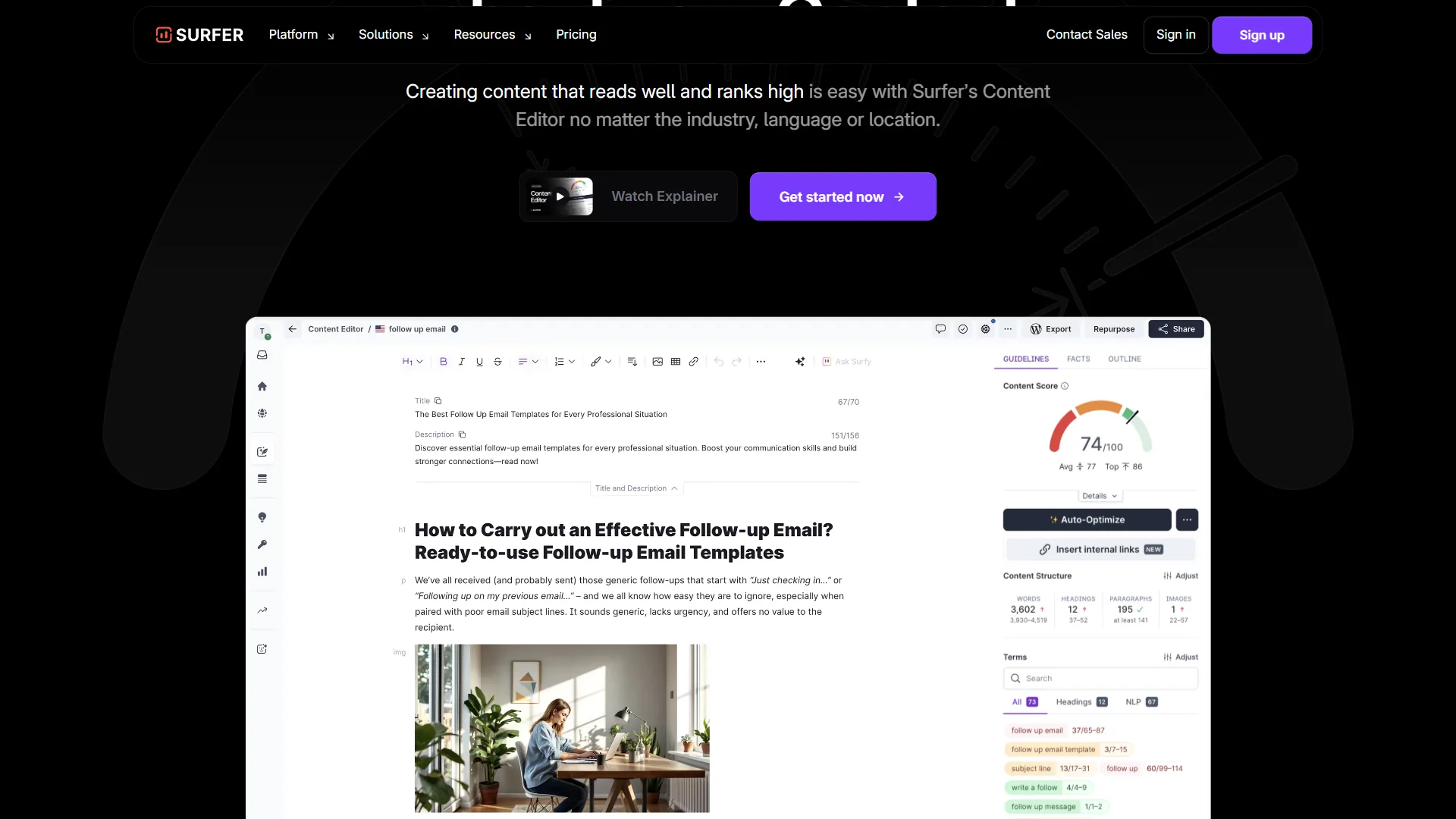
Before diving into optimization tactics, let’s demystify Surfer’s scoring system. The content score (ranging from 0-100) measures how well your article aligns with the top-ranking pages for your target keyword.
A score of 75 or higher is Surfer’s recommended threshold. This doesn’t mean your content is “perfect” - it means you’ve matched the topical coverage, keyword usage, and structural patterns of pages currently dominating the SERP.
Key components that influence your score:
| Field | Value |
|---|---|
| Keyword usage | Both primary and semantically related terms |
| Heading structure | How you organize content with H2s and H3s |
| Content length | Hitting the recommended word count range |
| NLP terms | Natural language entities Google associates with your topic |
| Image optimization | Alt text and image count |
The score is dynamic. As you write, Surfer recalculates in real-time, showing exactly which elements need attention. A 65 might indicate missing NLP terms, while an 85 suggests you’re ready to publish with confidence.
Top Surfer SEO Tips for Content Score Optimization
1. Prioritize Keywords by List Position
Surfer’s keyword list isn’t random - it’s ranked by importance. Keywords at the top appear more frequently across top-ranking competitors, making them higher priority for your content.
Practical approach:
- Focus on the first 10-15 keywords initially
- Use top keywords in H2 headings where contextually appropriate
- Don’t force exact matches - Surfer recognizes variations and plurals
- Check off keywords as you naturally incorporate them
The most common mistake? Writers trying to hit every single keyword, creating awkward, over-optimized content. Instead, aim for 70-80% coverage of the most important terms. Google values natural writing over keyword stuffing.
2. Use Headings Strategically
Your heading structure does double duty: organizing content for readers and signaling topical relevance to search engines. Surfer’s Content Editor shows exactly which topics competitors cover under their H2s and H3s.
Winning heading strategy:
- Use important keywords in H2s (especially top 5 from Surfer’s list)
- Create H3 subheadings for supporting points under each H2
- Match the heading count range Surfer recommends (typically 8-15 for long-form)
- Front-load keywords in headings when possible (“Surfer SEO Tips for Beginners” beats “Tips for Using Surfer SEO as a Beginner”)
December 2026 update: Surfer now provides AI structure suggestions through the new Readability Score feature. Before publishing, check this last-mile sanity check to ensure your headings create logical content flow.
3. Hit NLP Terms Without Overthinking
Natural Language Processing (NLP) terms are entities and phrases Google semantically associates with your topic. Surfer highlights these separately from exact-match keywords.
The beauty of NLP terms? You’re probably already using many of them if you understand your topic. For a post about “email marketing,” NLP terms might include “conversion rate,” “subject line,” “automation,” and “segmentation.”
How to handle NLP terms efficiently:
- Scan the list for terms you haven’t covered
- Integrate them into existing paragraphs (no need for dedicated sections)
- Use them in context - one natural mention counts
- Prioritize terms marked as “high importance”
Don’t create forced, unnatural sentences just to check boxes. If an NLP term doesn’t fit your angle, skip it. You don’t need 100% coverage. For more on entity-based optimization, see our breakdown of the best AI SEO tools 2026.
4. Use Auto-Optimize for One-Click Entity Coverage
One of Surfer’s most powerful December 2026 updates merged Auto-Optimize with Insert Facts. This feature now provides one-click entity coverage by automatically suggesting relevant facts and statistics.
Here’s how it works:
- Click “Auto-Optimize” within the Content Editor
- Surfer analyzes your content against top competitors
- It suggests specific additions: missing keywords, structural improvements, entity mentions
- Accept suggestions selectively based on relevance
This is particularly useful when you’re at 65-70 and struggling to identify what’s missing. Auto-Optimize pinpoints specific gaps rather than making you guess.
Pro tip: Review Auto-Optimize suggestions critically. Not every recommendation improves your content - prioritize those that add genuine value for readers.
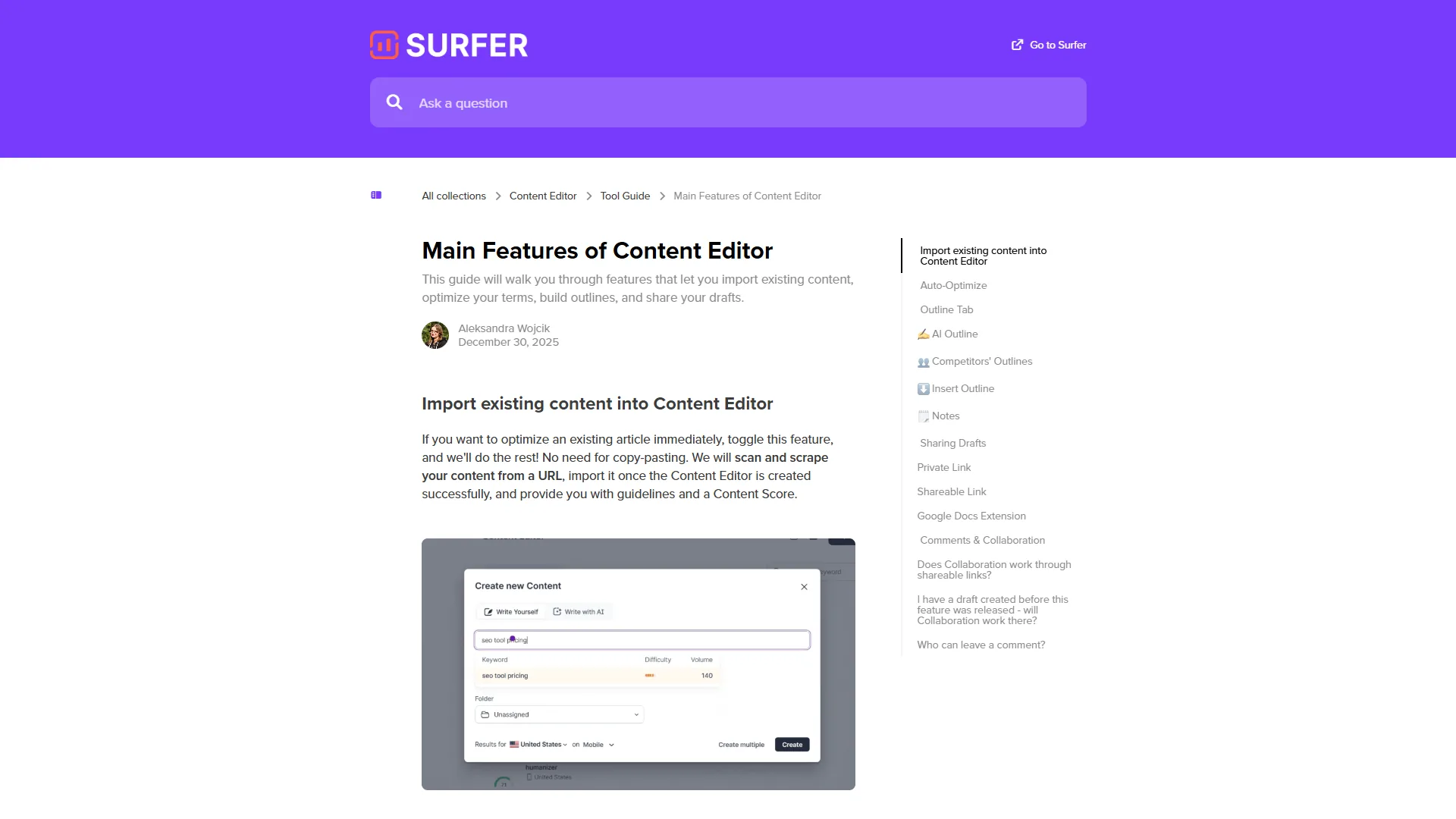
5. Install the Chrome Extension for Google Docs Integration
If you prefer writing in Google Docs over Surfer’s native editor, the Chrome extension brings real-time scoring directly into Docs.
Workflow advantages:
- Write with familiar tools (Grammarly, spell-check, revision history)
- See Surfer scores and keyword coverage without switching tabs
- Export to Docs when you need collaborative editing
- Sync changes back to Surfer instantly
The extension costs nothing extra with your Surfer subscription (Essential plan starts at $99/month, Scale at $219/month with 23% off for annual billing). It’s particularly valuable for agencies managing multiple writers who prefer Docs. For deeper writing-tool comparisons, see Best AI Writing Tools 2026.
6. Run Content Audits on Existing Posts
Surfer’s Content Audit Tool is criminally underutilized. It compares your published articles against current top-ranking pages, revealing how search intent and competitor content have shifted since you published.
When to audit:
- Posts that have dropped in rankings
- High-traffic pages you want to protect
- Evergreen content worth refreshing
The audit shows which keywords to add, outdated sections to update, and structural changes that could boost rankings. Think of it as a “re-optimization roadmap” for content that’s already live.
Combine this with Grow Flow (Surfer’s weekly recommendation tool) for automated alerts on which posts need attention most urgently. If you also run audits in tools like Ahrefs Site Audit or Semrush Site Audit, line up the findings before deciding which posts to refresh first.
7. Master the AI Tracker for Zero-Click Searches
December 2026’s AI Tracker update addresses one of SEO’s biggest challenges: AI-generated answer boxes that steal clicks. This feature filters for:
- “No mention”: Your brand/content isn’t cited in AI answers
- Competitor top spots: Who’s getting credited in AI summaries
- Sentiment signals: Positive/negative framing in AI citations
Why this matters: Google’s AI Overviews and ChatGPT’s search features increasingly answer queries without click-throughs. If your content isn’t referenced in these AI answers, you’re invisible to a growing segment of searches. Our roundup of the best AI search tools covers the platforms reshaping how queries get answered.
Use AI Tracker to identify:
- Topics where you should create more authoritative content
- Competitors whose content format you should study
- Keywords where traditional ranking still drives traffic vs. those dominated by AI answers
This is forward-looking SEO. Optimize for both traditional rankings and AI citation.
8. Tap Into Surfer Academy for Advanced Techniques
Surfer Academy offers unlimited training videos covering everything from basic Content Editor usage to advanced topical mapping strategies. It’s included free with all plans.
Most valuable courses:
- Content Editor best practices (covers keyword optimization in depth)
- SERP Analyzer for competitive research
- Topical Map creation for content planning
- AI Humanizer techniques (making AI-written content pass detection)
The academy updates regularly with new December 2026 features, including the Readability Score deep dive and Auto-Optimize workflows. Dedicate 2-3 hours to the core courses - it’ll dramatically improve your efficiency.
9. Balance Surfer Scores with User Experience
Here’s the controversial truth: you can hit 95+ on Surfer and still write terrible content. The tool measures topical coverage and SEO signals, not readability, originality, or persuasiveness.
Balancing act:
- Aim for 75-85 (the sweet spot for most content)
- Scores above 85 often indicate over-optimization
- Prioritize natural flow over perfect keyword density
- Use Surfer’s new Readability Score (December 2026) as a final quality check
Remember: Surfer optimizes for what’s currently ranking, but Google rewards genuinely helpful content. Use Surfer as a foundation, then layer in unique insights, original research, and better formatting than competitors.
10. Use Grow Flow for Low-Hanging Fruit
Grow Flow sends weekly recommendations for boosting impressions and traffic based on your Google Search Console data. It identifies:
- Posts close to page 1 (small tweaks = big gains)
- Declining rankings that need refreshes
- Keyword opportunities you’re ranking for unintentionally
Workflow tip: Set aside 30 minutes every Monday to review Grow Flow suggestions. Pick 2-3 quick wins - often these are minor keyword additions or heading optimizations that take under an hour but yield measurable ranking improvements within 2-4 weeks.
This systematic approach to content maintenance prevents the “publish and forget” trap that kills long-term SEO success. Pair Grow Flow with regular GSC reviews using Google Search Console to spot ranking shifts before they cost traffic.
What Common Mistakes Tank Your Surfer Scores?
Even experienced SEOs make these errors:
Ignoring the word count range: Surfer calculates optimal length based on competitors. Writing 1,000 words when top pages average 2,500 will hurt your score and rankings. Don’t arbitrarily cut content to “save time.”
Keyword stuffing to hit 100%: Forcing every suggested keyword creates robotic content. Focus on the top 70% of terms and let natural writing cover the rest. Google’s algorithm detects over-optimization.
Skipping image optimization: Surfer counts images and checks alt text. Competitors using 8-10 images means you should too. Each image is a chance to reinforce topical relevance through descriptive alt text.
Using outdated SERP data: Refresh your Surfer audit before optimizing. Search results shift constantly - a Content Editor brief from 6 months ago may recommend outdated strategies.
Treating all keywords equally: The list is prioritized for a reason. Spending 20 minutes working in a low-priority keyword when you’re missing 3 high-priority terms is backwards. Work top-down. If you’re weighing alternatives, our Surfer SEO vs Clearscope comparison breaks down how each tool ranks keyword importance.
How Do You Build a Surfer SEO Workflow That Works?
Here’s how to implement these Surfer SEO tips in a repeatable workflow:
- Create Content Editor brief for target keyword
- Review top 10-15 keywords and map them to planned H2 sections
- Draft content naturally focusing on expertise and value
- Check score at 50% completion - address major gaps early
- Use Auto-Optimize when stuck at 65-75 to identify missing elements
- Run Readability Score check before finalizing (December 2026 feature)
- Publish at 75-85 (sweet spot for most content)
- Set Grow Flow reminder to revisit in 30 days for optimization
This workflow balances efficiency with quality, ensuring you hit ranking thresholds without sacrificing user experience.
For more productivity insights, explore our guides on Best Ai Writing Tools 2026.
Conclusion
These Surfer SEO tips aren’t about chasing perfect scores - they’re about efficiently aligning your content with what’s actually working in search results. Focus on the high-impact strategies: prioritizing top keywords, using headings strategically, and getting the most out of December 2026’s Auto-Optimize and Readability Score features.
The most successful Surfer users treat it as a research tool, not a paint-by-numbers template. Use the data to understand what comprehensive coverage looks like for your topic, then create something better than what’s currently ranking.
Start with one article. Apply these techniques methodically. Track your rankings over 4-6 weeks. You’ll quickly identify which strategies work best for your niche and writing style.
Want to explore Surfer SEO’s full feature set? Check out their pricing plans starting at $99/month, or dive into Surfer Academy for free training on advanced optimization strategies.
Frequently Asked Questions
What does a Surfer SEO Content Editor score of 75 actually mean?
A score of 75 or higher is Surfer’s recommended threshold. It does not mean your content is perfect - it means you have matched the topical coverage, keyword usage, and structural patterns of pages currently dominating the SERP for your target keyword, putting your article in line with top-ranking competitors.
Which factors influence the Surfer SEO content score?
Key components include keyword usage for both primary and semantically related terms, heading structure across H2s and H3s, content length hitting the recommended word count range, NLP terms that Google associates with your topic, and image optimization covering alt text and image count. The score updates dynamically as you write.
How should I prioritize keywords from Surfer’s list?
Surfer’s keyword list is ranked by importance, with top terms appearing most often across ranking competitors. Focus on the first 10-15 keywords initially, use top keywords in H2 headings where contextually appropriate, and do not force exact matches - Surfer recognizes variations and plurals. Aim for 70-80% coverage of the most important terms.
What is the most common mistake writers make with Surfer SEO?
The most common mistake is trying to hit every single keyword in the list, which creates awkward, over-optimized content that reads poorly. Instead, aim for 70-80% coverage of the most important terms, check off keywords as you naturally incorporate them, and trust that Surfer recognizes variations and plurals without forced exact matches.
How long does it take to see ranking improvements after applying these tips?
Most content updates take 2-6 weeks to show measurable ranking changes, depending on your domain authority and keyword competition. Pages already ranking in positions 11-20 typically move first since Google re-evaluates them more frequently. For brand-new content optimized with Surfer, expect an initial indexing period of 7-14 days, followed by gradual ranking improvements as Google gathers user-engagement signals.
Should I aim for a perfect 100 Content Editor score?
No. Scores above 85 often indicate over-optimization and can read as keyword-stuffed to both Google and human readers. The 75-85 range is the sweet spot for most articles. Above that, you trade naturalness for marginal score gains that rarely produce real ranking lifts. Use the Readability Score as a sanity check - if it drops while your content score climbs, you have crossed the optimization line.
Want to learn more about Surfer SEO?
Related Guides
- Best SEO Content Tools 2026 - SEO tools compared
- Best AI Writing Tools 2026 - AI writing tools
- Best AI SEO Tools 2026 - AI SEO tools compared
Related Reads
Tools covered in this article:
- Surfer SEO - AI-powered SEO optimization
- Grammarly - AI writing assistant
External Resources
For official Surfer SEO documentation and updates:
- Surfer SEO Blog - SEO optimization guides and feature updates
- Surfer Academy - Free training and tutorials
Related Guides
- Content Optimization Guide: 2026 Walkthrough for Teams
- How to Write Faster With AI: 6 Tools Compared for 2026
- How to Write Proposals with AI: ChatGPT, Notion, Grammarly
- Topic Authority SEO - Framework, Metrics and Tools
- Writesonic Geo AI Search: 2026 Walkthrough for Teams
- Writesonic SEO Content Guide: AI Article Writer 5.0