


Most sales teams waste 40-60% of their prospecting time chasing contacts that will never convert. A well-built apollo sales prospecting system can shift a pipeline from “spray and pray” to predictable revenue generation. Organizations report qualified opportunities increasing by 35% after implementing structured prospecting workflows, with reps no longer burning hours on dead-end leads.
Apollo.io combines a 275M+ B2B contact database with email finder, verification, lead scoring, and sequencing in one platform. Instead of stitching together five different tools, you get everything in one place. The free tier (100 credits/month) is genuinely useful for testing the approach before committing budget.
This apollo sales prospecting guide walks through building a complete system from scratch, covering database search, lead scoring, email sequences, enrichment, and CRM integration. Whether you are a solo founder doing your own outreach or managing a sales team, the framework scales.
Why Apollo Sales Prospecting Works
Apollo Sales Prospecting covers the strategies and tools that deliver real productivity gains in this space. Most sales teams waste 40-60% of their prospecting time chasing contacts that will never convert. This guide walks through the practical steps from setup through advanced optimization.
Before diving into the setup, it helps to understand what makes Apollo different from standalone prospecting tools. Platforms like ZoomInfo focus on data. Tools like Outreach focus on sequences. Apollo merges both into a single workflow, which eliminates the friction of moving contacts between systems. If you are still mapping the broader landscape, our roundup of best AI sales tools covers adjacent options.
Apollo currently holds across review platforms, reflecting strong adoption among B2B sales teams of all sizes.
Three things set it apart:
- 275M+ contact database - Direct access to verified emails and phone numbers without needing a separate data provider. The database covers companies across industries, with filters for job title, seniority, company size, technology stack, and dozens of other criteria
- AI-powered recommendations - Apollo’s lead scoring and buying signals surface prospects who are actively researching solutions like yours, so you prioritize outreach to people already in-market
- Budget-friendly all-in-one pricing - The free tier includes 100 credits per month and basic sequencing. Paid plans start at $59/month, which is a fraction of what you would pay combining ZoomInfo ($15,000+/year) with a dedicated sequencing tool
How Do You Set Up Your Apollo Prospecting Foundation?
Define Your Ideal Customer Profile
The biggest mistake teams make with Apollo is searching before defining who they are searching for. The database is massive, and without constraints, you will pull thousands of contacts that look promising but never convert.
Start by answering three questions:
- Company profile - What industry, company size (employee count and revenue), and geography do your best customers share?
- Buyer persona - What job titles and seniority levels make purchasing decisions for your product?
- Timing signals - What events (funding rounds, job postings, technology adoption) indicate a company is ready to buy?
Document these in Apollo as saved searches. A recommended approach uses three tiers:
- Tier 1 (high intent) - Matches all three criteria. These get personalized outreach within 24 hours
- Tier 2 (good fit) - Matches company profile and persona but lacks timing signals. These enter automated sequences
- Tier 3 (nurture) - Matches company profile only. These get added to long-term nurture campaigns
Building Targeted Contact Lists
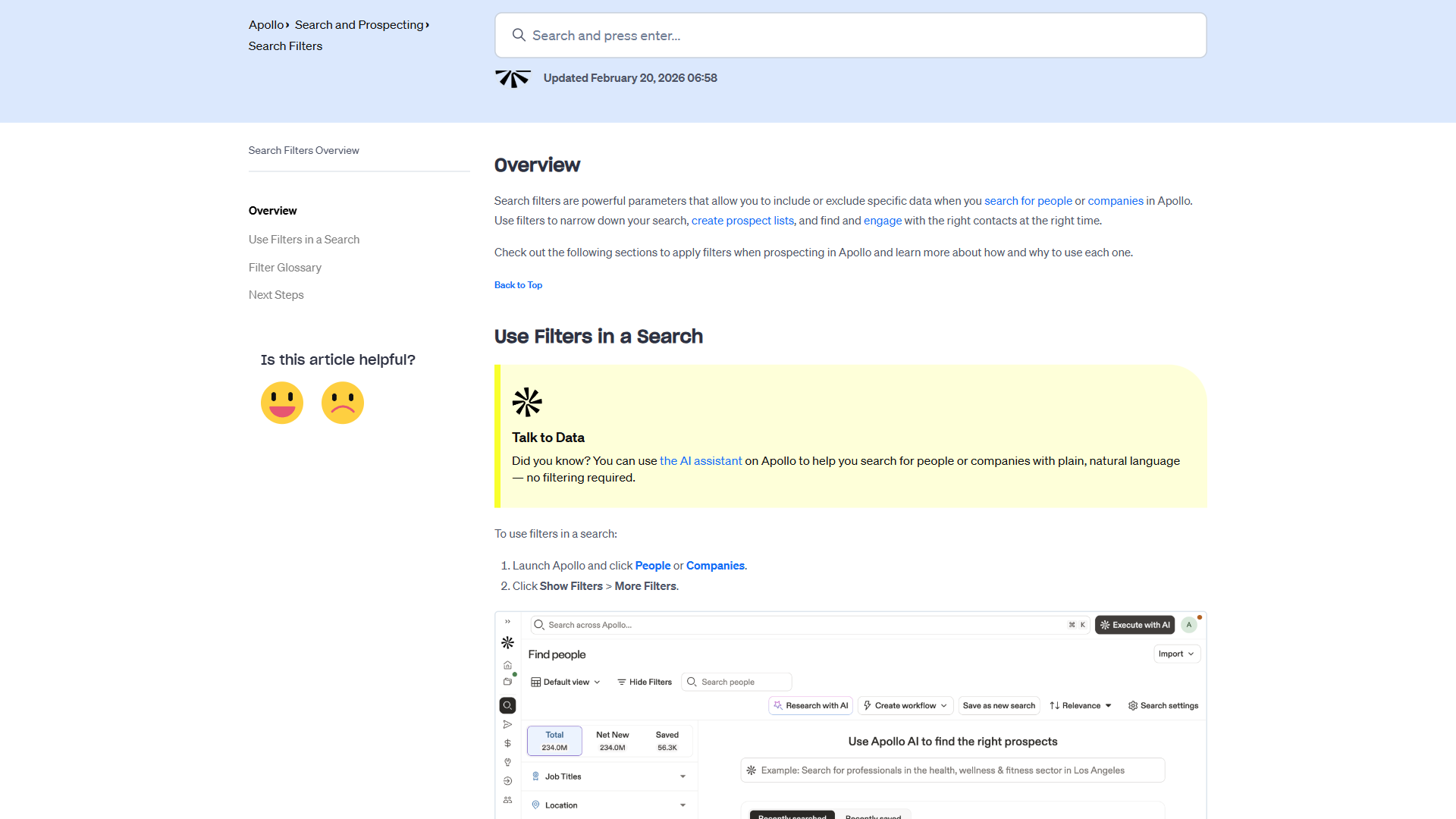
Apollo’s search filters are where the platform earns its value. The contact database lets you layer multiple criteria to build precise lists instead of broad, unfocused ones.
Effective filter combinations:
- Job title + seniority + company size - Find VP-level decision makers at companies with 50-500 employees in your target vertical
- Technology stack + department - Identify companies using competitor products or complementary tools
- Funding + hiring signals - Companies that just raised a Series B and are hiring sales roles are actively scaling their revenue engine
Pro tip: Use Apollo’s “People” search for direct outreach and “Companies” search for account-based strategies. The company search reveals organizational structure, letting you identify multiple entry points within a single account.
Email Finder and Verification
Apollo’s email finder pulls contact information directly from the database, but verification is what makes it reliable. Sending to unverified emails tanks your sender reputation, which ruins future campaigns.
Verification workflow:
- Build your contact list using saved searches
- Run email verification on the entire list before adding contacts to any sequence
- Remove “risky” and “invalid” emails immediately
- Keep “verified” contacts only for cold outreach sequences
- Use “catch-all” emails for warm follow-ups where you have another touchpoint (LinkedIn, phone)
Apollo provides verification status for each contact, color-coded for quick scanning. A proven best practice: no unverified email enters a cold outreach sequence, period. This single discipline can keep bounce rates below 2% across thousands of emails. If your team also manages outreach through a broader CRM platform, keeping contact data clean across both systems is even more critical.
Building High-Converting Email Sequences
Sequence Architecture
Apollo’s sequencing engine supports multi-step, multi-channel outreach. The key is structuring sequences that feel human, not robotic. Prospects receive dozens of automated emails daily - yours needs to stand apart.
The 5-touch framework that converts at roughly 12%:
- Day 1 - Personalized opener - Reference something specific about their company (recent news, job posting, tech stack). Apollo’s enrichment data makes this easy to template at scale
- Day 3 - Value-add follow-up - Share a relevant case study or insight. No ask, just value
- Day 7 - Direct question - Ask a specific question about a challenge you know their role faces. This invites a reply without pressure
- Day 14 - Social proof - Share a metric from a similar company. “Company X in [their industry] reduced [pain point] by 30%”
- Day 21 - Breakup email - Acknowledge you are stopping outreach. This paradoxically generates the highest reply rate (around 18% based on available data)
Writing Emails That Get Responses
Apollo includes AI-assisted email writing that drafts initial copy based on your target persona. The AI handles first drafts well, but the emails that convert share three characteristics:
- Specific opening lines - “I noticed your team posted a Senior SDR role last week” beats “I hope this email finds you well” every time. Apollo’s enrichment data feeds these openers
- One clear value proposition per email - Each touch in the sequence focuses on a single benefit. Cramming three selling points into one email overwhelms the reader
- Short paragraphs, clear CTA - Every email should be readable in under 30 seconds on mobile. The call-to-action should require minimal effort: “Worth a 15-minute conversation?” not “Please review the attached 20-page proposal”
Template variables that drive personalization at scale:
{"{first_name}"}- Basic but essential{"{company_name}"}- Shows you know who they are{"{technology}"}- Reference their tech stack (from Apollo enrichment){"{title}"}- Adjust messaging based on seniority
How Does Apollo Handle Lead Scoring and Prioritization?
How Apollo’s Scoring Works
Apollo’s lead scoring assigns numerical values to contacts based on fit (demographic/firmographic data) and engagement (email opens, clicks, replies, website visits). The combination prevents two common mistakes: chasing engaged but unqualified leads, and ignoring qualified leads who have not engaged yet.
Fit scoring factors:
- Company size relative to your ICP
- Industry alignment
- Seniority and job function match
- Technology stack overlap
- Geographic relevance
Engagement scoring factors:
- Email opens and click-through rates
- Reply sentiment (positive vs. negative vs. neutral)
- Website visit frequency and page depth
- Content download activity
Acting on Scores
Raw scores mean nothing without a response framework. Here is a proven approach:
- Score 80+ - Hot lead. Sales rep calls within 4 hours. These contacts get pulled from automated sequences and receive direct, personalized outreach
- Score 50-79 - Warm lead. Continue automated sequence but flag for rep review. Add to priority call list for next business day
- Score 30-49 - Developing lead. Stay in automated nurture. Review monthly for score changes
- Below 30 - Cold. Keep in long-term nurture but do not allocate rep time
The scoring system is only as good as your calibration. Review closed-won deals monthly and check whether high-scoring leads actually converted. Adjust weight factors quarterly based on real conversion data.
Data Enrichment and Buying Signals
Enrichment for Existing Contacts
If you already have a CRM full of contacts, Apollo’s enrichment feature fills in the gaps. Upload your existing list, and Apollo matches contacts against its database to add missing fields: direct phone numbers, verified emails, job changes, company funding data, and technology stack information.
Where enrichment pays off immediately:
- Stale CRM records - People change jobs every 2-3 years. Enrichment catches contacts who moved to new companies and updates their information
- Missing direct dials - Apollo’s Chrome extension and database provide direct phone numbers that bypass gatekeepers
- Company intel - Revenue estimates, employee count trends, and technology adoption data help reps prepare for conversations
Intent Data and Buying Signals
Apollo’s intent data layer identifies companies actively researching topics related to your product. This is the difference between cold outreach (“Are you interested in X?”) and warm outreach (“I noticed your team has been evaluating solutions for X”).
Signals to monitor:
- Topic intent - Companies researching keywords relevant to your solution
- Job posting signals - Hiring for roles that indicate investment in your category
- Funding alerts - Recent fundraising that enables new tool purchases
- Technology changes - Companies adopting or dropping competitor products
Set up Apollo alerts for your top 100 target accounts. When a signal fires, move the account to your Tier 1 list and trigger personalized outreach within 48 hours. Timing is everything in sales - being first to respond to a buying signal increases win rates dramatically.
CRM Integration and Workflow Automation
Connecting Apollo to Your CRM
Apollo integrates with Salesforce, HubSpot, and other major CRMs through native connectors. The integration syncs contacts, activities, and engagement data bidirectionally, so reps work from a single system. Apollo’s developer documentation covers field mappings if your team needs custom integration.
Integration setup priorities:
- Contact sync - Map Apollo fields to CRM fields. Deduplicate before enabling two-way sync to avoid creating duplicate records
- Activity logging - Automatically log Apollo emails, calls, and engagement events to CRM contact records. Reps should never manually log activities
- Lead routing - Set rules that automatically assign Apollo-sourced leads to the right rep based on territory, industry, or account ownership
- Stage mapping - Connect Apollo engagement scores to CRM pipeline stages so leads progress automatically as they engage
Chrome Extension for Daily Prospecting
Apollo’s Chrome extension is the tool reps actually use daily. It overlays prospect data on LinkedIn profiles, company websites, and email inboxes, eliminating the context-switching that kills prospecting momentum.
Daily workflow with the extension:
- Browse LinkedIn Sales Navigator for target accounts during morning prospecting blocks
- Click the Apollo extension to reveal verified contact data and engagement history
- Add promising contacts directly to sequences without leaving LinkedIn
- Use the built-in dialer to call prospects with Apollo data visible on screen
The extension turns passive LinkedIn browsing into active prospecting. Users report adding 15-20 qualified contacts per day with this workflow versus 5-8 without it. For a deeper dive on structuring multi-step email campaigns within Apollo, see our Apollo sequences and automated outreach guide, and our AI sales coaching tools roundup covers complementary tooling for ramping reps faster.
Pricing and Getting Started
Apollo’s pricing makes it accessible for teams at every stage:
| Plan | Monthly Price | Best For |
|---|---|---|
| Free | $0 | Solo founders testing the platform |
| Basic | $59/month | Small teams starting outbound |
| Professional | $99/month | Growing teams needing full automation |
| Organization | $119/month | Enterprise with advanced controls |
The free tier is genuinely useful - you get 100 credits per month, basic sequencing, and access to the contact database. It is enough to validate the approach before committing budget.
Recommendation for most teams: Start with Professional at $99/month. The AI-powered recommendations, advanced lead scoring, and unlimited sequences justify the step up from Basic. The Organization tier adds governance features that matter for 25+ person teams but are unnecessary for smaller groups.
The Bottom Line
Building an effective apollo sales prospecting system is less about the tool and more about the framework you build around it. Apollo gives you the data, the sequencing, and the scoring - but the results come from disciplining your team to follow the process: define your ICP first, verify before you send, personalize at scale, and act on scores quickly.
The platform’s strength is consolidation. Instead of managing a data provider, an email tool, a dialer, and a scoring system separately, Apollo puts everything in one place. For sales teams spending $500+ per month on multiple tools, switching to apollo sales prospecting typically saves money while improving results.
Start with the free tier on Apollo, build your first saved search and sequence using the framework above, and measure results for 30 days. The data will tell you whether to scale up. If you also use Salesforce or HubSpot as your CRM, Apollo’s native connectors keep contacts and engagement data in sync without manual exports. For broader email marketing platforms alongside your outreach stack, our comparison covers the options worth considering.
Want to learn more about Apollo.io?
Frequently Asked Questions
Is Apollo good for sales prospecting?
Yes - Apollo is effective for prospecting. Organizations using structured Apollo workflows report a 35% increase in qualified opportunities, with reps no longer burning hours on dead-end leads. The platform consolidates data, sequencing, and scoring in one place, and for teams spending $500+ monthly on multiple tools, switching to Apollo typically saves money while improving results.
What is the Apollo prospecting tool?
Apollo.io is a sales prospecting platform that combines a 275M+ contact database, email finder, verification, lead scoring, and sequencing into a single tool. Instead of stitching together five different tools, users get everything in one place. A free tier is available for testing the approach before committing budget.
How do you prospect using Apollo?
Define an ICP, build a saved search that matches it, verify every contact before outreach, and run a 5-touch sequence over 21 days. Use Apollo’s Chrome extension to add prospects directly from LinkedIn, and review lead scores daily so reps prioritize the highest-fit accounts that show engagement signals.
What is Apollo.io and how does it help with sales prospecting?
Apollo.io combines a 275M+ contact database, email finder, verification, lead scoring, and sequencing into a single platform. Rather than stitching together separate tools for data, outreach, and scoring, Apollo merges everything into one workflow - eliminating the friction of moving contacts between systems and reducing wasted prospecting time.
How do you keep bounce rates low when using Apollo?
Apollo provides color-coded verification status for each contact. A proven best practice is to never let an unverified email enter a cold outreach sequence. Following this single discipline consistently can keep bounce rates below 2% across thousands of emails, protecting your sender reputation and future campaign deliverability.
Related Guides
External Resources
- Apollo.io Product Overview - Official features page covering the contact database, sequencing, and enrichment capabilities
- Apollo.io Pricing - Current pricing tiers and feature comparison
- Apollo.io Knowledge Base - Official documentation for setup, integrations, and best practices
Related Guides
- 15 Calendly Tips and Tricks to Save 4+ Hours Weekly
- ActiveCampaign AI Features: Active Intelligence Guide
- ActiveCampaign CRM Setup: How to Set Up ActiveCampaign CRM
- ActiveCampaign Email Automation: 10 Workflows That Work
- ActiveCampaign Lead Scoring: Complete Setup Guide (2026)
- AI Avatar Video Marketing: 2026 Walkthrough for Teams
- AI Chatbots Customer Service Setup: Complete 2026 Guide
- Apollo Sequences Automated Outreach: Complete 2026 Guide
- ChatGPT Custom GPTs Guide - Save 130+ Hours a Year
- ChatGPT Tips And Tricks: 2026 Walkthrough for Teams