





Granola ai meeting notes free of bot intrusions is a fundamentally different approach to capturing and structuring meeting content. Rather than joining calls as a visible participant like Otter.ai or Fireflies.ai, Granola records directly from your system audio, then uses GPT-4 to combine your manual notes with a full transcription into structured summaries, action items, and key decisions.
Every professional has experienced it: a meeting bot joins the call uninvited, someone asks “who is that?”, and the next two minutes are spent explaining that it is just the notetaker. The meeting loses momentum before a single agenda item is covered. Multiply that across 15 meetings per week, and meeting bots are not just awkward - they are actively costing your team time and trust.
Granola takes a fundamentally different approach to AI meeting notes. Instead of dropping a bot into your call, it records directly from your system audio and uses AI to structure your notes after the meeting ends. No participant notifications, no bot avatars in the attendee list, no disruption whatsoever. Users report that the difference in meeting dynamics when there is no bot present is immediately noticeable across client calls, internal standups, and 1:1s.
This guide covers everything from initial setup to advanced template customization, CRM integration workflows, and the privacy model that makes Granola stand apart from every bot-based alternative.
How Granola AI Meeting Notes Work: The Bot-Free Approach
The granola ai meeting notes approach is fundamentally different from what most AI tools do. Most AI meeting tools - Otter.ai, Fireflies.ai, and others - work by joining your meeting as a participant. They dial in as a bot, record audio and sometimes video, and process everything in the cloud. This works, but it creates friction: participants feel surveilled, clients wonder who the extra attendee is, and some organizations block unknown participants entirely.
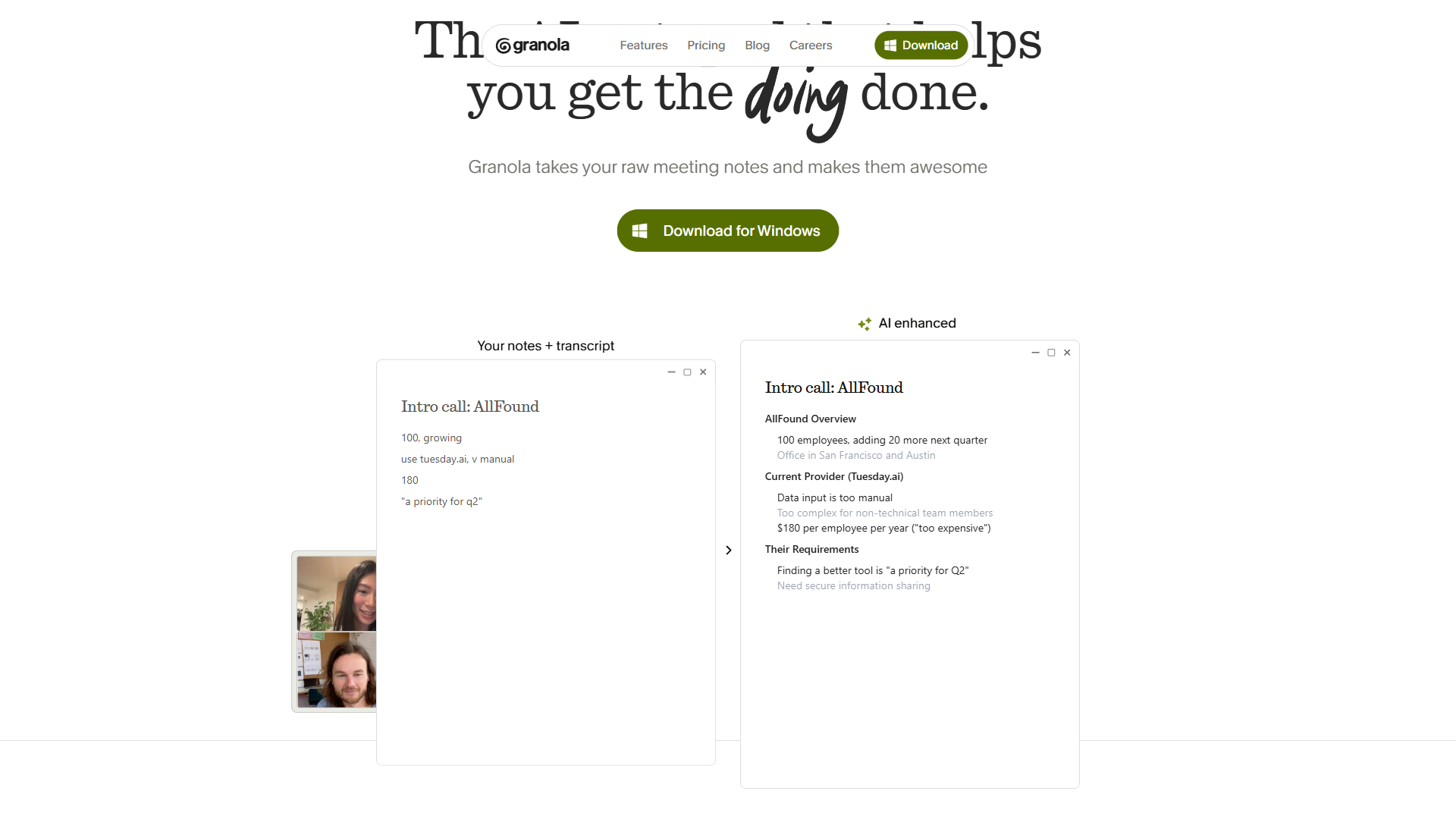
Granola sidesteps all of this by recording through your computer’s system audio. Here is how the process works:
- Before the meeting - Granola syncs with your Google Calendar and detects upcoming meetings automatically. When a meeting starts, it begins capturing system audio locally on your machine.
- During the meeting - You take notes as you normally would in Granola’s notepad. These can be as sparse or detailed as you prefer - quick bullet points, keywords, or full sentences. The AI uses your notes as anchors alongside the audio transcription.
- After the meeting - Granola’s AI engine (powered by GPT-4 and advanced thinking models) combines your manual notes with the full transcription. It produces a structured summary that follows your chosen template, extracts action items, and identifies key decisions.
The result is meeting documentation that feels like something you wrote yourself, not a generic AI transcript dump. Your notes provide context and emphasis that pure transcription misses, and the AI fills in everything you did not have time to write down.
Granola currently holds across review platforms, with users consistently highlighting transcription accuracy and the natural, distraction-free workflow as standout strengths.
Setting Up Granola with Your Calendar
Getting started with Granola AI login takes less than five minutes. Granola AI free tier access is available on macOS and Windows, and Granola ai meeting notes iOS users can download the iOS mobile app for recording on the go. Note that Granola AI Android is not currently supported.
Installation and Configuration
Download Granola from the official website, install the desktop app, and grant microphone and system audio permissions. On macOS, this requires allowing Granola access to your audio input in System Settings. On Windows, the process is similar through the standard permissions dialog.
Essential setup steps:
- Calendar connection - Link your Google Calendar so Granola automatically detects meetings. When a scheduled meeting begins, the app prompts you to start recording without any manual configuration.
- Audio source selection - Granola captures system audio by default, which means it records whatever comes through your speakers or headphones during a video call. No microphone sharing is required with the meeting platform.
- AI model preferences - Business plan users can access advanced AI thinking models for higher-quality summaries. The default GPT-4 model works well for most meetings.
- Notification preferences - Configure whether Granola prompts you before each meeting or starts recording automatically based on calendar events.
Your First Meeting with Granola
Start with a low-stakes internal meeting. When the meeting begins, open Granola’s notepad and jot down whatever feels natural - participant names, key topics, decisions made, or questions raised. Do not try to capture everything. The beauty of this system is that the AI handles comprehensive documentation while you focus on active listening and strategic note-taking.
After the meeting ends, Granola processes the audio and your notes together. Within a minute or two, you will have a structured summary that captures the full conversation while preserving the emphasis points from your manual notes. Review this first output carefully to calibrate your expectations - you will quickly learn how much or how little you need to write during the meeting to get the output quality you want.
Custom Templates for Different Meeting Types
One of the strongest parts of the granola ai meeting notes system is its template functionality. With 29+ customizable templates, you can ensure that every meeting type produces notes in exactly the format you need.
Built-In Templates
Granola ships with templates for the most common meeting types:
- 1:1 meetings - Captures discussion topics, feedback shared, career development notes, and follow-up actions. Structured to make recurring 1:1s easy to review over time.
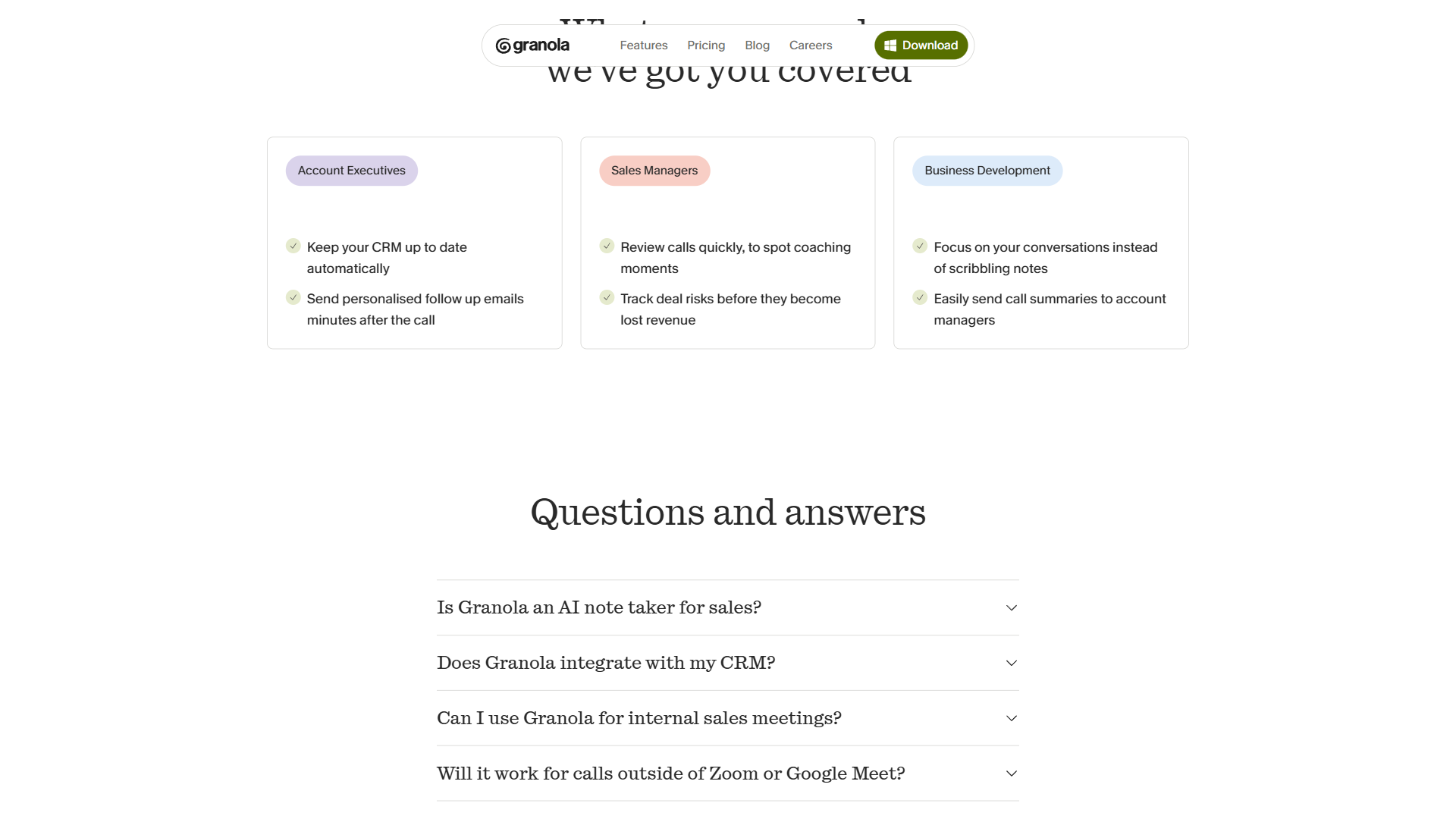
- Sales calls - Extracts prospect pain points, objections raised, next steps, and deal-relevant details. Designed to feed directly into CRM updates.
- Standup meetings - Pulls out blockers, progress updates, and commitments for each participant. Keeps daily standups to their essential information.
- Customer interviews - Captures user feedback, feature requests, sentiment indicators, and verbatim quotes worth preserving.
- Sprint retrospectives - Organizes feedback into what went well, what needs improvement, and action items for the next sprint.
Creating Custom Templates
The built-in templates cover standard use cases, but the real power comes from customization. You can modify any template or create new ones from scratch. A strong custom template includes:
- Section headings that match your team’s preferred structure
- Prompt instructions that tell the AI what to emphasize (for example: “prioritize action items and deadlines over general discussion”)
- Output format preferences such as bullet points versus paragraphs, or whether to include timestamps
Template examples by role:
For product managers, a strong template includes sections for user feedback themes, feature requests with priority indicators, competitive mentions, and a decisions log. This turns every customer call into structured product intelligence without extra processing time.
For account managers, build a template that outputs client sentiment, upsell opportunities mentioned, risk indicators, and a timeline of commitments made. Pair this with CRM integration and your client records stay current with zero manual data entry.
For team leads running standups, create a template that groups output by person: what they completed, what they are working on, and what is blocking them. This format makes it easy to paste directly into Slack or your project management tool. Pair this with our AI meeting summary techniques for follow-up.
AI Note Structuring and Action Items
The AI engine is where Granola earns its reputation. After processing your meeting audio, it does not just produce a transcript - it creates structured documentation that is genuinely useful.
How Structuring Works
Granola’s AI analyzes the conversation for several elements:
- Key decisions - Identifies moments where the group agreed on a direction, approved a plan, or made a commitment
- Action items - Extracts tasks with associated owners and deadlines when mentioned. These are pulled from natural language, so someone saying “I will send the proposal by Friday” becomes an action item attributed to that person
- Discussion themes - Groups related conversation segments under topic headings, even when the discussion jumped between subjects
- Important context - Preserves background information, rationale for decisions, and nuanced points that a simple transcript would bury in surrounding text
Chat with Folders
One of Granola’s newer features is the ability to query across entire folders of meeting notes using AI. Organize your meetings into folders - by client, by project, by quarter - and then ask questions like:
- “What action items from the last three client meetings are still outstanding?”
- “Summarize the key product feedback themes from all customer interviews this month”
- “What decisions did we make about the pricing strategy across the last four leadership meetings?”
This cross-meeting intelligence is a significant advantage over tools that treat each meeting as an isolated event. For consultants managing multiple client engagements or product teams tracking feature requests across dozens of user interviews, the ability to surface patterns across meetings changes how you work with meeting data entirely.
CRM and Tool Integrations
Meeting notes are only valuable if they reach the systems where your team actually works. Granola integrates with the tools that matter most for meeting follow-through.
CRM Integrations
- HubSpot - Push meeting summaries, action items, and deal-relevant details directly to contact records and deal timelines. Sales reps report eliminating 90% of manual CRM update time.
- Attio - Sync meeting notes with Attio’s relationship intelligence platform. Contact records automatically reflect recent conversations.
- Affinity - Feed meeting data into Affinity’s relationship management system, keeping relationship context current for deal-focused teams.
Productivity Integrations
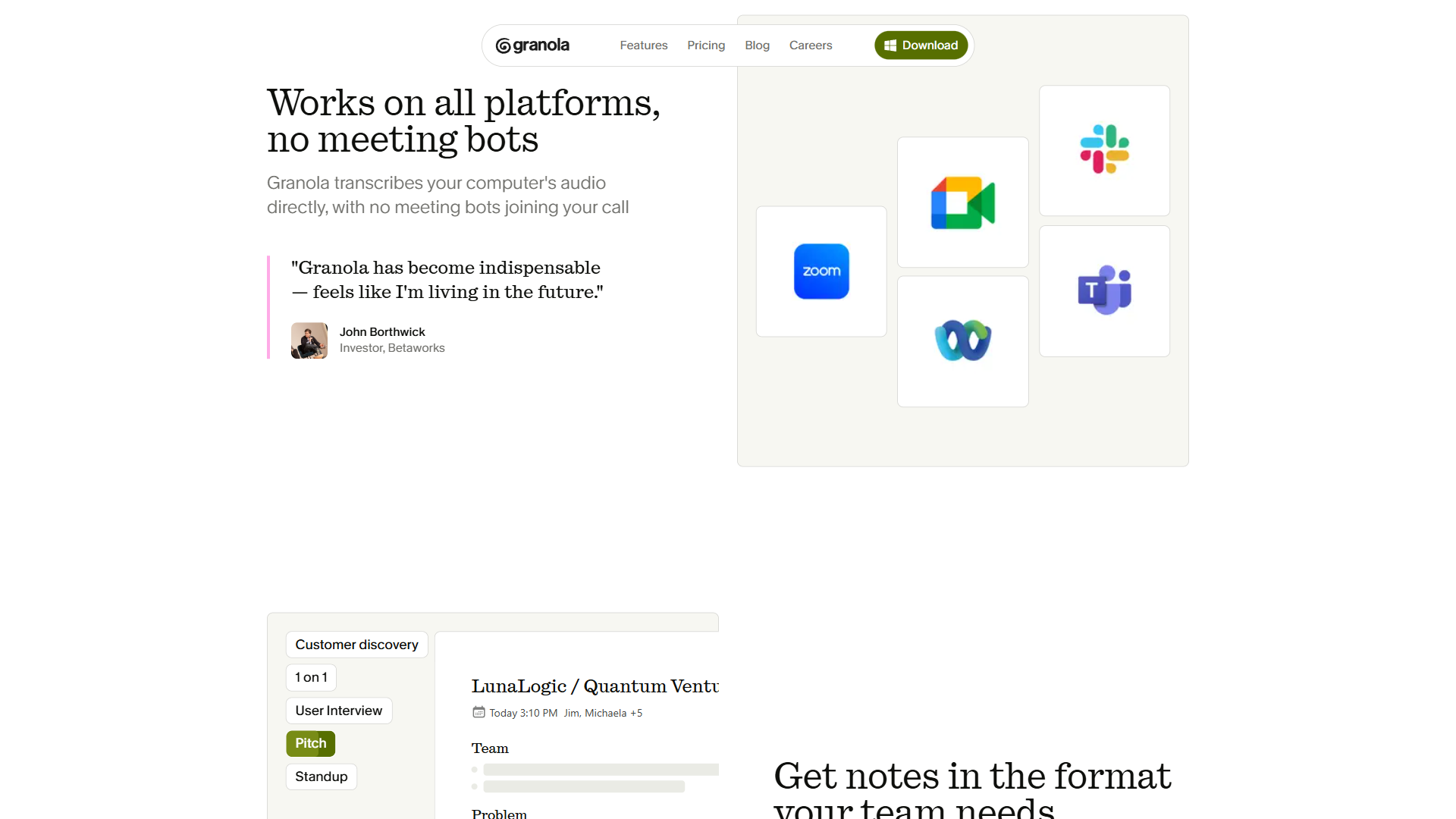
- Slack - Send meeting summaries to channels or direct messages. Useful for keeping stakeholders informed without scheduling follow-up meetings.
- Notion - Save structured meeting notes to Notion databases. Each meeting becomes a searchable entry with all the metadata your templates generate.
- Zapier - Connect Granola to 8,000+ apps through Zapier. This opens up workflows like automatically creating Jira tickets from action items, updating project management boards, or logging meeting data to spreadsheets.
Integration Workflow Example
Here is a practical workflow for sales teams: After a prospect call, Granola processes the meeting and produces notes using your sales call template. The summary, including prospect objections, next steps, and competitive mentions, automatically pushes to HubSpot and posts to your team’s Slack channel. Your manager sees the update within minutes. The CRM record is current. No one had to type a single word of follow-up documentation.
Note that CRM integrations require the Business plan ($14/month). The free Basic tier does not include advanced integrations.
Privacy and Security Considerations
Privacy is one of the strongest arguments for choosing Granola over bot-based alternatives. The architecture is fundamentally different from tools that join your meetings as a third-party participant.
How Granola handles your data:
- Local audio processing - System audio is captured on your device. Granola does not join your meeting as a bot, so no third-party service has access to your meeting in real time. See Granola’s security page for the full architecture.
- No raw audio stored - After processing, only the text transcript and your structured notes are retained. Raw audio and video files are not saved to Granola’s servers.
- Model training opt-out - Free tier users can individually opt out of having their data used for model training. Enterprise plans allow organization-wide opt-out policies.
- Enterprise controls - The Enterprise tier ($35/month) includes SSO, admin controls for meeting link sharing, org-wide auto-deletion periods, and priority support for compliance questions.
For teams in regulated industries or organizations that prohibit third-party meeting bots, Granola’s local recording model removes the compliance barrier that blocks adoption of most AI meeting tools. Your meeting participants never know Granola is running - there is no bot to trigger security concerns or violate meeting recording policies that apply to third-party attendees.
That said, be aware that recording meetings without participant consent may violate local laws depending on your jurisdiction - the U.S. Department of Justice’s two-party consent overview is a useful starting point if your team operates across multiple states. Granola’s approach is more discreet than a bot, but the legal obligation to inform participants about recording still applies in most regions. Check your organization’s recording policy before deploying.
Pricing Breakdown
Granola offers three tiers with clear differentiation between individual and team use cases.
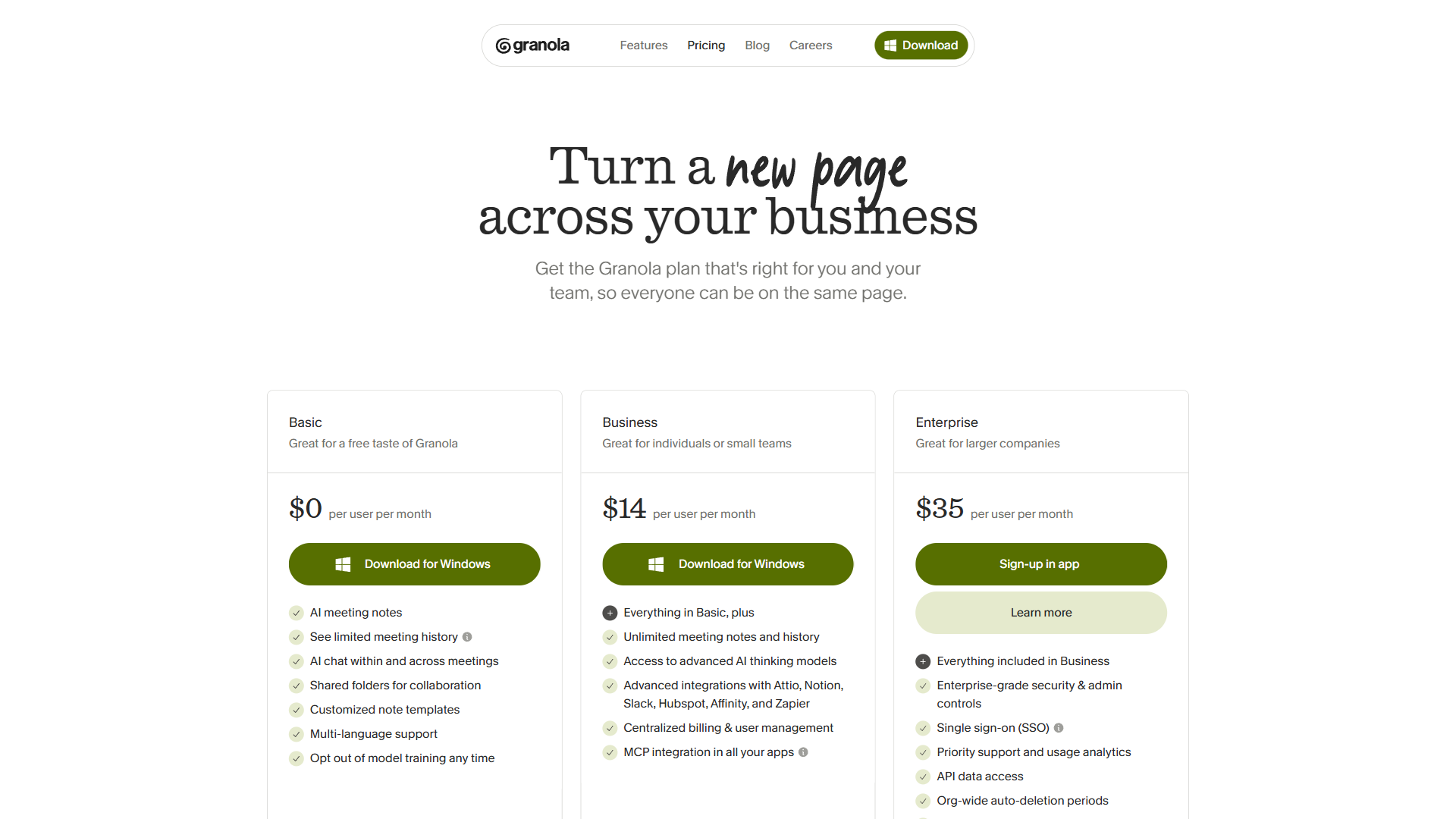
Basic (Free):
- AI meeting notes with GPT-4 transcription
- Limited meeting history
- AI chat within and across meetings
- Shared folders for collaboration
- Customizable note templates
- Multi-language support
- Option to opt out of model training
The free tier is genuinely useful for trying Granola and understanding whether the bot-free approach works for your meeting workflow. The limited meeting history is the main constraint - after a certain number of meetings, older notes become inaccessible unless you upgrade.
Business ($14/month per user):
- Everything in Basic plus unlimited meeting notes and history
- Access to advanced AI thinking models for higher-quality summaries
- Advanced integrations: HubSpot, Attio, Affinity, Notion, Slack, Zapier
- Centralized billing and user management
- Shared team folders
- Chat with folders feature
Business is the sweet spot for most professionals. At $14/month, it is competitively priced against Otter.ai (starting at $16.99/month) and offers the unique bot-free advantage that no competitor matches. The unlimited history and CRM integrations justify the cost for anyone attending more than a handful of meetings per week.
Enterprise ($35/month per user):
- Everything in Business plus enterprise-grade security
- Single sign-on (SSO)
- Priority support and usage analytics
- Organization-wide auto-deletion periods
- Admin controls for meeting link sharing
- Org-wide model training opt-out
Enterprise pricing is straightforward compared to competitors that hide enterprise costs behind “contact us” pages. At $35/month, teams get the compliance and administrative features that IT departments require for organization-wide deployment.
Granola vs Bot-Based Alternatives
The central trade-off with Granola is clear: you gain meeting professionalism and privacy but give up some features that bot-based tools provide.
Where Granola wins:
- No meeting bot disruption - participants do not see or interact with an AI attendee
- Privacy-first architecture with local audio processing
- Simultaneous note-taking that blends human context with AI transcription
- Clean, template-driven output instead of raw transcript dumps
- Competitive pricing at $14/month for full-featured use
Where bot-based tools win:
- Speaker identification - Otter.ai and Fireflies.ai can attribute quotes to specific speakers. Granola does not offer speaker diarization, which matters in large group meetings where knowing who said what is critical.
- Video and screen recording - Fireflies.ai captures video alongside audio. Granola is audio-only.
- Language coverage - Fireflies.ai supports 69+ languages. Granola’s multi-language support is more limited, which may be a factor for global teams. Our AI transcription comparison benchmarks accuracy across languages and accents if this matters for your team.
- Conversation analytics - Some bot-based tools offer sentiment tracking, talk-time ratios, and other analytics. Granola focuses on notes rather than meeting analytics.
The bottom line on competition: If your primary concern is meeting professionalism - keeping client calls distraction-free, avoiding the “who is that bot?” question, and maintaining privacy - Granola is the clear choice. If you need speaker attribution in large meetings or video recording capabilities, Otter.ai or Fireflies.ai will serve you better despite the bot trade-off.
Platform Availability
Granola is available on macOS and Windows for desktop use, with an iOS mobile app for recording meetings and phone calls on the go. The mobile app is particularly useful for in-person meetings where you can set your phone on the table and let Granola record through the device microphone.
Android support is not yet available. If your team is split across mobile platforms, this is worth factoring into your decision.
Who Should Use Granola
Based on feature analysis and user feedback, Granola delivers the most value for:
- Sales professionals who need clean CRM updates after every prospect call without the awkwardness of a bot joining client meetings
- Product managers running back-to-back customer interviews and strategy sessions who need structured takeaways between calls
- Consultants and freelancers managing multiple client relationships where meeting documentation feeds directly into deliverables. See our best AI tools for note-taking guide for complementary tools that work outside of meetings
- Executives who want meeting summaries without adding friction to high-stakes conversations with board members, investors, or partners
- Privacy-conscious teams in regulated industries where third-party meeting bots are prohibited or create compliance risk
Granola is less suited for teams that need speaker identification across large group meetings, organizations requiring video recording of meetings, or global teams operating primarily in languages with limited support.
The Bottom Line
The granola ai meeting notes approach solves the right problem in the right way. Meeting notes should not require disrupting the meeting to capture them. By recording system audio locally and combining AI transcription with your manual notes, Granola produces meeting documentation that is more useful than raw transcripts and more professional than sending a bot into every call.
The $14/month Business plan delivers strong value - unlimited history, CRM integrations, and advanced AI models make it a practical daily tool rather than an experiment. Users report saving 5 hours per week on manual note-taking and CRM updates, which translates to meaningful ROI within the first week of use.
Start with the free Basic tier to test the bot-free workflow with your actual meetings. If you attend more than five meetings per week and find yourself spending time after each one typing up notes or updating your CRM, Granola will pay for itself quickly. The shift from bot-based recording to invisible system audio capture is the kind of upgrade that, once experienced, makes the old approach feel unnecessarily intrusive.
Want to learn more about Granola?
Frequently Asked Questions
Does Granola AI work for in-person meetings?
Yes, Granola works for in-person meetings. The iOS mobile app lets you record meetings and phone calls on the go - you can set your phone on the table and let Granola record through the device microphone. This makes it practical for face-to-face meetings where no video call platform is involved.
Is the Granola AI note taker legal to use?
Granola’s discreet local recording approach does not exempt users from legal obligations. Recording meetings without participant consent may violate local laws depending on your jurisdiction. While Granola is more discreet than a bot, the legal requirement to inform participants about recording still applies in most regions. Check your organization’s recording policy before deploying.
What are Granola AI notes?
Granola AI notes are structured meeting summaries produced by recording system audio locally and combining AI transcription with your manual notes. Instead of a raw transcript, Granola generates documentation that preserves your emphasis and context while filling in details you did not write down - all without deploying a bot into your call.
How accurate are Granola’s AI summaries compared to bot-based tools?
Granola’s accuracy comes from combining your manual notes with full system-audio transcription, rather than relying on transcription alone. The AI uses your bullet points as anchors that emphasize what mattered, then fills in surrounding detail from the audio. For pure word-for-word transcription accuracy across noisy multi-speaker calls, dedicated bots can edge ahead, but Granola’s structured-summary quality is consistently rated higher in user feedback.
Does Granola join meetings as a bot?
No - Granola records directly from your system audio instead of joining as a participant. There is no bot avatar in the attendee list, no participant notifications, and no disruption to the meeting. Other tools like Otter.ai and Fireflies.ai dial in as a bot, which Granola’s approach avoids entirely.
Related Guides
- How to Summarize Meetings with AI
- Best AI Meeting Assistants for 2026
- AI Notetaker Shootout 2026
- Fathom vs Fireflies: CRM Integration Compared
External Resources
- Granola Official Website - Download the desktop app and explore features
- Granola Blog - Product updates, template guides, and workflow tips from the Granola team
- Granola Zapier Integrations - Browse automation recipes connecting Granola to 8,000+ apps
- Granola Security Documentation - Architecture details on local audio processing and data retention
- Granola iOS App - Mobile capture for in-person meetings and phone calls
Related Guides
- 12 Voice Productivity Tips to Save 6.5 Hours Weekly
- 15 Calendly Tips and Tricks to Save 4+ Hours Weekly
- ActiveCampaign AI Features: Active Intelligence Guide
- ActiveCampaign CRM Setup: How to Set Up ActiveCampaign CRM
- ActiveCampaign Lead Scoring: Complete Setup Guide (2026)
- ActiveCampaign Shopify Integration: Complete Setup
- ActiveCampaign WordPress: Forms, Tracking & Automation
- ActiveCampaign Zapier: 10 Automations to Build Today
- AI Agent Orchestration: Patterns That Scale in 2026
- AI Avatar Video Marketing: 2026 Walkthrough for Teams