


If you search “claude vs chatgpt” you will find dozens of feature tables, benchmark charts, and framing like Claude vs ChatGPT for writing or Claude vs ChatGPT for coding. What you will not find is an honest comparison of how these tools perform on the work that actually fills your day - drafting emails, prepping meetings, planning projects, and analyzing documents. That is what this guide covers.
Based on research into how both Claude and ChatGPT perform across real productivity workflows - including Claude vs ChatGPT for everyday use and the Claude vs ChatGPT ethics trade-offs - the short version is this: Claude wins on depth, accuracy, and long-document work. ChatGPT wins on breadth, ecosystem, and multimedia. Neither replaces the other, and knowing exactly where each one saves you time is worth more than any benchmark score.
This comparison focuses on the areas competitors miss - productivity workflow performance, integration ecosystems, Claude vs ChatGPT pricing efficiency, and enterprise compliance - so you can make a decision based on how you actually work, whether you have also weighed Claude vs ChatGPT vs Gemini or Claude vs ChatGPT vs Grok. Tradeoffs are real on both sides; this guide spells them out instead of crowning one winner.
Comparison Table
Claude vs ChatGPT comes down to where each tool excels. Claude is the stronger choice for depth, while ChatGPT leads on breadth. This comparison covers pricing, features, and real workflow performance to help you pick the right option for your needs.
| Category | Claude | ChatGPT |
|---|---|---|
| Rating | ||
| Best For | Long documents, reasoning, coding | Creative writing, images, voice, ecosystem |
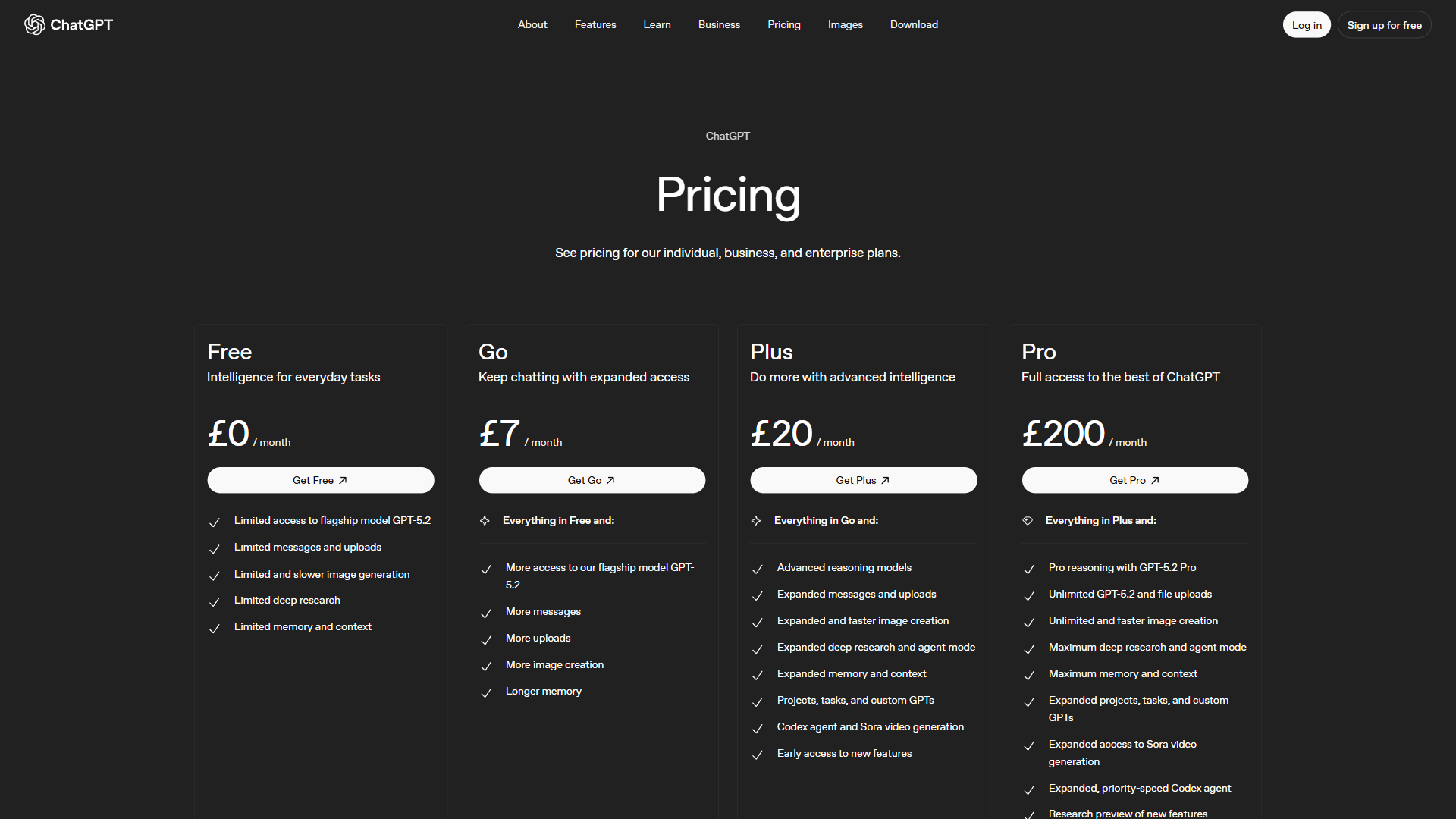
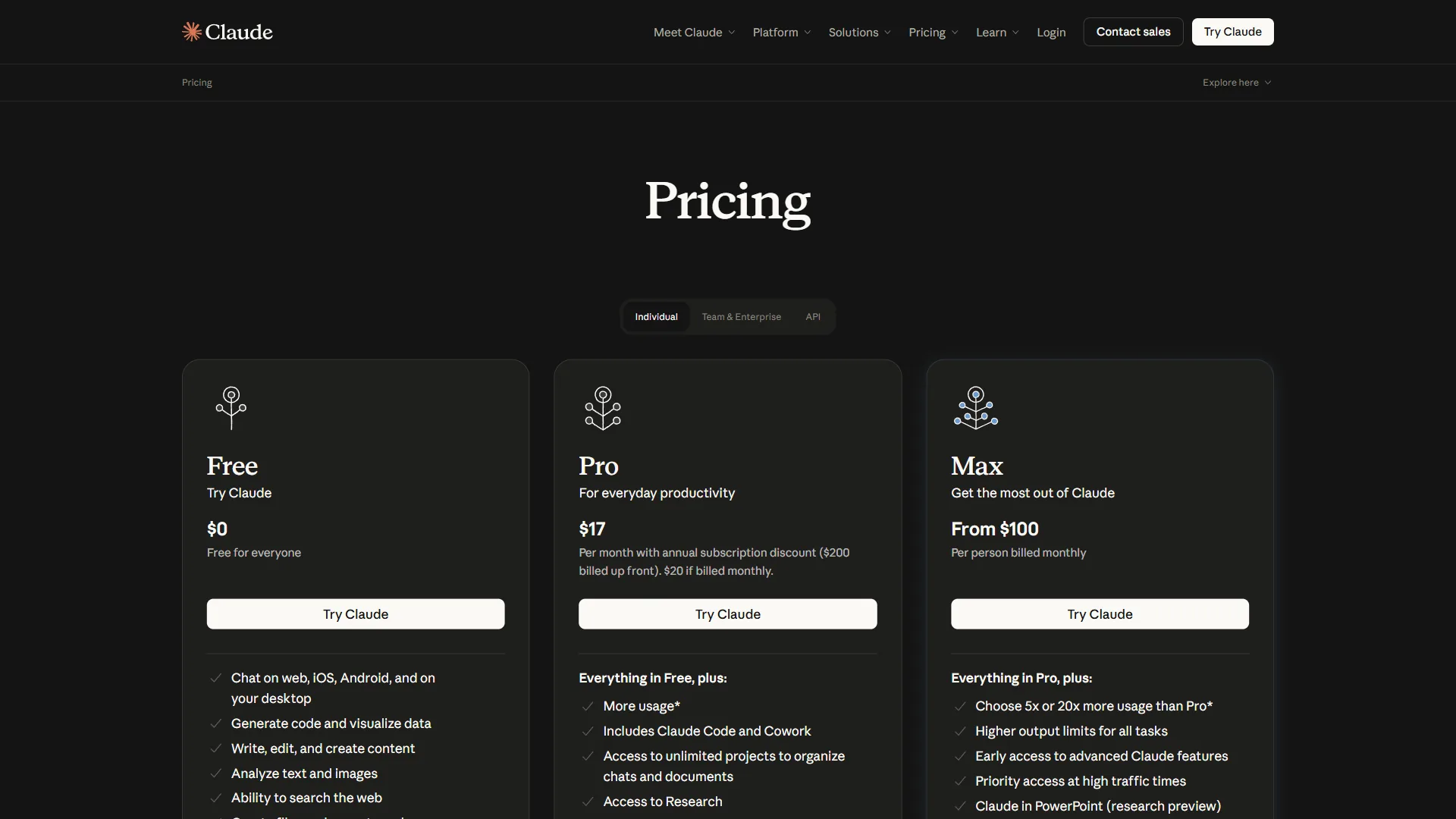
| Pro Price | $20/mo (Pro) | $20/mo (Plus) |
| Premium Price | $100/mo (Max) | $200/mo (Pro) |
| Context Window | 200K tokens (1M beta) | 128K tokens (GPT-5) |
| Image Generation | No | Yes (GPT-4o DALL-E) |
| Voice Mode | No | Yes (Live voice) |
| Web Search | Pro/Max with citations | Plus/Pro, no citations |
| Autonomous Coding | Claude Code (Pro/Max) | N/A |
| Privacy Default | Data never trains models | Free tier trains models |
| Enterprise Min | 70 users | 150 users |
Quick verdict: Choose Claude if your work involves long documents, complex reasoning, or code. Choose ChatGPT if you need image generation, voice interactions, or the broadest plugin ecosystem. At $20 per month each, many professionals subscribe to both.
Limitations and who this comparison is not for: Skip both Claude and ChatGPT if your team needs on-prem inference for sovereign data - neither offers a self-hosted option, and the cons of cloud-only delivery are non-negotiable for some regulated industries. Both also have rate-limit drawbacks at the $20 tier that will frustrate heavy daily users.
Claude vs ChatGPT: Productivity Workflow Comparison
This is the section no other comparison covers - and it is the one that matters most for professionals. Both tools are compared here across five common productivity workflows: completion quality, time to usable output, and editing effort.
Email Drafting
Claude maintains your communication style across sessions through Projects. Upload your last ten sent emails, and it learns your tone, formality level, and signature patterns. The 200K context window means it can reference an entire email thread - including attachments - without losing track of who said what. First drafts typically need one round of light editing.
ChatGPT uses its Memory feature to learn your preferences over time, which works well once trained. Custom GPTs let you build dedicated email assistants with specific personas. For quick one-off replies, ChatGPT is marginally faster. But for threading context across long conversations, it struggles with anything beyond 30-40 messages.
Winner: Claude, by a clear margin. The Projects feature turns email drafting from a per-message task into a workflow where context accumulates.
Meeting Preparation
Claude excels here. Upload a meeting agenda, past meeting notes, relevant documents, and participant bios in one shot. Ask for a briefing document, and Claude synthesizes everything into a structured prep sheet with talking points, potential objections, and background context. The output is consistently thorough and well-organized.
ChatGPT handles meeting prep competently but requires more prompting to achieve the same depth. Where ChatGPT wins is the web browsing capability - it can pull recent news about attendees or their companies in real time. If your meetings involve external stakeholders, that live research component is valuable.
Winner: Claude for internal meetings where you have the documents. ChatGPT for external meetings where you need real-time background research.
Project Planning
Claude produces more structured project plans with clearer dependency mapping. Ask it to break down a product launch into phases, and the output reads like something a senior PM wrote - with realistic timelines, risk flags, and resource considerations. Claude Artifacts can generate interactive Gantt-style views alongside the conversation.
ChatGPT brings Advanced Data Analysis (Code Interpreter) to the table, which means it can run actual calculations - budget projections, resource allocation models, timeline simulations. Upload a spreadsheet with historical velocity data, and ChatGPT will crunch numbers that Claude can only estimate. The combination of planning and computation is powerful.
Winner: Tie. Claude for qualitative planning and strategy. ChatGPT for quantitative planning with calculations.
Document Analysis
Claude dominates document analysis. A 200K token context window holds roughly 150,000 words - enough for most contracts, reports, or research papers without splitting them. Claude identifies relevant clauses, flags inconsistencies, and produces summaries that capture nuance rather than just surface-level takeaways. For legal, financial, or technical document review, nothing else comes close.
ChatGPT handles shorter documents well (under 50 pages) but starts losing coherence on longer inputs. GPT-5 improved contextual understanding, but the 128K token limit means large documents still require chunking. For quick summaries of short reports, ChatGPT is perfectly adequate.
Winner: Claude, decisively. If document analysis is a regular part of your work, this alone justifies the subscription.
Content Creation
ChatGPT leads content creation with built-in image generation via GPT-4o, voice mode for brainstorming, and a natural writing style that works well for marketing copy, social posts, and creative content. Custom GPTs let you build brand-specific content assistants that remember your style guide and tone preferences.
Claude produces more accurate, carefully reasoned content - particularly for technical writing, documentation, and long-form articles where factual precision matters more than creative flair. Fewer hallucinated claims mean less fact-checking time. But Claude lacks image generation entirely, so visual content workflows require separate tools.
Winner: ChatGPT for marketing and creative content. Claude for technical and long-form content where accuracy is non-negotiable. For more pricing context, see our Claude pricing breakdown, and if image work is part of your stack, our best AI image generators roundup covers the tools that pair best with either chatbot.
Workflow limitations and who each is not for: Skip Claude if your daily workflow needs image generation, voice mode, or any kind of multimodal output - those drawbacks are absolute, not partial. Skip ChatGPT if your work centers on long documents over 200 pages or audit-grade accuracy: the 128K context limit and higher hallucination rate are real cons that show up most on legal, medical, and financial review. Both struggle with truly novel research questions and shouldn’t replace a domain expert.
Integration Ecosystem: MCP vs Custom GPTs
One of the biggest differences in the Claude vs ChatGPT debate is how they extend their capabilities - and most comparisons barely mention it.
Claude’s Model Context Protocol (MCP)
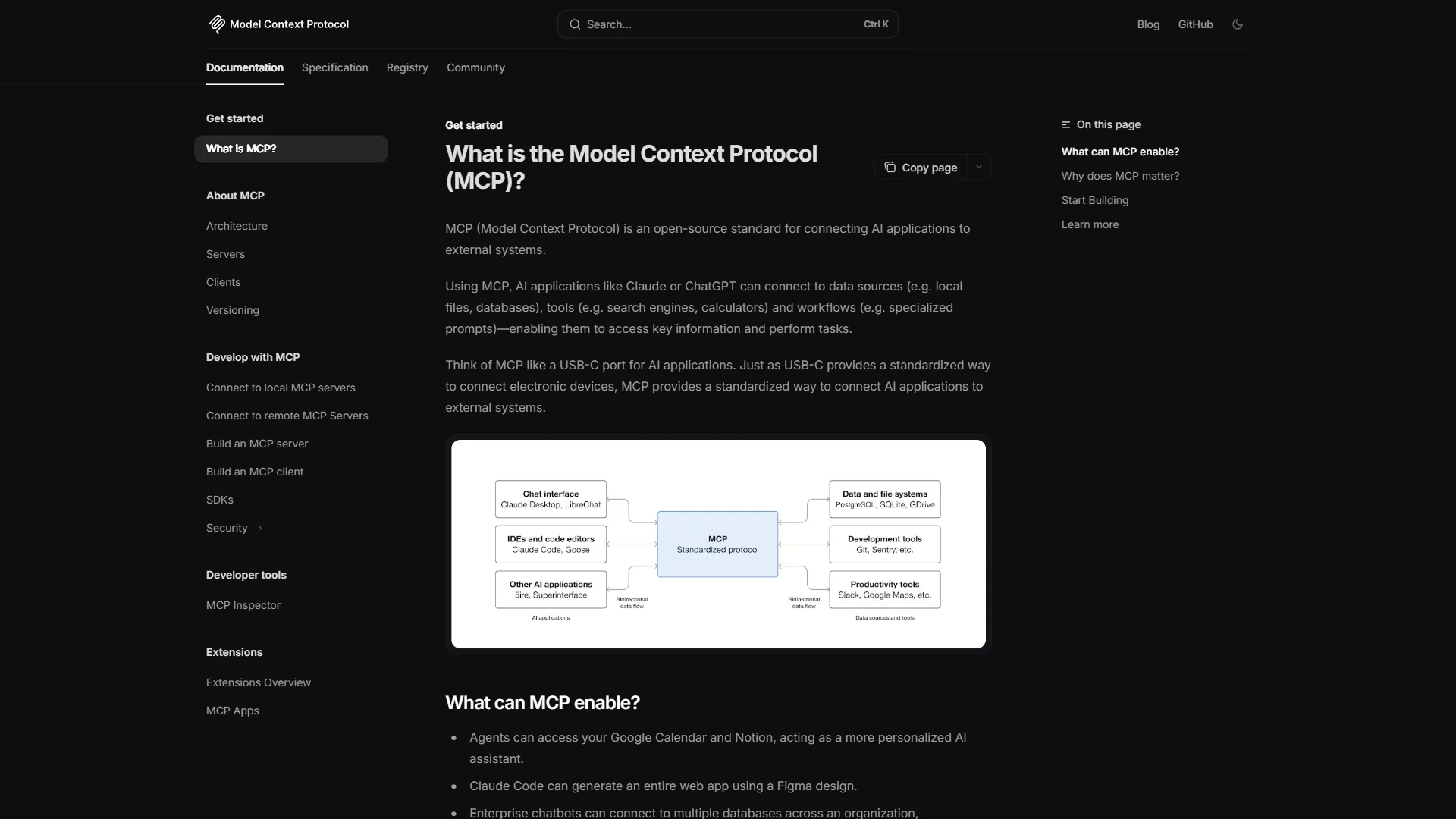
Claude uses the Model Context Protocol (MCP) - an open standard that lets Claude connect to external tools, databases, and APIs through a unified protocol. MCP servers run locally or remotely and give Claude direct access to your file system, GitHub repos, Slack channels, databases, and more.
The advantage of MCP is depth of integration. Claude does not just read data from these tools - it can take actions. Write code and commit it. Query a database and analyze results. Read Slack threads and draft responses in context. For developers and technical users, MCP turns Claude from a chatbot into an actual workflow tool.
The disadvantage is that MCP requires some technical setup. You need to configure servers, manage connections, and understand the protocol. Non-technical users will find the Custom GPT approach more accessible.
ChatGPT’s Custom GPTs and Plugins
ChatGPT’s ecosystem of 3 million+ Custom GPTs and native integrations takes a different approach - breadth over depth. The GPT Store offers pre-built assistants for nearly every use case imaginable, and building a Custom GPT requires zero code. Add instructions, upload knowledge files, and connect actions.
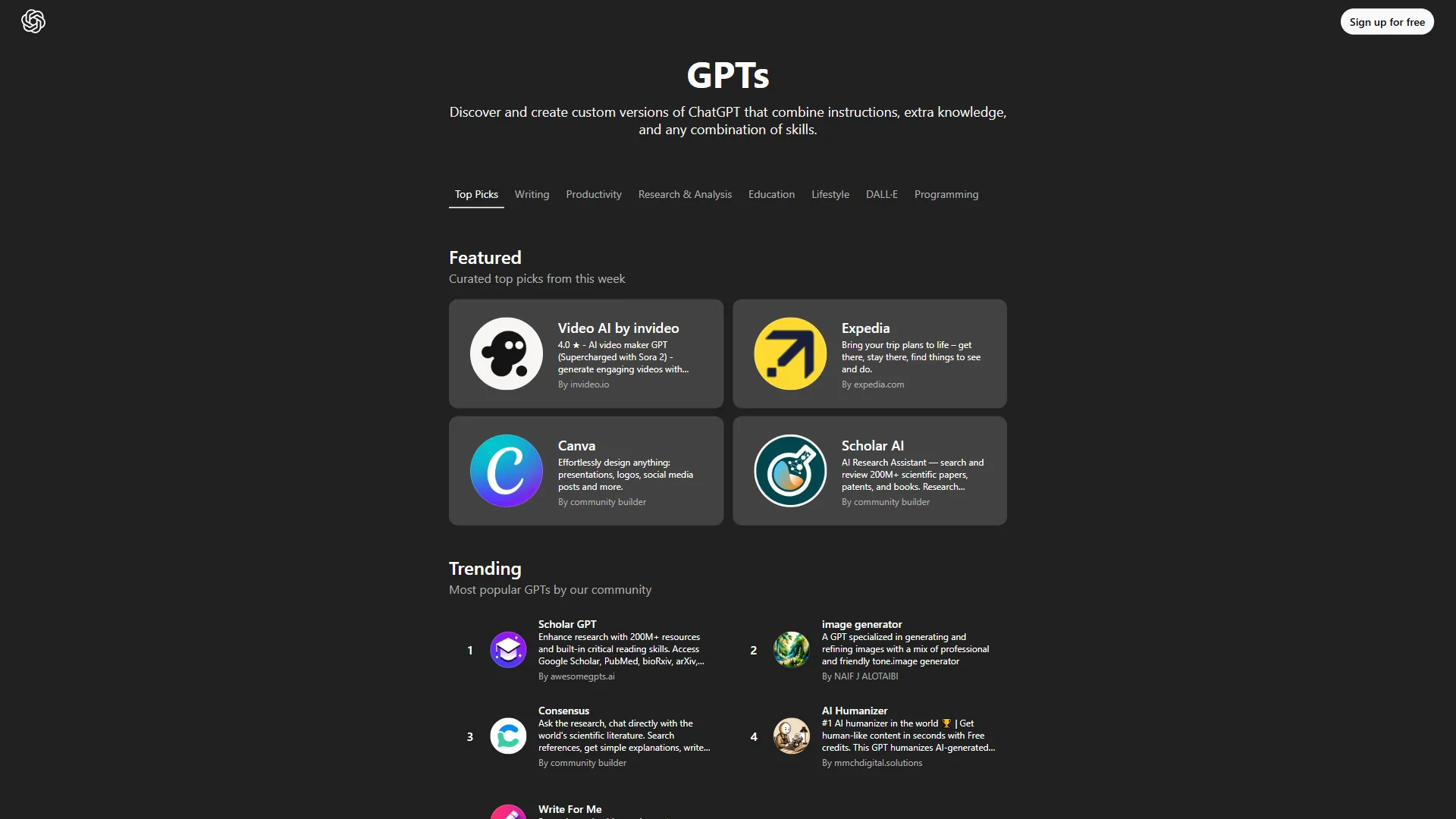
The advantage is accessibility. Anyone can create or use a Custom GPT in minutes. Zapier integration connects ChatGPT to thousands of apps without code. Memory features let ChatGPT learn your preferences over time.
The disadvantage is that many Custom GPTs are low quality, and the integration depth is shallower than MCP. ChatGPT can read data from connected tools but has limited ability to take meaningful actions within them.
The integration verdict: Claude MCP for technical users who want deep, action-oriented integrations. ChatGPT Custom GPTs for non-technical users who want breadth and ease of setup.
Integration limitations and who each is not for: Skip Claude’s MCP if you don’t have someone on the team who can configure JSON manifests and manage local servers - the setup tax is the biggest drawback non-technical teams hit. Skip ChatGPT’s Custom GPTs if you need actions that go beyond reading data: the cons include shallow write capabilities and quality control problems in the public GPT Store. Both ecosystems still trail mature platforms like Zapier or Make for serious automation work.
Cost Efficiency: Price Per Task
Both tools charge $20 per month at the standard paid tier, but the Claude vs ChatGPT value proposition differs significantly based on your usage patterns.
| Metric | Claude Pro ($20/mo) | ChatGPT Plus ($20/mo) |
|---|---|---|
| Usage Limit | 5x free tier (~100 messages/day) | ~80 GPT-5 messages/3 hours |
| Premium Model Access | Limited Opus 4.5 | Full GPT-5 |
| Web Search | Included with citations | Included without citations |
| File Analysis | 200K context | 128K context |
| Image Generation | N/A | Included |
| Voice Mode | N/A | Included |
| Coding Tools | Claude Code included | N/A |
| Next Tier | $100/mo (Max) | $200/mo (Pro) |
For text-heavy workflows - writing, analysis, coding - Claude Pro delivers more value per dollar. The 200K context window alone saves significant time on document work. Claude Code, included with Pro, adds autonomous coding capabilities that ChatGPT does not match at any price point.
For multimedia workflows - image generation, voice brainstorming, visual content - ChatGPT Plus is the only option since Claude lacks these features entirely.
The premium tier gap is notable. Claude Max at $100 per month gives you generous Opus 4.5 access, full Claude Code with checkpoints, and Chrome automation. ChatGPT Pro at $200 per month gives you unlimited messages and o1 pro mode reasoning. Claude Max offers better value for most professional use cases.
Pricing limitations and who each tier is not for: Skip Claude Pro if you need image generation or voice - the $20 per month is wasted on those workflows. Skip ChatGPT Plus if you do heavy document review: the lower context window and weaker citations turn into cons fast. Both Pro/Plus tiers have soft rate caps that surprise users coming from API access; drawbacks include opaque throttling and limited model-rollback options when a new release regresses.
Enterprise Readiness
When deciding Claude vs ChatGPT for teams, compliance and security are not optional.
| Enterprise Feature | Claude | ChatGPT |
|---|---|---|
| Data Training | Never used for training | Free tier trains; Plus opts out |
| SOC 2 | Enterprise tier | Enterprise tier |
| HIPAA | Available via API | Available via Enterprise |
| SSO/SAML | Enterprise | Enterprise |
| Audit Logs | Team and Enterprise | Enterprise only |
| Min Enterprise Users | 70 | 150 |
| Data Retention | Custom rules | Custom rules |
| Admin Console | Team and Enterprise | Team and Enterprise |
Claude’s privacy-first stance is a meaningful differentiator. User data is never used for model training at any tier - not even the free plan. ChatGPT requires at least the Plus tier to opt out of training, and full compliance features require Enterprise.
Claude’s lower enterprise minimum (70 vs 150 users) makes it more accessible to mid-size companies. Both platforms offer comparable security certifications at the enterprise level, but Claude’s default privacy posture - documented on Anthropic’s trust portal - simplifies procurement conversations.
Enterprise limitations and who each is not for: Skip Claude Enterprise if you need a mature partner channel and global field engineering presence - those are real drawbacks compared to OpenAI’s deeper Microsoft-backed bench. Skip ChatGPT Enterprise if your security review gates on default-private training data: the cons of having to opt out at multiple layers slow procurement. Both lag dedicated enterprise platforms (Glean, Writer, Cohere) on features like fine-grained ACL inheritance from source systems.
Which Is Faster: Claude or ChatGPT?
Response speed matters when you are using AI dozens of times per day. In practice, both tools deliver sub-second first-token responses for standard queries. The differences emerge on complex tasks.
Claude Sonnet 4.5 is optimized for speed and handles most daily tasks with near-instant responses. Claude Opus 4.5, the premium model, is slower but produces higher-quality reasoning on complex problems. You can choose the model per conversation based on task complexity.
ChatGPT with GPT-5 delivers consistently fast responses across most tasks, and the GPT-5 release notes confirm the Plus tier offers 2x processing speed over free. Where ChatGPT slows down is on Advanced Data Analysis tasks where it runs code in the background - these can take 10-30 seconds.
For typical productivity tasks - writing, summarizing, answering questions - both tools feel equally responsive. The latency difference is negligible for most users. If you want to get more out of ChatGPT specifically, our ChatGPT tips and tricks guide covers the workflows that save the most time.
Speed limitations and who is not the right user: Skip both for low-latency production workloads (under 200ms response): web UIs add overhead that the API tier doesn’t, and that’s a hard tradeoff. Cons here include unpredictable peak-hour slowdowns and no SLA on the consumer plans. If you need guaranteed throughput, the limitation is solved only at the API or Enterprise tier.
Which Is More Accurate: Claude or ChatGPT?
This is the area where benchmarks actually matter for productivity. A hallucinated fact in a client email or legal analysis can cost real money.
Claude’s Constitutional AI approach produces measurably fewer hallucinations on factual queries. Anthropic’s internal research shows Claude models refuse to answer rather than fabricate information - a design choice that prioritizes reliability over helpfulness. The same trade-off shows up in our hands-on Claude review, where the model defaults to saying “I’m not sure” instead of inventing a plausible-sounding answer.
ChatGPT’s GPT-5 improved accuracy significantly over GPT-4o, but the model still occasionally generates confident-sounding claims that are partially or fully incorrect, as OpenAI’s own safety guidance warns. The lack of source citations on web browsing results compounds this - you get answers without easy verification.
For productivity workflows where accuracy matters (legal review, financial analysis, technical documentation), Claude’s lower hallucination rate translates to less time spent fact-checking and fewer costly errors.
Accuracy limitations and who shouldn’t rely on either: Both models still hallucinate. Skip either as a primary source for medical, legal, or safety-critical decisions - the drawbacks are not theoretical. Cons include confident citation of nonexistent papers, fabricated case law, and stale knowledge cutoffs that vary by model. Verification through primary sources is non-negotiable, and any team treating these as oracles is courting real liability.
Winner by Category
Choose Claude When
- Document analysis is a daily task. The 200K context window handles contracts, reports, and codebases that ChatGPT cannot process in one pass.
- Accuracy matters more than features. Legal analysis, technical writing, financial review - Claude hallucinates less.
- You are a developer. Claude Code is the most capable autonomous coding assistant included with a subscription. MCP integrations connect to your entire dev toolchain.
- Data privacy is a requirement. No training on your data at any tier. Simpler compliance conversations with procurement.
- You want better premium value. Claude Max at $100 per month versus ChatGPT Pro at $200 per month.
Choose ChatGPT When
- You need one tool for everything. Writing, images, voice, web browsing, data analysis - no other single subscription covers this much ground.
- Image generation is part of your workflow. GPT-4o’s integrated DALL-E is not available elsewhere at this price.
- Non-technical team members need AI access. Custom GPTs and the GPT Store make ChatGPT the most accessible AI platform.
- Voice interaction is valuable. Live voice mode for brainstorming, language practice, or hands-free work.
- Your team already uses Microsoft tools. ChatGPT’s integrations with Microsoft 365 and Teams are more mature than Claude’s Google Workspace integration.
The Bottom Line
The claude vs chatgpt comparison is not about which tool is better in the abstract. It is about which tool fits your specific workflow.
For productivity-focused professionals - writers, developers, analysts, and managers who handle complex documents daily - Claude delivers more useful output per conversation. The 200K context window, lower hallucination rates, and Claude Code integration solve real problems that ChatGPT cannot match. Our ChatGPT competitors guide covers the broader market beyond these two.
For creative professionals and generalists who need one subscription to handle everything from image generation to voice brainstorming to quick research - ChatGPT remains the most capable all-in-one platform. No other tool matches its breadth.
The practical answer for many professionals: spend $40 per month on both. Use Claude for deep work - analysis, coding, long documents, anything where accuracy and depth matter. Use ChatGPT for creative tasks, image generation, and quick lookups. That combination outperforms either tool alone, and at $40 per month total, it is still cheaper than most software subscriptions that deliver far less value.
FAQ
Q: Are Claude better than ChatGPT?
The claude vs chatgpt comparison is not about which tool is better in the abstract. It is about which tool fits your specific workflow.
Q: Why is Claude so much smarter than ChatGPT?
Based on research into how both Claude and ChatGPT perform across real productivity workflows, the short version is this: Claude wins on depth, accuracy, and long-document work.
Q: Why use ChatGPT vs. Claude?
The claude vs chatgpt comparison is not about which tool is better in the abstract. It is about which tool fits your specific workflow.
Q: Why switch from ChatGPT to Claude?
The claude vs chatgpt comparison is not about which tool is better in the abstract. It is about which tool fits your specific workflow.
Q: Is Claude better than ChatGPT?
Neither is universally better - it depends on workflow. Claude wins on depth, accuracy, and long-document work thanks to its 200K context window and lower hallucination rate. ChatGPT wins on breadth, ecosystem, and multimedia with image generation, voice mode, and Custom GPTs. For document analysis, coding, and technical writing, Claude delivers more useful output. For creative content and image work, ChatGPT leads.
Related Reading
- ChatGPT vs Claude: Which AI Assistant Is Better? - Our reverse comparison from ChatGPT’s perspective
- Best AI Assistants for Productivity in 2026 - Comprehensive guide covering Claude, ChatGPT, Perplexity, and more
- Perplexity vs Claude for Research - If research is your primary use case
- Best AI Coding Assistants - Developer’s guide to Claude Code, Copilot, and Cursor
- AI Writing Tools - Full comparison of AI writing assistants
- ChatGPT Review
- Claude Review
External Resources
- Claude Official Site - Anthropic’s AI platform with pricing and feature details
- ChatGPT Official Site - OpenAI’s product page with latest features and pricing
- Model Context Protocol - Open standard for AI tool integrations