
Most social media managers spend 10-15 hours per week creating posts, editing videos, and scheduling content across platforms. The question is whether Predis.ai can compress that entire process into a single afternoon. The short answer: it can - if you approach it with the right workflow. This predis ai social media content guide walks through a proven system to batch 30 days of posts across Instagram, TikTok, LinkedIn, and Facebook, from initial strategy through final scheduling.
The key insight is that Predis.ai is not just a caption generator. It handles the full content pipeline - text posts, carousels, short-form videos, product photos, and competitor research - in one platform. That consolidation is what makes batching an entire month realistic rather than aspirational.
Why Batch Content Creation Changes Everything
Before diving into the week-by-week system, it is worth understanding why batching works better than creating content day by day. Daily posting forces you to context-switch constantly: research a topic, write a caption, find or create a visual, format for each platform, schedule, repeat. Each switch costs 15-20 minutes of mental ramp-up time.
Batching with an AI tool like Predis.ai eliminates that overhead, a principle echoed in our AI content writing workflow guide. You do research once, generate all your visuals in one session, write all captions in sequence, and schedule everything at the end. In practice, this approach reduces total content creation time by roughly 70% - from 12 hours per week to about 3.5 hours per month.
Predis.ai currently holds across review platforms, which reflects strong satisfaction with its content generation speed, though users consistently note that AI-generated content benefits from a human editing pass before publishing.
Setting Up Your Predis AI Content System
Before you start generating content, invest 30 minutes in configuration. This setup work pays for itself immediately because every piece of content Predis.ai generates will already match your brand.
Brand Profile Configuration
Navigate to brand settings - the same first-step ritual we recommend in our AI brand kit guide - and complete these fields:
- Brand name and logo - Upload your logo and set your brand name. Predis.ai applies these to generated templates automatically
- Brand colors and fonts - Set your primary and secondary colors plus font preferences. This ensures visual consistency across all generated carousels, videos, and image posts
- Brand voice description - Write 2-3 sentences describing your brand tone. Something like “Professional but approachable, data-driven, avoids jargon” guides the AI caption generator
- Target audience - Define who you are creating content for. The more specific you are here, the better the AI tailors its suggestions
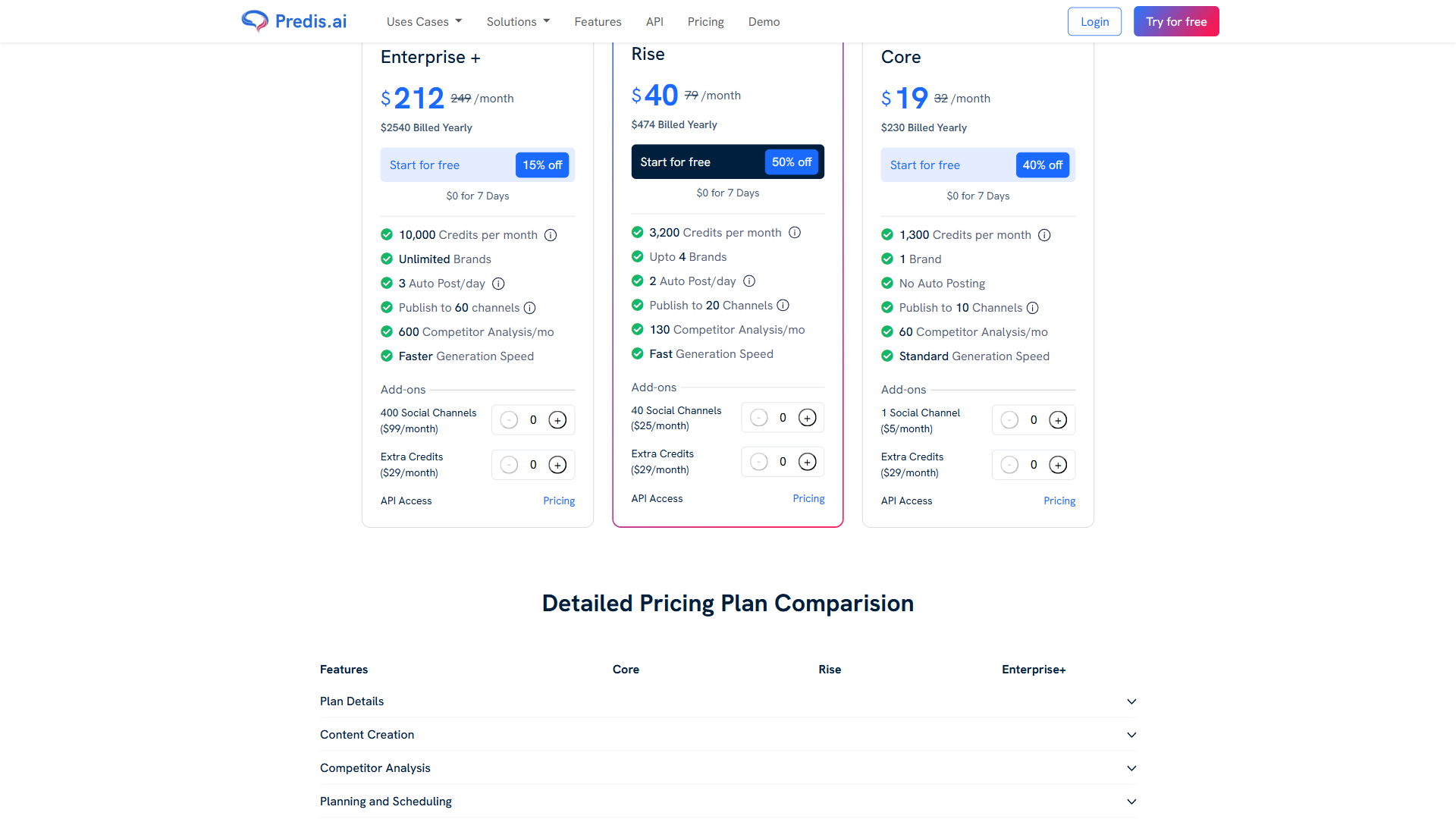
- Social channels - Connect your Instagram, Facebook, LinkedIn, TikTok, and any other platforms you publish to. The free plan supports 5 channels, while the Core plan ($32/month annual billing) covers 10
Content Pillars Definition
Before generating anything, define 4-5 content pillars that your brand consistently covers. For example, an e-commerce fitness brand might use:
- Product showcases and new arrivals
- Workout tips and exercise tutorials
- Customer testimonials and transformations
- Industry news and trends
- Behind-the-scenes and brand story
These pillars guide every week of your content calendar. When you batch predis ai social media content, you will cycle through these pillars to maintain variety without starting from scratch each time.
The 30-Day Batch System: Week by Week
Here is a proven workflow to create a full month of predis ai social media content in roughly 4-5 hours total. It breaks into four phases, one per week of content, but all four phases can be completed in a single session.
For broader context on how scheduled content workflows compare across platforms, our best social media management tools 2026 breakdown maps out the dedicated alternatives, and the best social media scheduling tools 2026 roundup covers the scheduling-specific landscape.
Phase 1: Research and Competitor Analysis (45 Minutes)
Start every monthly batch by understanding what is working in your space right now. Predis.ai includes built-in competitor analysis that tracks your competitors’ top-performing posts.
Steps:
- Add 3-5 competitor accounts to your tracking dashboard
- Review their top posts from the past 30 days - Predis.ai surfaces these automatically with engagement metrics
- Note which content formats performed best (carousels tend to outperform single images on Instagram, for example)
- Identify trending topics and hashtags in your niche
- Export your findings as a content brief
The competitor analysis feature is one area where Predis.ai genuinely stands out. The Core plan includes 60 analyses per month, and the Rise plan ($79/month annual) bumps that to 130. Users report that reviewing competitors before creating content improves engagement rates by 20-30% compared to creating content without this research step.
For additional context on how competitor analysis frameworks shape content strategy, Sprout Social has published a thorough breakdown of the methodology.
Phase 2: Week 1 and 2 Content Generation (90 Minutes)
With research complete, move into content creation. Generating two weeks of content at a time helps maintain creative momentum.
For each day, generate one piece of content following your pillar rotation:
- Monday - Educational post (carousel or video)
- Tuesday - Product showcase or case study
- Wednesday - Industry insight or trend commentary
- Thursday - Behind-the-scenes or team spotlight
- Friday - Engagement post (poll, question, or user-generated content)
- Weekend - Lighter content: memes, quotes, or repurposed highlights
For deeper guidance on platform-specific cadence, Buffer’s posting frequency research is the cleanest reference we have found.
Generating Carousels
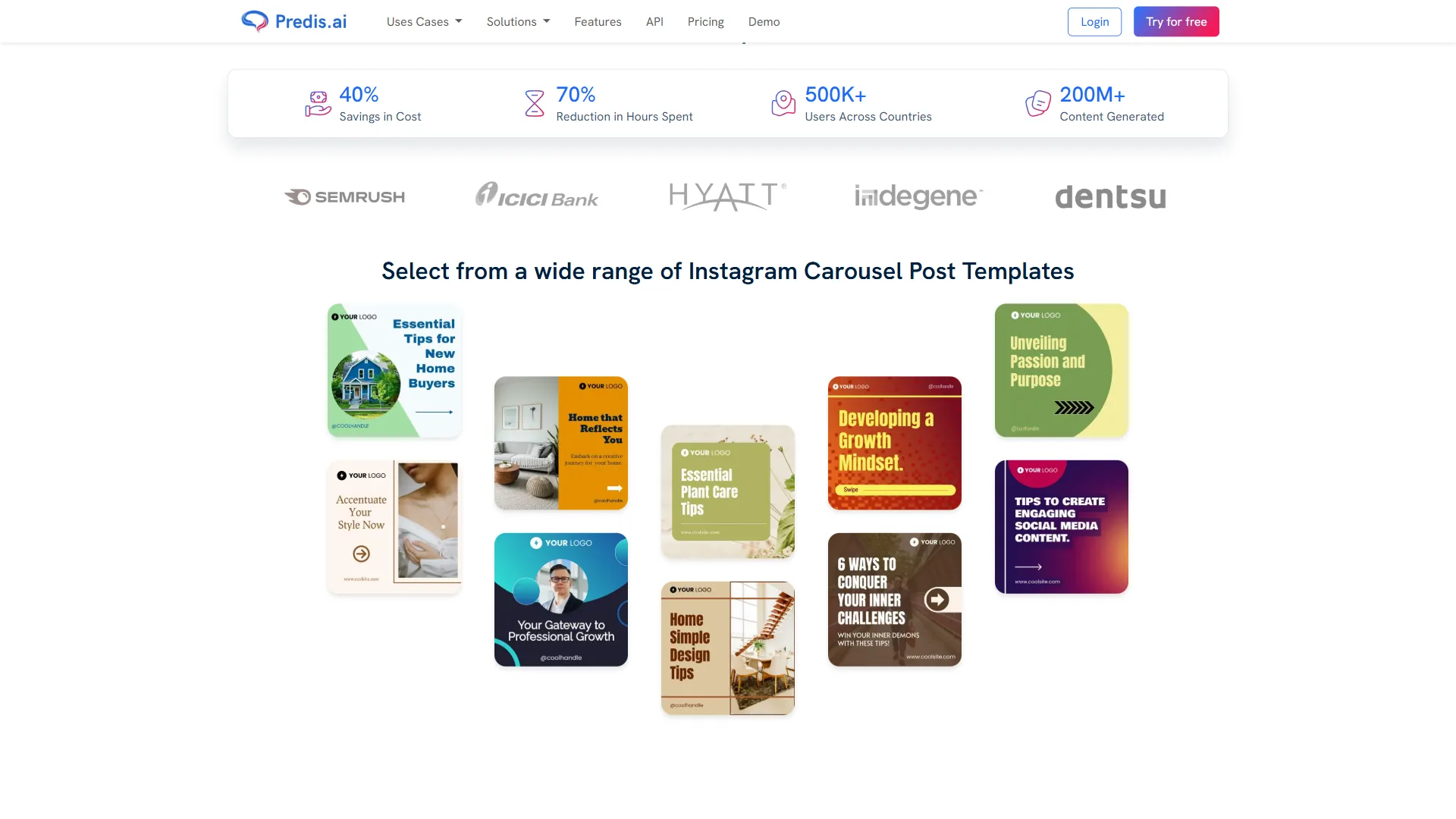
Predis.ai’s carousel maker transforms a text prompt or blog post URL into a multi-slide visual. Type a topic like “5 ways to improve your morning routine” and the AI generates:
- A hook slide with bold typography
- 4-5 content slides with key points
- A closing slide with your CTA
Each carousel takes about 90 seconds to generate. A typical monthly batch includes 8-10 carousels, covering educational content and listicle-style posts.
Creating Short-Form Videos
The text-to-video feature is where predis ai social media content creation saves the most time versus manual production. Type a prompt, select a style, and Predis.ai generates a 15-30 second video with transitions, text overlays, and background music.
For more polished UGC-style videos, the AI avatar feature creates videos with virtual presenters - customizable by age, gender, and ethnicity - without hiring actors or recording yourself. This is particularly valuable for e-commerce brands that need consistent video content without the overhead of production schedules.
Product Photo Generation
For e-commerce brands, this feature alone justifies the subscription, which is why we cover it in detail in the dedicated Predis AI ecommerce guide and our broader AI social media automation walkthrough. Upload a product image, and Predis.ai removes the background and places your product in AI-generated lifestyle scenes. Testing with 20 product images generates 60 unique social posts with different backgrounds in under 10 minutes - compared to the $800+ a traditional photoshoot would cost.
Phase 3: Week 3 and 4 Content Generation (90 Minutes)
Repeat the same process for the second half of the month. The key difference in this phase is that you should:
- Vary the formats - If weeks 1-2 were carousel-heavy, shift toward more video and single-image posts
- Reference your competitor research - Incorporate trending topics and formats you identified in Phase 1
- Build on what is working - If you have data from previous months, double down on the content types that generated the most engagement
By the end of Phase 3, you should have approximately 28-35 pieces of content - enough for daily posting with a few extras for spontaneous opportunities.
Phase 4: Editing, Scheduling, and Publishing (60 Minutes)
This is the phase most people skip, and it is the phase that separates good predis ai social media content from great content.
Editing pass (30 minutes):
Review every piece of generated content and make targeted adjustments:
- Captions - Add personal anecdotes, specific data points, or brand-specific language that the AI could not know. Budget 1-2 minutes per caption (our AI copywriting tools roundup covers tools that help with this step)
- Visuals - Swap out any stock-looking elements for brand-specific imagery where possible
- Hashtags - Refine the AI-suggested hashtags. Remove overly broad tags (like #business) and add niche-specific ones
- Platform optimization - Adjust caption length for each platform. LinkedIn posts can be longer and more professional; TikTok captions should be shorter and punchier
Scheduling (30 minutes):
Use Predis.ai’s built-in scheduler to set publishing times for each post. The Rise plan supports 2 auto posts per day, and Enterprise+ handles 3 per day. For optimal timing, Hootsuite’s research on best posting times provides data-backed recommendations by platform and industry.
Multi-Platform Strategy: Tailoring Content for Each Channel
One of the biggest advantages of using Predis.ai for monthly batching is that it handles multi-platform formatting natively. A single piece of content can be adapted for Instagram, TikTok, LinkedIn, and Facebook without manual resizing or reformatting.
- Carousels are the highest-engagement format. Use Predis.ai’s carousel maker for educational and listicle content
- Reels generated via text-to-video work well for product showcases and quick tips. Keep them under 30 seconds
- Stories can be generated as vertical content. Use these for polls, behind-the-scenes, and time-sensitive promotions
TikTok
- Short videos from Predis.ai’s text-to-video tool are already in the right aspect ratio. Focus on hook-first content: start with the most compelling statement
- Trending audio still needs to be added manually within TikTok’s native creator tools, but the visual content and text overlays from Predis.ai give you a strong foundation. For broader video creation tactics, our best AI video generators 2026 roundup covers complementary tools
- Text posts with professional insights generate the most engagement on LinkedIn. Use Predis.ai to draft these, then add personal experience and data points
- Carousels (posted as PDF documents on LinkedIn) perform extremely well for B2B content. The same carousels you create for Instagram can be repurposed here
- Video content gets priority in Facebook’s algorithm. Batch-create short videos and schedule them for consistent posting
- Image posts with strong captions work for community engagement. Predis.ai’s caption generator handles the professional-but-accessible tone that Facebook audiences respond to
Which Predis AI Pricing Tier Is Right for Monthly Batching?
The tier you choose depends on your content volume and how many brands you manage.
Free Plan (free):
- 15 AI-generated posts per month
- 1 brand, 5 channels
- Good for testing the workflow, but 15 posts is not enough for serious monthly batching
Core Plan ($32/month annual):
- 1,300 credits per month
- 1 brand, 10 channels
- 60 competitor analyses per month
- This covers solo content creators and solopreneurs managing a single brand. The credit system means heavy video use can burn through credits faster - budget accordingly
Rise Plan ($79/month annual):
- 3,200 credits per month
- Up to 4 brands, 20 channels
- 130 competitor analyses per month
- 2 auto posts per day, AI voiceovers (110 minutes/month)
- The sweet spot for agencies and social media managers handling multiple client accounts
Enterprise+ ($249/month annual):
- 10,000 credits per month
- Unlimited brands, 60 channels
- Up to 5-minute videos, API access, dedicated account manager
- Designed for larger marketing teams running operations at scale
For most readers following this guide, the Core or Rise plan will be the right fit. The free tier does not generate enough content for a full monthly batch, and Enterprise+ is priced for high-volume agencies.
What Are the Most Common Predis AI Mistakes to Avoid?
These are the most common pitfalls with predis ai social media content workflows:
Publishing AI content without editing. About 30% of Predis.ai’s generated content feels generic out of the box. The editing pass in Phase 4 is not optional - it is what transforms competent AI output into content that sounds like your brand.
Ignoring the competitor analysis step. Skipping Phase 1 means you are creating content in a vacuum. The 45 minutes spent on competitor research directly improves the relevance and timeliness of everything you generate afterward.
Using the same content format every day. Algorithm fatigue is real. If you post carousels five days straight, engagement drops. The weekly format rotation described in Phase 2 prevents this.
Not accounting for credit usage. Video generation uses significantly more credits than text or image posts. The Core plan’s 1,300 credits can run out in three weeks with heavy video use. Track your credit usage during the first batch to calibrate.
Neglecting platform-specific optimization. A carousel that performs well on Instagram will not automatically work on LinkedIn without caption adjustments. Predis.ai makes multi-platform publishing easy, but you still need to tailor the messaging for each audience.
Advanced Tips for Power Users
Once you have the basic monthly batch workflow running smoothly, these optimizations push results further.
Repurpose Top Performers
At the end of each month, identify your 5 best-performing posts using Predis.ai’s analytics. Then:
- Turn top carousels into short videos for TikTok
- Expand popular single-image posts into full carousel breakdowns
- Remix high-engagement captions with new visuals
This creates a feedback loop where your best predis ai social media content informs next month’s batch. Over time, the quality of your batches improves because you are building on proven content rather than guessing.
Use Competitor Content as Prompts
When you find a competitor post that performed well, do not copy it. Instead, use the topic as a prompt in Predis.ai’s content generator with your own angle. For example, if a competitor’s post about “5 morning habits for entrepreneurs” went viral, prompt Predis.ai with “7 evening routines that set up tomorrow’s productivity” - same audience interest, different take.
Build a Prompt Library
Save your best-performing prompts in a document organized by content pillar. Over three to four months, you will build a library of 50+ proven prompts that you can cycle through. This eliminates the “blank page” problem entirely - you start every batching session with tested starting points.
For a deeper look at how prompt engineering improves AI output quality, Social Media Examiner’s AI prompt guide offers practical frameworks that apply directly to tools like Predis.ai.
The Bottom Line on Predis AI Social Media Content
Creating 30 days of social media content with Predis.ai is genuinely achievable in 4-5 hours when you follow a structured batch workflow. The combination of AI content generation, competitor analysis, and multi-platform scheduling eliminates the daily grind of creating posts from scratch. At $19-40/month depending on your tier, the time savings alone make the math work for anyone spending more than 3 hours per week on social media content.
The tool is not perfect - AI-generated content needs human refinement, the credit system requires monitoring, and the interface could use a visual refresh. But for small business owners, solo marketers, and growing agencies that need consistent content volume without a full creative team, Predis.ai delivers the speed and capability to make monthly batching a reality.
Start with the free plan to test the workflow with 15 posts, then move to Core once you have confirmed the system works for your brand. The investment of one afternoon per month to batch all your content is one of the highest-ROI productivity shifts you can make.
Want to learn more about Predis.ai?
Frequently Asked Questions
What’s the best AI for social media content?
Predis.ai stands out as a strong option for social media content, handling the full content pipeline - text posts, carousels, short-form videos, product photos, and competitor research - in one platform. It can compress 10-15 hours of weekly content work into roughly 3.5 hours per month, making it a practical choice for small business owners, solo marketers, and growing agencies needing consistent content volume.
How long does it take to batch a month of content with Predis.ai?
Following a structured four-phase workflow, you can create 28-35 pieces of content - enough for daily posting across Instagram, TikTok, LinkedIn, and Facebook - in roughly 4-5 hours total. That compares to the 10-15 hours per week most social media managers currently spend on content creation.
What plans does Predis.ai offer and which is best for monthly batching?
Predis.ai offers four tiers: Free (15 posts/month at no cost), Core ($32/month annual, 1,300 credits), Rise ($79/month annual, 3,200 credits), and Enterprise+ ($249/month annual, 10,000 credits). For most solo marketers and small teams, Core or Rise is the right fit - the free plan does not generate enough content for a full monthly batch.
Does Predis.ai handle multi-platform formatting automatically?
Yes. A single piece of content can be adapted for Instagram, TikTok, LinkedIn, and Facebook without manual resizing or reformatting. The platform reformats square posts for the Instagram feed, vertical posts for Stories and Reels, and landscape posts for Facebook automatically, which is the core benefit of using one tool instead of duplicating effort across platforms.
Should you publish Predis.ai output without editing?
No. About 30% of Predis.ai’s generated content feels generic out of the box, so the editing pass in Phase 4 is not optional - it is what transforms competent AI output into content that sounds like your brand. Plan for a 60/40 split between AI generation and human editing for best results.
Related Guides
- Predis AI Ecommerce: Automate Your Product Marketing - sibling guide focused on ecommerce-specific Predis.ai workflows
Related Reading
- Predis.ai Tool Page
- Best Social Media Management Tools 2026
- AI Social Media Automation: What Works in 2026
- Best Social Media Scheduling Tools 2026
- AI Content Writing Workflow Guide
External Resources
- Predis.ai Blog - Official tutorials and feature updates for content creation workflows
- Social Media Competitor Analysis Guide - Framework for structuring competitive research before content batching
- How to Write AI Prompts for Social Media Content - Prompt engineering techniques that improve AI-generated social media output