


MCP server development is the practice of building Model Context Protocol servers that extend AI assistants with custom capabilities through three primitives: tools for actions, resources for data, and prompts for templates. Production-ready servers use JSON-RPC request-response flow and single-responsibility patterns to deliver maintainable implementations rather than fragile experiments.
The Model Context Protocol (MCP) has become the standard for extending AI assistants with custom capabilities. As mcp server development matures, patterns have emerged that separate robust, maintainable implementations from fragile experiments. This guide explores the architectural patterns that make MCP servers production-ready.
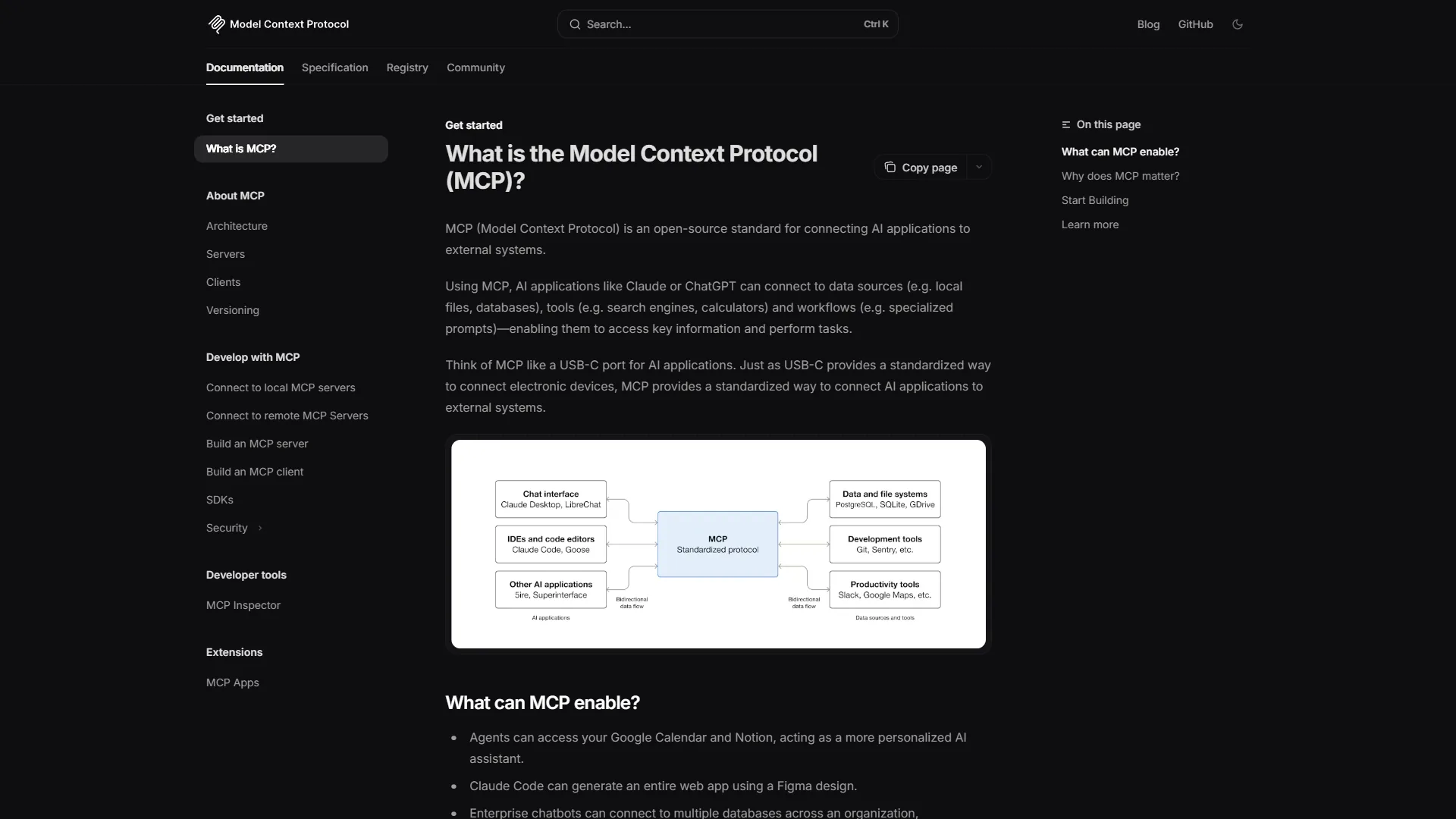
Understanding MCP Server Development Architecture
MCP Server Development covers the strategies and tools that deliver real productivity gains in this space. The Model Context Protocol (MCP) has become the standard for extending AI assistants with custom capabilities. This mcp server development tutorial walks through the practical steps from setup through advanced optimization with examples in Python, building on the foundation laid out in our building MCP servers guide and the broader official MCP specification docs.
Before diving into patterns, let’s establish a mental model of how mcp server development works in practice.
The Three Primitives
MCP exposes three core primitives:
- Tools: Actions the AI can invoke (functions with typed inputs/outputs)
- Resources: Data sources the AI can read (files, databases, APIs)
- Prompts: Reusable prompt templates with parameters
Each primitive serves a distinct purpose. Tools perform actions, resources provide context, and prompts standardize interactions across the mcp server development tools and mcp server development examples teams ship in production. Understanding when to use each is the first pattern.
Request-Response Flow
┌─────────────┐     ┌─────────────┐     ┌──────────────┐
│   Client    │────▶│ MCP Server  │────▶│   External   │
│ (Claude)    │◀────│             │◀────│   Service    │
└─────────────┘     └─────────────┘     └──────────────┘
      JSON-RPC           Your code          APIs/DBs
The client - typically an AI coding tool like Claude Code or Cursor - sends JSON-RPC requests to your server. Your server processes them and may interact with external services. Responses flow back through the same channel.
Pattern 1: Single Responsibility Tools
Each tool should do one thing well. Resist the temptation to create swiss-army-knife tools.
Anti-Pattern: The God Tool
# DON'T: One tool that does everything
@server.tool("database")
async def database_tool(action: str, table: str, data: dict):
    if action == "create":
        # ... create logic
    elif action == "read":
        # ... read logic
    elif action == "update":
        # ... update logic
    elif action == "delete":
        # ... delete logic
Pattern: Focused Tools
# DO: Separate tools for each action
@server.tool("create_record")
async def create_record(table: str, data: dict):
    """Create a new record in the specified table."""
    return await db.insert(table, data)

@server.tool("get_record")
async def get_record(table: str, id: str):
    """Retrieve a record by ID."""
    return await db.find_one(table, {"id": id})

@server.tool("update_record")
async def update_record(table: str, id: str, updates: dict):
    """Update an existing record."""
    return await db.update_one(table, {"id": id}, updates)

@server.tool("delete_record")
async def delete_record(table: str, id: str):
    """Delete a record by ID."""
    return await db.delete_one(table, {"id": id})
Why It Matters
- Clearer tool descriptions help the AI choose correctly
- Simpler parameter validation per tool
- Easier testing and debugging
- Better error messages
Pattern 2: Typed Parameters with Validation
Never trust input. Always validate and provide clear schemas.
Anti-Pattern: Loose Typing
@server.tool("send_email")
async def send_email(data: dict):
    # Hope data has the right fields...
    return await email_service.send(data)
Pattern: Strict Typing with Pydantic
from pydantic import BaseModel, EmailStr, Field

class EmailRequest(BaseModel):
    to: EmailStr
    subject: str = Field(..., min_length=1, max_length=200)
    body: str = Field(..., min_length=1, max_length=10000)
    cc: list[EmailStr] = []
    attachments: list[str] = Field(default=[], max_items=10)

@server.tool("send_email")
async def send_email(request: EmailRequest):
    """Send an email with optional CC and attachments.

    Args:
        request: Email details including recipient, subject, and body.

    Returns:
        Confirmation with message ID.
    """
    return await email_service.send(
        to=request.to,
        subject=request.subject,
        body=request.body,
        cc=request.cc,
        attachments=request.attachments
    )
Benefits
- Automatic validation with clear error messages from Pydantic
- Self-documenting parameter schemas
- IDE autocomplete for developers
- Prevents malformed requests from reaching your logic
Pattern 3: Graceful Error Handling
Errors will happen. How you handle them determines user experience.
Anti-Pattern: Raw Exceptions
@server.tool("fetch_data")
async def fetch_data(url: str):
    response = await httpx.get(url)  # Can throw many errors
    return response.json()  # Can also throw
Pattern: Structured Error Responses
from enum import Enum
from dataclasses import dataclass

class ErrorCode(Enum):
    NETWORK_ERROR = "network_error"
    VALIDATION_ERROR = "validation_error"
    NOT_FOUND = "not_found"
    PERMISSION_DENIED = "permission_denied"
    RATE_LIMITED = "rate_limited"

@dataclass
class ToolResponse:
    success: bool
    data: dict | None = None
    error: str | None = None
    error_code: ErrorCode | None = None

@server.tool("fetch_data")
async def fetch_data(url: str) -> ToolResponse:
    """Fetch JSON data from a URL.

    Args:
        url: The URL to fetch data from.

    Returns:
        ToolResponse with data or error details.
    """
    try:
        if not url.startswith(("http://", "https://")):
            return ToolResponse(
                success=False,
                error="URL must start with http:// or https://",
                error_code=ErrorCode.VALIDATION_ERROR
            )

        async with httpx.AsyncClient(timeout=30) as client:
            response = await client.get(url)

            if response.status_code == 404:
                return ToolResponse(
                    success=False,
                    error=f"Resource not found: {url}",
                    error_code=ErrorCode.NOT_FOUND
                )

            if response.status_code == 429:
                return ToolResponse(
                    success=False,
                    error="Rate limited. Try again later.",
                    error_code=ErrorCode.RATE_LIMITED
                )

            response.raise_for_status()
            return ToolResponse(success=True, data=response.json())

    except httpx.TimeoutException:
        return ToolResponse(
            success=False,
            error="Request timed out after 30 seconds",
            error_code=ErrorCode.NETWORK_ERROR
        )
    except httpx.RequestError as e:
        return ToolResponse(
            success=False,
            error=f"Network error: {str(e)}",
            error_code=ErrorCode.NETWORK_ERROR
        )
Pattern 4: Resource Caching
Resources are read frequently. Caching prevents redundant work.
Anti-Pattern: Fresh Fetch Every Time
@server.resource("config")
async def get_config():
    # Reads file on every request
    with open("config.json") as f:
        return json.load(f)
Pattern: Smart Caching with Invalidation
from functools import lru_cache
from datetime import datetime, timedelta
import hashlib

class CachedResource:
    def __init__(self, ttl_seconds: int = 300):
        self._cache = {}
        self._ttl = timedelta(seconds=ttl_seconds)

    def get(self, key: str):
        if key in self._cache:
            value, timestamp = self._cache[key]
            if datetime.now() - timestamp < self._ttl:
                return value
        return None

    def set(self, key: str, value):
        self._cache[key] = (value, datetime.now())

    def invalidate(self, key: str):
        self._cache.pop(key, None)

config_cache = CachedResource(ttl_seconds=60)

@server.resource("config")
async def get_config():
    """Get application configuration.

    Cached for 60 seconds to reduce file I/O.
    """
    cached = config_cache.get("config")
    if cached:
        return cached

    with open("config.json") as f:
        config = json.load(f)

    config_cache.set("config", config)
    return config

@server.tool("update_config")
async def update_config(updates: dict):
    """Update configuration values."""
    with open("config.json", "r+") as f:
        config = json.load(f)
        config.update(updates)
        f.seek(0)
        json.dump(config, f, indent=2)
        f.truncate()

    # Invalidate cache after update
    config_cache.invalidate("config")
    return {"success": True}
Pattern 5: Middleware for Cross-Cutting Concerns
Logging, authentication, and metrics apply to multiple tools. Use middleware.
Pattern: Decorator-Based Middleware
import logging
import time
from functools import wraps

logger = logging.getLogger(__name__)

def log_tool_call(func):
    @wraps(func)
    async def wrapper(*args, **kwargs):
        start = time.time()
        tool_name = func.__name__

        logger.info(f"Tool called: {tool_name}", extra={
            "args": args,
            "kwargs": kwargs
        })

        try:
            result = await func(*args, **kwargs)
            duration = time.time() - start

            logger.info(f"Tool completed: {tool_name}", extra={
                "duration_ms": duration * 1000,
                "success": True
            })

            return result

        except Exception as e:
            duration = time.time() - start

            logger.error(f"Tool failed: {tool_name}", extra={
                "duration_ms": duration * 1000,
                "error": str(e),
                "success": False
            })

            raise

    return wrapper

def require_permission(permission: str):
    def decorator(func):
        @wraps(func)
        async def wrapper(*args, **kwargs):
            # Check permission (implementation depends on your auth system)
            if not await check_permission(permission):
                raise PermissionError(f"Missing permission: {permission}")
            return await func(*args, **kwargs)
        return wrapper
    return decorator

# Usage
@server.tool("delete_user")
@log_tool_call
@require_permission("admin:delete")
async def delete_user(user_id: str):
    """Delete a user account. Requires admin:delete permission."""
    return await user_service.delete(user_id)
Pattern 6: Composable Tools
Complex operations should compose simpler tools internally.
Pattern: Internal Tool Composition
class OrderService:
    def __init__(self, server):
        self.server = server

    async def create_order(self, customer_id: str, items: list[dict]):
        """Compose multiple operations into one workflow."""
        # Validate customer exists
        customer = await self._get_customer(customer_id)
        if not customer:
            return {"error": "Customer not found"}

        # Check inventory for all items
        for item in items:
            available = await self._check_inventory(item["product_id"])
            if available < item["quantity"]:
                return {"error": f"Insufficient inventory for {item['product_id']}"}

        # Create order
        order = await self._create_order_record(customer_id, items)

        # Reserve inventory
        for item in items:
            await self._reserve_inventory(item["product_id"], item["quantity"])

        # Send confirmation
        await self._send_confirmation(customer["email"], order)

        return {"order_id": order["id"], "status": "created"}

    async def _get_customer(self, customer_id: str):
        # Internal helper, not exposed as tool
        return await db.customers.find_one({"id": customer_id})

    async def _check_inventory(self, product_id: str):
        return await db.inventory.get_available(product_id)

    # ... other private helpers

# Expose the composed operation as a tool
order_service = OrderService(server)

@server.tool("create_order")
async def create_order(customer_id: str, items: list[dict]):
    """Create a new order with inventory validation and confirmation."""
    return await order_service.create_order(customer_id, items)
Pattern 7: Pagination for Large Results
Never return unbounded results. Always paginate.
Pattern: Cursor-Based Pagination
from dataclasses import dataclass
from typing import TypeVar, Generic

T = TypeVar('T')

@dataclass
class PaginatedResponse(Generic[T]):
    items: list[T]
    next_cursor: str | None
    has_more: bool
    total_count: int | None = None

@server.tool("list_records")
async def list_records(
    table: str,
    cursor: str | None = None,
    limit: int = 50
) -> PaginatedResponse:
    """List records with pagination.

    Args:
        table: Table name to query.
        cursor: Pagination cursor from previous response.
        limit: Maximum records to return (1-100).

    Returns:
        Paginated list of records with cursor for next page.
    """
    # Enforce limits
    limit = min(max(1, limit), 100)

    # Build query with cursor
    query = {}
    if cursor:
        query["_id"] = {"$gt": decode_cursor(cursor)}

    # Fetch one extra to detect has_more
    records = await db[table].find(query).limit(limit + 1).to_list()

    has_more = len(records) > limit
    items = records[:limit]

    next_cursor = None
    if has_more and items:
        next_cursor = encode_cursor(items[-1]["_id"])

    return PaginatedResponse(
        items=items,
        next_cursor=next_cursor,
        has_more=has_more
    )
Pattern 8: Idempotency for Safe Retries
Network failures happen. Make tools safe to retry.
Pattern: Idempotency Keys
from uuid import UUID

class IdempotencyStore:
    def __init__(self):
        self._store = {}

    async def check_and_set(self, key: str, result: dict) -> dict | None:
        """Returns existing result if key exists, otherwise stores new result."""
        if key in self._store:
            return self._store[key]
        self._store[key] = result
        return None

    async def get(self, key: str) -> dict | None:
        return self._store.get(key)

idempotency = IdempotencyStore()

@server.tool("process_payment")
async def process_payment(
    idempotency_key: str,
    amount: float,
    currency: str,
    customer_id: str
):
    """Process a payment with idempotency protection.

    Args:
        idempotency_key: Unique key for this payment (UUID recommended).
        amount: Payment amount.
        currency: Three-letter currency code.
        customer_id: Customer to charge.

    Returns:
        Payment confirmation or existing result if retried.
    """
    # Check for existing result
    existing = await idempotency.get(idempotency_key)
    if existing:
        return {**existing, "idempotent_replay": True}

    # Process payment
    result = await payment_provider.charge(
        amount=amount,
        currency=currency,
        customer_id=customer_id
    )

    # Store result for future retries
    await idempotency.check_and_set(idempotency_key, result)

    return result
Pattern 9: Health Checks and Diagnostics
Production servers need observability.
Pattern: Built-In Diagnostics
from datetime import datetime
import psutil

@server.tool("health_check")
async def health_check():
    """Check server health and dependencies.

    Returns:
        Health status for server and all dependencies.
    """
    checks = {
        "server": {"status": "healthy", "timestamp": datetime.utcnow().isoformat()},
        "memory_mb": psutil.Process().memory_info().rss / 1024 / 1024,
        "dependencies": {}
    }

    # Check database
    try:
        await db.command("ping")
        checks["dependencies"]["database"] = {"status": "healthy"}
    except Exception as e:
        checks["dependencies"]["database"] = {"status": "unhealthy", "error": str(e)}

    # Check external API
    try:
        async with httpx.AsyncClient(timeout=5) as client:
            response = await client.get("https://api.example.com/health")
            checks["dependencies"]["external_api"] = {
                "status": "healthy" if response.status_code == 200 else "degraded"
            }
    except Exception as e:
        checks["dependencies"]["external_api"] = {"status": "unhealthy", "error": str(e)}

    # Overall status
    all_healthy = all(
        dep["status"] == "healthy"
        for dep in checks["dependencies"].values()
    )
    checks["server"]["status"] = "healthy" if all_healthy else "degraded"

    return checks
Common Pitfalls
Even experienced developers run into recurring issues in mcp server development. Here are the mistakes that come up most often in 2026 - and how to avoid them.
Returning Too Much Data
One of the fastest ways to degrade performance is returning large, unfiltered result sets. AI models have context limits, and flooding them with thousands of records makes it harder for the model to extract relevant information. Always paginate (Pattern 7) and consider adding a fields parameter so the caller can request only the data it needs.
Vague Tool Descriptions
The AI client chooses which tool to call based on its name and description. If your descriptions are generic - like “Handles data operations” - the model will struggle to pick the right tool or may invoke the wrong one. Write descriptions as if you are explaining the tool to a new team member: be specific about what it does, what inputs it expects, and what it returns.
Ignoring Timeouts
External API calls without timeouts can hang indefinitely, blocking the MCP server and stalling the AI assistant. Always set explicit timeouts on HTTP requests, database queries, and any I/O operation. A good default is 30 seconds for network calls and 10 seconds for local operations, but adjust based on your service’s expected response times.
Mixing Side Effects with Reads
Keep tools that read data separate from tools that write or modify data. When a single tool both fetches records and updates state, it becomes difficult to retry safely and impossible to cache. Following the single responsibility principle (Pattern 1) naturally avoids this, but it is worth calling out because composite read-write tools are one of the most common anti-patterns in early MCP server projects.
Skipping Input Sanitization
Even with Pydantic validation, you should sanitize inputs that will be used in database queries, file paths, or shell commands. Validation ensures the data matches a schema; sanitization ensures it cannot be used for injection attacks. Both are necessary for a production-grade server. The OWASP Top Ten remains a sensible reference for the injection categories you should defend against.
Putting It All Together
Here’s a complete example combining multiple patterns:
from mcp.server import Server
from pydantic import BaseModel, Field
import logging

# Initialize
server = Server("production-mcp-server")
logger = logging.getLogger(__name__)

# Models
class TaskCreate(BaseModel):
    title: str = Field(..., min_length=1, max_length=200)
    description: str = Field(default="", max_length=2000)
    priority: int = Field(default=3, ge=1, le=5)

class TaskResponse(BaseModel):
    success: bool
    task: dict | None = None
    error: str | None = None

# Tools
@server.tool("create_task")
@log_tool_call
async def create_task(request: TaskCreate) -> TaskResponse:
    """Create a new task with validation."""
    try:
        task = await task_service.create(
            title=request.title,
            description=request.description,
            priority=request.priority
        )
        return TaskResponse(success=True, task=task)
    except Exception as e:
        logger.exception("Failed to create task")
        return TaskResponse(success=False, error=str(e))

# Run
if __name__ == "__main__":
    server.run()
Conclusion
Production-ready mcp server development requires thinking beyond basic functionality. The patterns in this guide - single responsibility, typed parameters, graceful errors, caching, middleware, composition, pagination, idempotency, and diagnostics - form a foundation for servers that are reliable, maintainable, and user-friendly.
Start with the basics: focused tools with good typing. Add patterns incrementally as your server grows. Each pattern addresses a specific production concern, and together they create servers that stand up to real-world demands.
The MCP ecosystem is young but maturing rapidly. The servers you build today will power the AI-assisted workflows of tomorrow. For a hands-on companion that wires these patterns into a real Claude Code workflow, our Claude Code skills tutorial covers how reusable skills sit on top of well-designed MCP servers.
Frequently Asked Questions
What is MCP and why does it matter for AI development?
The Model Context Protocol is an open standard that lets AI assistants like Claude Code and Cursor invoke external tools, read external data, and use shared prompt templates over a common JSON-RPC interface. It matters because it removes the need for custom integrations per assistant - one MCP server can serve any compatible client. As mcp server development matures, this interoperability is what makes vendor lock-in less painful and lets teams ship custom capabilities once instead of per tool.
Should each tool do one thing or handle many actions?
Each MCP tool should follow the single responsibility principle. A focused create_record tool with a clear schema and description helps the AI client pick the right action and produces better error messages than a god-tool that branches internally on an action parameter. Smaller tools also make testing, caching, and observability dramatically easier. When you find yourself writing nested if-else inside one tool, that is a strong signal to split it.
How do you handle errors from MCP tools gracefully?
Return structured error responses rather than raising raw exceptions. Define an error code enum (network, validation, not_found, permission_denied, rate_limited) and a typed response wrapper that always carries success, data, and error_code. Wrap external calls with explicit timeouts and retry logic, validate inputs with Pydantic before doing real work, and let the AI client decide how to react based on the error_code rather than parsing free-form messages.
When should you cache MCP resources?
Cache any resource that is read frequently and changes infrequently - configuration, reference data, schema documents, and similar. A simple TTL cache (60 seconds is a good starting point) avoids repeated file or database reads. Always invalidate the cache when the underlying source is updated, ideally inside the same tool that performs the write. For multi-instance deployments, use a shared cache like Redis instead of an in-process dictionary.
What are the most common MCP server pitfalls?
The recurring problems are returning unbounded result sets, writing vague tool descriptions, ignoring timeouts on external calls, mixing read and write side effects in one tool, and skipping input sanitization beyond schema validation. Each one degrades production reliability. Pagination, descriptive tool names, explicit timeouts, single-purpose tools, and proper sanitization for inputs that touch SQL, shell, or file paths solve most issues before they reach users.
Want to learn more about Claude Code?
Related Guides
- Building MCP Servers Guide - Step-by-step walkthrough for your first MCP server
- Claude Code Hooks Deep Dive - Extend Claude Code with custom automation hooks
- Claude Code Skills Tutorial - Create reusable skills for Claude Code workflows
- Claude Code Prompt Engineering - Optimize prompts for AI-assisted development
Related Reading
Dive deeper into MCP and Claude Code development:
- Building MCP Servers Guide - Step-by-step guide to creating your first MCP server
- Claude Code Hooks Deep Dive - Extend Claude Code with custom automation hooks
- Claude Code Skills Tutorial - Create reusable skills for Claude Code workflows
- Claude Code Prompt Engineering - Optimize prompts for better AI-assisted development
- Claude Code Review - Our in-depth review of Claude Code
- Claude Review - Our in-depth review of Claude AI
- Cursor Review - Our in-depth review of Cursor IDE
External Resources
Official documentation and reference materials:
- Model Context Protocol - Official MCP specification and docs
- MCP Servers Repository - Official reference implementations
- Claude Code Documentation - Anthropic’s official Claude Code docs
Related Guides
- AI Agent Orchestration: Patterns That Scale in 2026
- AI Productivity Trends 2026: 6 Real Shifts, No Hype
- AI Workflow Automation Maturity Model: 5 Levels
- Building AI First Workflows: A Practitioner's 2026 Guide
- Building Mcp Servers Guide: 2026 Walkthrough for Teams
- ChatGPT Custom GPTs Guide - Save 130+ Hours a Year
- ChatGPT Prompts 2026: Basic vs Engineered, 18 Examples
- ChatGPT Tips And Tricks: 2026 Walkthrough for Teams
- Claude Code Hooks Guide: PreToolUse, PostToolUse, Stop
- Claude Code Simplifier Pre-commit Hook: Complete 2026 Guide