





Murf AI multilingual voiceover is the practice of generating audio in 35 languages using MultiNative technology, which preserves the same voice identity across markets. It enables marketers, teachers, and product teams to switch languages mid-sentence without losing natural flow, maintaining brand consistency across global campaigns, e-learning courses, and localized product demos.
Producing a murf ai multilingual voiceover used to mean hiring separate voice actors for every language, managing dozens of recording sessions, and hoping the brand voice survived translation. Murf’s MultiNative technology changes that equation entirely. It lets you generate voiceovers in 35 languages using the same voice identity - and switch languages mid-sentence without losing the natural flow of speech.
For marketers running global campaigns, teachers building multilingual course content, or product teams localizing demo videos, MultiNative removes the biggest bottleneck in multilingual audio production: maintaining a consistent voice across languages. This guide covers everything you need to set up multilingual projects in Murf AI, from supported languages and plan requirements to mid-sentence switching techniques and per-language quality tips, going well beyond what the Murf AI text-to-speech free tier handles for monolingual users. For broader background on the underlying text-to-speech engine, our Murf AI voiceover guide walks through the full studio.
What Does MultiNative Actually Do for Murf AI Multilingual Voiceover?
Murf AI Multilingual Voiceover covers the strategies and tools that deliver real productivity gains when you use the Murf AI voice generator across global markets. Murf AI’s MultiNative technology lets you generate voiceovers in 35 languages using the same voice identity, removing the biggest bottleneck in multilingual audio production and maintaining brand consistency across every market you enter.
Most text-to-speech platforms handle multiple languages by offering separate voice libraries for each one. Pick a Spanish voice, then pick a completely different French voice, and hope they sound vaguely similar. The result is jarring for audiences who encounter your brand across markets - the English product demo sounds nothing like the German version.
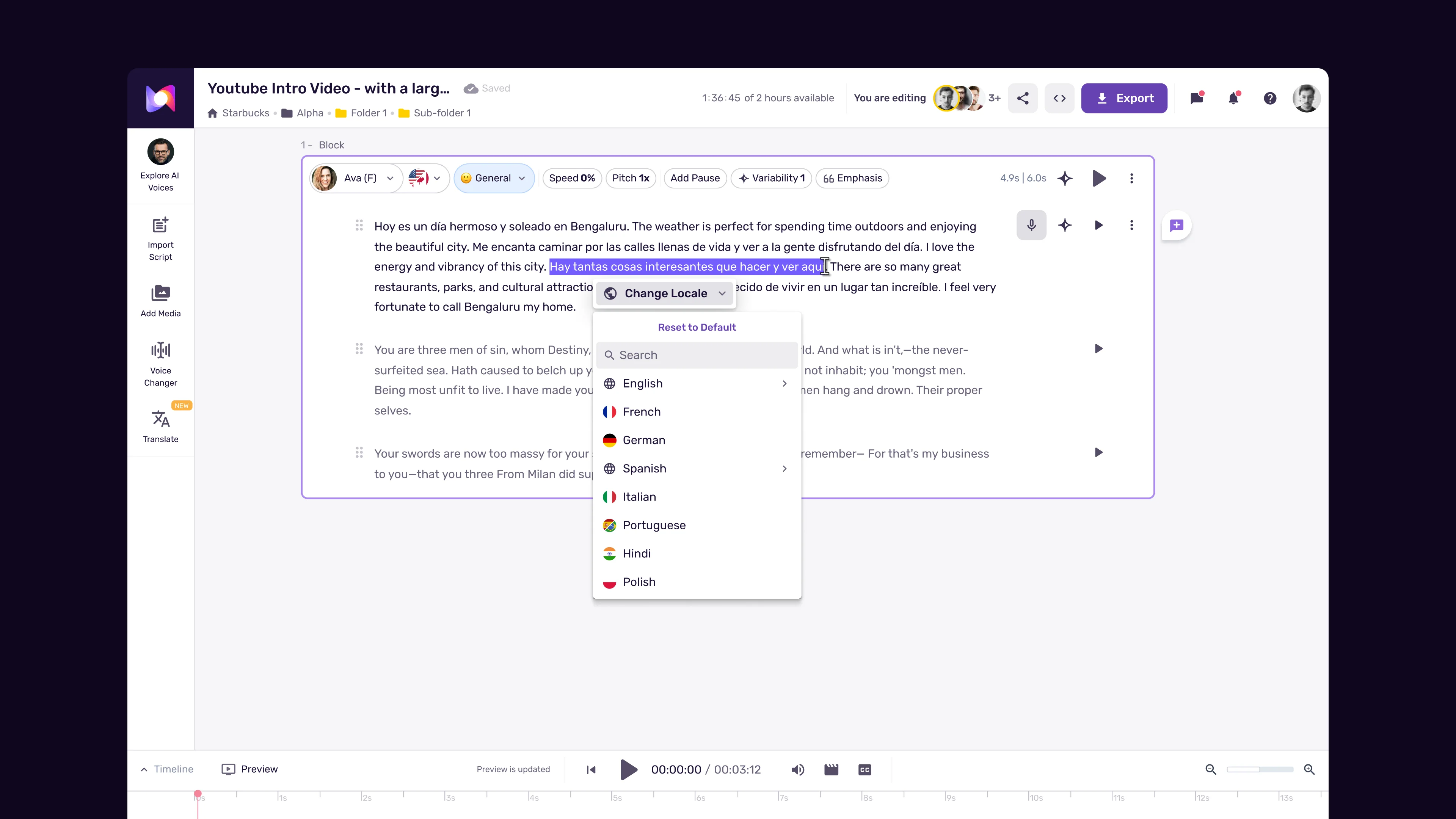
MultiNative takes a fundamentally different approach. Instead of maintaining isolated voice models per language, it preserves the core characteristics of a voice - timbre, pacing tendencies, tonal qualities - while adapting pronunciation and phonetics to each target language. The practical effect is that your audience hears the same “person” whether the content is in English, Japanese, or Arabic.
This is not just a convenience feature. For brands investing in voice identity, it means one voice actor (or one AI voice selection) scales across every market you enter. For e-learning providers, it means students who switch between language versions of a course hear a familiar narrator. For product teams, it means demo videos maintain tonal consistency regardless of which regional version a prospect watches.
The technology supports 35 languages with what Murf describes as consistent voice quality across all of them. In practice, the quality does vary by language - European languages tend to sound the most natural, while tonal languages like Mandarin and Vietnamese require more careful script preparation. This guide covers those nuances in detail.
When to Use MultiNative
MultiNative is not the right tool for every multilingual audio project. Here is when it shines and when you should consider alternatives.
MultiNative is ideal for:
- Global marketing campaigns - Product launches, ad narrations, and brand videos where voice consistency across markets is a priority
- Multilingual e-learning - Course content delivered in multiple languages where students benefit from hearing the same narrator
- International product demos - SaaS walkthroughs, onboarding videos, and feature tours localized for regional audiences
- Internal corporate communications - Training materials, company updates, and policy narrations for multinational teams
- Podcast localization - Producing versions of the same episode in multiple languages for broader reach
Consider alternatives when:
- You need regional accents within a single language (e.g., Latin American Spanish vs. Castilian Spanish) - MultiNative focuses on language switching, not accent variation within a language
- Your content requires deep cultural adaptation beyond translation - the voice will sound consistent, but cultural nuance in delivery is limited
- You only produce content in one language - the feature adds no value for monolingual projects
- You need real-time multilingual voice output - MultiNative is designed for pre-recorded content generation, not live interpretation
Which Murf AI Plan Do You Need for MultiNative?
MultiNative is not available on every one of the Murf AI plans, and you can compare each Murf pricing tier before you commit. Here is what you need.
| Plan | Monthly Price | Annual Price | MultiNative Access | Languages |
|---|---|---|---|---|
| Free | $0 | $0 | No | Limited voices |
| Creator | $29/month/mo | $19/month annual/mo | No | Limited selection |
| Business | $99/month/mo | $66/month annual/mo | Yes - full access | All 35 languages |
| Enterprise | Custom | Custom | Yes - full access + API | All 35 languages |
The Business plan at $99/month (or $66/month annual billed annually) is the entry point for MultiNative. This is also the tier that unlocks voice cloning, which pairs well with MultiNative if you want your own cloned voice speaking across languages.
If you are working with a team, the Business plan adds collaboration features - 3 editors and 5 viewers - which matters when multiple people need to review and approve multilingual content before publication. For agencies managing client voiceovers across markets, the collaboration tools justify the price jump.
For individual content creators or freelancers producing multilingual content, the Business plan covers everything you need. The annual billing discount brings it to $66/month annual, which is less than a single session with a human voice actor in most markets. If budget is tighter, our Murf free plan tips cover how to validate the workflow before paying.
Supported Languages
MultiNative supports 35 languages. The quality and naturalness vary across language families, so understanding the tiers helps you set expectations and plan script preparation accordingly.
Tier 1 - Highest Quality (native-speaker-level naturalness):
- English (US, UK, Australian, Indian variants)
- Spanish (Castilian)
- French
- German
- Portuguese (Brazilian)
- Italian
- Dutch
Tier 2 - Strong Quality (natural with occasional prosody quirks):
- Japanese
- Korean
- Hindi
- Mandarin Chinese
- Russian
- Polish
- Turkish
- Swedish
Tier 3 - Good Quality (usable for production, may need script adjustments):
- Arabic
- Thai
- Vietnamese
- Indonesian
- Malay
- Finnish
- Norwegian
- Danish
- Czech
- Romanian
- Hungarian
- Greek
- Hebrew
- Ukrainian
- Bengali
- Tamil
- Telugu
- Marathi
- Filipino
- Swahili
The tier classification is based on practical testing, not official Murf documentation. Tier 1 languages consistently produce output that is difficult to distinguish from human narration. Tier 2 languages sound natural in most contexts but occasionally stumble on complex sentence structures or idiomatic expressions. Tier 3 languages are production-ready but benefit from shorter sentences and simpler grammar in your scripts.
Setting Up Multilingual Projects
Setting up a multilingual project in Murf follows a specific workflow that differs from single-language voiceover creation. Here is the step-by-step process.
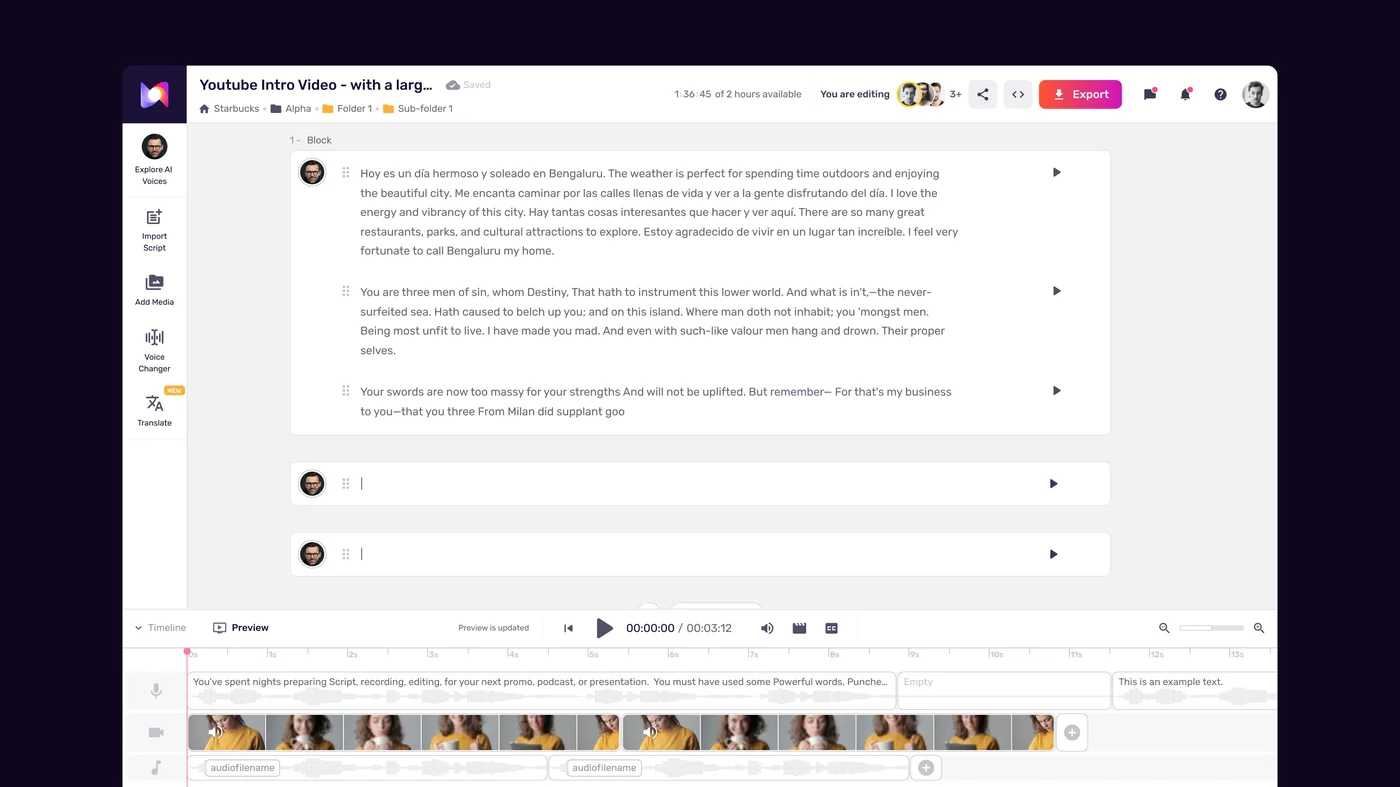
Step 1: Create a new project and select your base voice.
Start in Murf Studio by creating a new project. Choose your primary voice - this is the voice identity that will carry across all languages. Spend time here. Listen to several options with your base language script before committing, because changing the voice later means regenerating every language version. The voice selection guide walks through picking voices that translate well across markets.
Pick a voice labeled as MultiNative-compatible. Not every voice in the library supports all 35 languages. The voice selection panel shows a language badge indicating which languages each voice supports.
Step 2: Write and import your base language script.
Paste your script into the editor in your primary language. Run it through the AI Script Assistant to catch issues before generation. This is especially important for multilingual projects because script problems in the base language often amplify when the same text structure carries over to translations.
Step 3: Generate your base language voiceover.
Create the voiceover in your primary language first. Listen carefully and adjust pacing, emphasis, and pronunciation. This version becomes your reference point - you want it to be right before producing other language versions.
Step 4: Add language versions.
With your base voiceover complete, add additional languages to the project. For each new language:
- Provide the translated script (Murf does not translate for you - use professional translation or a tool like DeepL, and consider running the source through a continuous localization pipeline first)
- Select the same voice identity - the system automatically applies MultiNative to maintain voice consistency
- Generate the voiceover
- Compare against your base language version for tone and pacing alignment
Step 5: Review and adjust each language version.
Listen to each language version back-to-back with your base. Common adjustments include:
- Tweaking pacing where the translated text runs longer or shorter than the original
- Adjusting pronunciation of brand names and technical terms that should remain in the original language
- Modifying emphasis markers when the translated sentence structure shifts emphasis to different words
Step 6: Export all versions.

Export each language version individually. Use consistent file naming - something like product-demo-en.wav, product-demo-es.wav, product-demo-fr.wav - to keep your asset library organized. WAV format preserves the highest quality for post-production work. Export MP3 only for final delivery where file size matters.
Mid-Sentence Language Switching
This is the feature that makes MultiNative genuinely unique. Most multilingual TTS platforms require you to generate separate files for each language. MultiNative lets you switch languages within a single sentence - and the voice transitions naturally without audible breaks.
When mid-sentence switching is useful:
- Product names that should be pronounced in their original language within a localized script
- Technical terms borrowed from English in non-English content
- Multilingual marketing taglines that blend languages intentionally
- Educational content that teaches vocabulary by embedding foreign-language words in native-language sentences
- Code-switching content for bilingual audiences who naturally mix languages
How to set up a mid-sentence language switch:
- In your script, mark the language transition using Murf’s inline language tags
- Wrap the foreign-language portion with the appropriate language identifier
- The system detects the tag, switches pronunciation and phonetic rules for that segment, then reverts to the base language
Example script with language switching:
Welcome to our product tour. Our philosophy is [FR]joie de vivre[/FR] -
bringing joy to every interaction. Today we will explore the
[DE]Zusammenarbeit[/DE] features that make team collaboration seamless.
In this example, the French and German words are pronounced with native phonetics while the surrounding English maintains its natural flow. The voice identity stays consistent throughout.
Tips for clean language switches:
- Keep switched segments short - single words or short phrases work best. Full sentences in a different language within a paragraph can sound disorienting
- Add a brief natural pause before and after the switch by inserting a comma or period in your script. This gives the listener a micro-moment to register the language change
- Test pronunciation of the switched segment in isolation before embedding it in the full script
- Avoid switching between languages with very different prosodic patterns (e.g., English to Mandarin) within the same sentence unless the switch is a single word. The tonal shift can be abrupt
Quality Tips per Language
Getting the best output from MultiNative requires language-specific script preparation. Here are practical tips for the most commonly used languages.
English (base language for most users):
- Keep sentences under 25 words for optimal pacing
- Spell out acronyms on first use - the AI handles common ones (FBI, NASA) but stumbles on industry-specific abbreviations
- Use contractions naturally. “You will” sounds more formal than “you’ll” - choose based on your target tone
Spanish:
- Spanish translations typically run 15-20% longer than English. Adjust your timing expectations accordingly
- Use formal “usted” consistently or informal “tu” consistently - mixing registers sounds unnatural in AI-generated Spanish
- Add explicit punctuation for inverted question marks and exclamation points - the AI uses them to set intonation
French:
- Liaisons (connected pronunciation between words) are handled automatically but occasionally sound forced with uncommon word combinations
- Numbers should be written as words for amounts under 100 to ensure correct pronunciation
- Avoid very long sentences - French subordinate clauses can create pacing issues in TTS
German:
- Compound words are pronounced correctly but may need custom pronunciation entries for brand-specific compounds
- The AI handles umlauts well, but verify pronunciation of proper nouns with umlauts
- German sentences tend to run longer than English - break them into shorter segments for more natural delivery
Japanese:
- Kanji readings can be ambiguous. Use furigana annotations or write in hiragana for critical words where the wrong reading would change meaning
- Honorific levels (keigo) should be consistent throughout. The AI does not automatically adjust politeness level based on context
- Keep sentences especially short - under 20 characters per phrase for the most natural output
Arabic:
- Right-to-left script is handled correctly in the editor, but preview the audio to verify word order in complex sentences
- Short vowels are not always marked in Arabic script. For precise pronunciation, consider adding diacritical marks (tashkeel) to the script
- Modern Standard Arabic (MSA) is the default - the system does not support dialectal Arabic
Mandarin Chinese:
- Tone accuracy is generally good for common words but can falter with technical vocabulary
- Write numbers as Chinese characters rather than Arabic numerals for natural-sounding output
- Segment long sentences with commas - Mandarin TTS performs better with clear phrase boundaries
Portuguese (Brazilian):
- Brazilian Portuguese output is noticeably more natural than European Portuguese. If targeting Portugal, listen carefully and adjust
- Nasal vowels are handled well, but compound words with nasal sounds may need pronunciation overrides
- Informal registers sound more natural than formal - match this to your content needs
Pro Tips
Build a pronunciation dictionary early. Before generating multilingual content at scale, create a custom pronunciation dictionary for brand names, product names, and technical terms that appear across all your language versions. Add these to Murf’s pronunciation controls once, and they carry across every project.
Use a pilot language pair. Before committing to all 35 languages, produce your content in your primary language plus one secondary language. Get both versions approved internally, then scale to additional languages. This catches script structure issues early - before you have generated (and need to regenerate) a dozen versions.
Combine voice cloning with MultiNative. If you are on the Pro plan or above, combine voice cloning with MultiNative. Clone your own voice or a brand spokesperson’s voice, then use it across all 35 languages. The result is a genuinely personalized multilingual voice that sounds like the real person speaking each language.
Batch your exports strategically. Generate all language versions of a single script before moving to the next script. This keeps the voice settings consistent and makes comparison easier. If you generate English for ten scripts, then come back to do Spanish for all ten, subtle voice setting drift can occur between sessions.
Always have native speakers review. AI-generated multilingual content handles pronunciation and grammar well, but cultural nuance requires human review. A phrase that is technically correct can still sound awkward or carry unintended connotations in certain cultures. Budget for a native speaker review pass on each language version before publication.
Tag your files systematically. When managing voiceovers in 10+ languages, file management becomes a real problem. Use a consistent naming convention: [project]-[section]-[language-code]-[version]. For example: onboarding-intro-ja-v2.wav. This saves significant time when you need to update a specific language version later.
FAQ
How many languages does Murf MultiNative support?
MultiNative currently supports 35 languages with consistent voice quality. The highest quality output comes from European languages (English, Spanish, French, German, Portuguese, Italian, Dutch), with strong results in Asian languages (Japanese, Korean, Mandarin Chinese, Hindi) and good production-ready quality across the remaining supported languages. Murf continues to expand language coverage - check the Murf platform for the latest count.
Which Murf plan do I need for MultiNative?
MultiNative requires the Business plan ($99/month, or $66/month annual with annual billing) or higher. The Free and Creator plans do not include MultiNative access. The Business plan also adds shared projects with editor and viewer roles for team collaboration. Check the pricing page for current rates.
Can I switch languages in the middle of a sentence?
Yes - mid-sentence language switching is one of MultiNative’s standout capabilities. You can embed foreign-language words or phrases within a base-language sentence using inline language tags in your script. The voice transitions naturally between languages without audible breaks. This works best with short phrases or individual words. Full mid-sentence switches between languages with very different prosodic patterns (like English to Mandarin) can sound abrupt, so keep those transitions brief.
Does MultiNative work with cloned voices?
Yes. If you are on the Pro plan or above, you can clone your voice (or any voice you have rights to use) and then apply MultiNative to that cloned voice. The system preserves the cloned voice’s characteristics - timbre, pacing, tonal qualities - while adapting pronunciation for each target language. This combination is particularly powerful for brands that want a recognizable human voice speaking across all their markets. The cloning process requires a clean 2-minute audio sample and takes 24-48 hours to process.
How does MultiNative differ from simply using separate voices per language?
Using separate voices per language means each market hears a different “person” narrating your content. MultiNative maintains the same voice identity across all languages, so your audience recognizes the voice whether they are watching your English, Spanish, or Japanese content. This consistency strengthens brand recognition and creates a more cohesive experience for multilingual audiences. The technology adapts phonetics and pronunciation to each language while preserving the core voice characteristics - it is not just applying an accent to a single language model.
What happens if my target language is not in the supported list?
If your target language is not among the 35 supported languages, you will need to use a separate voice for that language. You can still produce the voiceover in Murf using whatever voices are available in that language’s library, but it will not benefit from MultiNative’s voice consistency. For languages with limited Murf support, consider ElevenLabs which covers 29 languages on its paid tiers, or LOVO which supports 100+ languages with varying quality levels.
Want to learn more about Murf AI?
Related Guides
- Murf AI Voiceover Guide - Complete walkthrough of the Murf studio
- Murf AI Pronunciation and Emphasis Guide - Word-level controls that pair with multilingual projects
- Murf Voice Cloning Setup - Combine cloning with MultiNative for cross-language voice consistency
- Murf E-learning Course Narration - Multilingual training content workflow
Related Reading
- Murf AI Tool Page - Full review with pricing, features, and ratings
- AI Voiceover Tips for Professional Audio Content - Best practices across all AI voice platforms
External Resources
- Murf AI Help Center - Official documentation for MultiNative, voice cloning, and studio features
- W3C Language Tags Reference - Standard codes for the 35 languages MultiNative supports
- Unicode CLDR Language Plural Rules - Critical reference for translators handling pluralization across languages
Related Guides
- Activecampaign AI Content Generation: Complete 2026 Guide
- AI Video Creation Tips: 2026 Walkthrough for Teams
- AI Voice Cloning Ethics Best Practices: Complete 2026 Guide
- AI Voiceover Corporate Training With WellSaid Labs
- AI Voiceover for YouTube Videos: Murf Workflow Guide 2026
- AI Voiceover Tips: Making Synthetic Voices Sound Human
- ElevenLabs API Setup: Developer Quick Start Guide (2026)
- ElevenLabs Audio Native Embed Audio on Any Website
- ElevenLabs Audio Quality Settings: Pro Tips and Settings
- ElevenLabs Audiobook Creation: Long-Form Audiobook