
Murf AI marketing voiceover is the workflow for turning ad scripts into professional voice tracks using Murf’s Studio editor. This guide covers selecting a voice that matches your brand persona, pacing and emphasis controls, syncing voice to video timelines, and exporting finished audio for use in video ads, radio spots, and social campaigns.
Producing ad voiceover used to mean booking a voice actor, waiting on availability, paying session fees, and then repeating the process every time a campaign changed. For marketing teams running A/B tests across multiple creatives, or agencies managing ad production for a dozen clients, that model does not scale. Murf AI changes the economics entirely. You brief the voiceover in the platform, write a script, select a voice and emotion profile, generate broadcast-quality audio, and export it formatted for every ad platform - in the time it used to take to file a talent booking request. New to Murf? Start with the Murf AI getting started guide before tackling ad workflows.
This guide covers the complete murf ai marketing voiceover workflow for ad campaigns. From defining brand voice and CTA before you open the editor, through writing high-converting ad scripts that work with AI delivery, to platform-specific export configurations for social video, radio, podcast, and explainer video placements, every step is covered in sequence. If you have a Murf account and a campaign brief ready, you can have production-ready ad voiceover in 25 minutes. The official Murf text-to-speech overview documents the voice library and languages referenced throughout this workflow.
Why Murf AI Marketing Voiceover Works for Ad Campaigns
Murf AI Marketing Voiceover covers the strategies and tools that deliver real productivity gains in this space. Producing ad voiceover used to mean booking a voice actor, waiting on availability. This guide walks through the practical steps from setup through advanced optimization.
Ad voiceover sits at the intersection of three constraints that trip up traditional production: cost, speed, and consistency. A single voice actor session for a 30-second radio spot costs anywhere from two hundred to over a thousand dollars before post-production. That cost per asset makes A/B testing voiceover variants financially impractical for most marketing budgets. And when a campaign pivots - a price point changes, a CTA gets updated, a seasonal variant needs recording - every revision triggers another booking cycle.
Murf AI addresses all three constraints in a single platform. The cost per asset drops to minutes of generation credit rather than session fees. The speed from brief to final file is measured in tens of minutes rather than days. And the consistency is built in - the same voice, tone, emotion profile, and delivery characteristics regenerate identically across every asset in a campaign series, whether you are producing one ad or forty. For broader context on AI voice options, see the best AI voice generators roundup.
The workflow covered in this guide is structured around three realities of ad production. First, ad scripts have specific structural requirements - they are short, directive, and engineered around a single CTA - that require a different approach than narration or tutorial voiceover. Second, voice selection for ads is not about finding the “best” voice in Murf’s library - it is about matching vocal character and emotion profile to the brand and the ad placement. Third, each ad platform has distinct audio format requirements that affect export settings. The workflow addresses all three.
What Ad Types Does This Workflow Cover?
This workflow applies to four core ad voiceover formats:
-
Social video ads - 15 to 60 second video ad spots for Instagram, Facebook, TikTok, YouTube pre-roll, and LinkedIn. Short, high-energy scripts with a single visual CTA supported by voiceover.
-
Radio spots - 15 to 60 second audio-only ads for AM/FM broadcast and streaming radio (Spotify Ad Studio, Pandora, iHeart). Voice is the entire creative - no visual support.
-
Explainer videos - 60 to 180 second product or service explainer videos used in paid placements, landing pages, and email campaigns. Conversational narration style with a structured argument leading to CTA.
-
Podcast ads - Host-read style or produced spots of 15 to 60 seconds for podcast ad networks. Conversational register, high credibility, often requires multiple voice variants for different shows.
Each format has distinct voice requirements, script conventions, and export settings. The platform-specific tips section at the end of this guide covers the differences. The core five-step workflow applies to all four.
Prerequisites
Before starting this workflow, confirm you have the following in place:
-
A Murf AI account - The free trial provides enough generation credits to work through this guide and produce a first draft ad - see the Murf free plan tips guide for stretching evaluation minutes. For ongoing campaign production, the Creator or Business plan unlocks commercial use rights, the full voice library, and higher monthly generation limits. Commercial use rights are required before any ad goes live in a paid placement; review the Murf pricing page for the licensing matrix.
-
A campaign brief - You need a clear product or service, a defined target audience, a primary message, and a CTA before writing a word of script. Step 1 covers how to extract this into a voiceover brief if you are working from a broader creative brief.
-
Brand voice guidelines (if available) - If your brand has documented tone of voice guidelines, have them open during Step 3 for voice selection. If not, a simple one-sentence description of how your brand sounds to customers is sufficient.
-
Platform specifications - Know in advance which platforms the ad will run on. Platform determines script length, audio format, and export settings. The platform tips section lists the key specs for each.
You do not need a recording setup, audio engineering experience, or prior voiceover production background. The workflow is designed for marketers, copywriters, and agency producers who are new to AI voice generation.
Workflow Overview
The complete murf ai marketing voiceover workflow for ad campaigns runs through five steps:
- Brief the voiceover - define tone, CTA, and brand voice before touching the editor
- Write a high-converting ad script optimized for AI delivery
- Select the right voice and emotion profile for the ad type and brand
- Generate and fine-tune the audio - pacing, pauses, and emphasis
- Export for each ad platform with the correct format settings
Each step takes between three and eight minutes. The 25-minute total assumes your campaign brief is ready. If you are working without a brief and need to define the message and CTA from scratch, add 10 to 15 minutes to the first step.
Step 1: Brief the Voiceover
The single most common mistake in ad voiceover production - with AI or human voice talent - is going straight to the script before the brief is complete. A voiceover brief is not a formality. It is the set of decisions that determines whether the finished audio sounds like the brand and converts the audience.
Before opening Murf Studio, write down answers to four questions:
What is the primary message? One sentence that captures the core value proposition the ad is communicating. “Our project management tool helps small teams ship faster without more meetings.” Not a tagline - a clear, functional description of what the ad is arguing.
What is the CTA? The single action the listener should take immediately after the ad ends. “Start your free trial at [URL].” “Visit [URL] for exclusive pricing.” “Download the app and get your first month free.” One CTA, stated explicitly. Ads with multiple CTAs convert at lower rates than ads with a single clear instruction.
What is the brand voice? Choose three adjectives that describe how your brand sounds to customers. Energetic, trustworthy, approachable. Authoritative, precise, confident. Warm, direct, human. These adjectives drive voice selection in Step 3 and emotion settings in Step 4. The Murf emotion control guide walks through every emotion setting.
Who is the target listener? The voice that converts a 22-year-old discovering a lifestyle brand on TikTok is different from the voice that converts a 45-year-old CFO listening to a B2B software ad during their morning commute. Define the listener before selecting a voice. The deeper Murf voice selection tips guide covers the full audition process.
With these four answers documented, you have the brief you need to write a script that actually serves the ad rather than filling time.
Step 2: Write a High-Converting Ad Script
Ad scripts are structurally different from all other voiceover content. They are short - typically 30 to 150 words - and every word carries conversion weight. There is no room for warm-up content, qualifying clauses, or exploratory sentences. The structure that reliably converts across ad formats follows a three-part pattern: hook, argument, CTA.
The hook (first 5 to 10 words). The hook determines whether a listener stays or skips - Think with Google research on video ad attention shows the first three seconds carry disproportionate weight. It must address the listener’s situation directly - a problem they recognize, a desire they have, a question they are already asking. “Tired of spending hours editing video?” lands. “Are you a video content creator looking for a solution?” does not. Write the hook last, after you have written the argument and CTA, so you know exactly what you are hooking them into.
The argument (the body of the script). For 15 to 30 second ads, the argument is one or two sentences that support the core message. The companion Murf script writing tips guide covers TTS-friendly argument construction. For 60 second spots, it can run to five or six sentences with a supporting detail or proof point. The argument answers: “Why should I believe this?” and “Why does this matter to me?” Keep every sentence under 20 words and use active voice throughout.
The CTA (final 5 to 15 words). State the action explicitly and make it specific. “Visit murf.ai today” is weak - it does not tell the listener what happens when they visit. “Start your free trial at murf.ai and generate your first voiceover in minutes” converts better because it completes the promise. End the script on the CTA - never add filler content after the action instruction.
Script length guide by ad format:
| Ad Format | Script Length | Target Audio Duration |
|---|---|---|
| 15-second social / pre-roll | 30 - 45 words | 12 - 15 seconds |
| 30-second social / radio | 65 - 85 words | 28 - 32 seconds |
| 60-second radio / podcast | 130 - 160 words | 58 - 62 seconds |
| 90-second explainer | 200 - 230 words | 85 - 95 seconds |
| 2-minute explainer | 270 - 310 words | 110 - 125 seconds |
Script formatting rules for AI delivery:
Spell out all numbers. Write “twenty percent” not “20%”, “one hundred dollars” not “$100”, “three times faster” not “3x faster.” AI voices handle spelled-out numbers correctly and handle symbols unpredictably. The Murf script writing tips guide covers full TTS-friendly conventions.
Write every abbreviation in full or phonetically. “SaaS” may be read as “sass” or “S-A-A-S” depending on context - neither may be what you want. Write “software as a service” on first mention or write “sass” if that is the accepted pronunciation in your industry.
End every sentence with a period. Hard stops produce reliable delivery pauses in Murf. Semicolons and colons behave inconsistently across voices. If you need a pause mid-sentence for dramatic effect, use a comma followed by an explicit pause marker in Step 4.
Read your script aloud before pasting it into Murf. Count the seconds. If a 30-second ad script reads in 40 seconds at comfortable speed, cut it. The timing check at this stage saves you from discovering a length problem after generating audio.
Step 3: Select the Right Voice and Emotion
Voice selection is the most consequential creative decision in ad voiceover production. The wrong voice - technically perfect audio delivered by a voice that does not match the brand or the placement - undermines the entire campaign. The right voice does work the script cannot do alone: it establishes credibility, creates emotional connection, and drives the listener toward the CTA. For deeper coverage of voice character and audition technique, see the Murf voice selection tips guide.
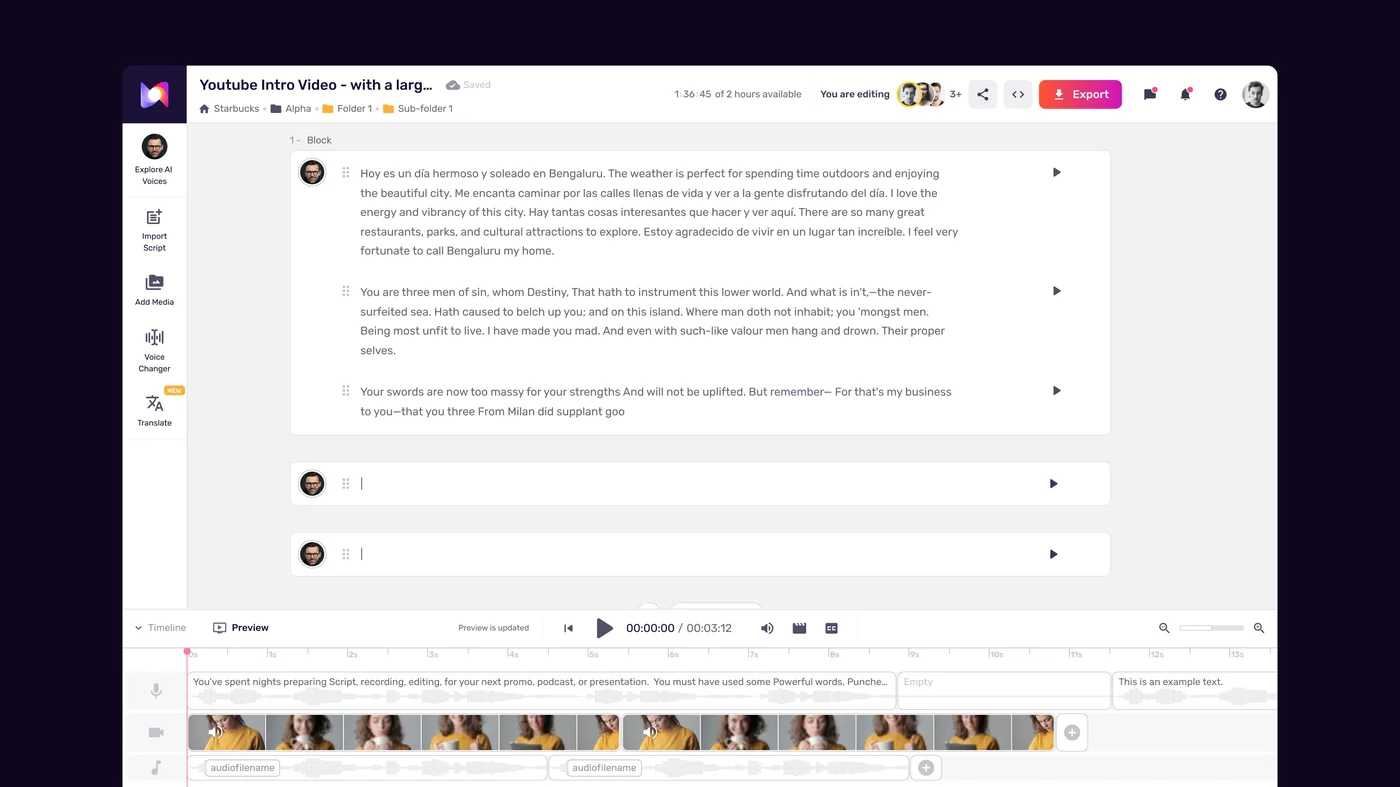
Open the voice browser and filter systematically:
The Murf Studio workspace walkthrough covers the editor environment in detail.
- Log into Murf AI and create a new project - name it with the campaign and ad format for easy reference
- Paste your script into the Studio editor
- Open the voice browser from the right panel
- Filter by language first, then by gender if your brief specifies it
- Apply the “Ads & Commercial” or “Promo” use case filter to narrow the library to voices tuned for commercial delivery
Audition voices with your actual script:
Do not audition voices on Murf’s sample sentences. Copy your hook and first argument sentence - the most tonally important section of your script - and paste it into the voice preview input. This surfaces problems that generic samples hide: a voice that sounds authoritative on a sample may sound flat on your specific CTA, or a voice tagged “energetic” may sound anxious rather than enthusiastic on your particular phrasing.
Shortlist three to five voices before making a final decision. Generate each one on the same test section and compare. The voice that makes your hook land is the right one - not the voice that is technically impressive on neutral content.
Voice matching by ad format and brand:
- Social video ads - Voices with natural energy and slight upward inflection on key words. Avoid voices that sound like broadcast announcers - social audiences skip ads that sound like traditional advertising. Conversational voices with authentic character outperform polished commercial voices on social platforms. The Murf YouTube voiceover workflow covers a related creator-focused pipeline.
- Radio spots - Broadcast-quality voices with clean enunciation and authority. Radio listeners are conditioned to professional voice talent, and a voice that sounds too casual undercuts the ad’s credibility. Look for voices tagged “professional” or “radio” with a strong mid-range tone.
- Explainer videos - Warm, clear, measured voices that convey expertise without formality. The listener is spending 60 to 120 seconds with this voice - it needs to be easy to listen to for that duration without becoming fatiguing. Avoid high-energy voices for explainer formats.
- Podcast ads - Conversational voices that feel close and personal, matching the register of the podcast medium. Podcast listeners have a trained skepticism toward over-produced ad spots. A voice that sounds like a knowledgeable friend beats a polished announcer for conversion in podcast placements.
Set the emotion profile:
After selecting your voice, open the emotion settings panel. This is where murf ai marketing voiceover separates from basic text-to-speech tools. The emotion control modifies the overall affective register of the delivery - not individual word emphasis, but the underlying tone the voice carries through the entire script. The Murf emotion control guide walks through every setting and use case.
For most ad formats, match the emotion to the CTA’s desired feeling:
- Ads driving trial or purchase - “Excited” or “Cheerful” at medium intensity
- Ads building trust or credibility - “Professional” or “Calm” with confident undertones
- Ads creating urgency - “Assertive” at medium intensity - avoid “Urgent” settings which often tip into anxiety-inducing delivery
- Ads for luxury or premium positioning - “Sophisticated” or neutral with a low-intensity setting to let the voice quality speak
Apply the voice and generate a preview of your complete script before moving to fine-tuning. This preview establishes your baseline - the starting point you will adjust in Step 4.
Step 4: Generate and Fine-Tune the Audio
With your script loaded and your voice and emotion profile set, generate the initial ad audio. Click “Generate All” to produce audio for every script block simultaneously. For a standard 65-word 30-second ad, generation takes 15 to 30 seconds.
After generation, listen to the complete output before making any changes. The first listen is diagnostic - identify patterns, not individual problems. A single mispronounced word is fixed in 30 seconds. A systemic pacing problem that makes the entire ad feel rushed requires a global speed adjustment that you want to identify before starting block-level edits.
Adjusting pace for ad timing:
Ad delivery pace is dictated by the platform clock, not by what sounds natural at default speed. A 30-second radio spot must fit within 30 seconds, period. A 15-second pre-roll must hit its CTA before the skip button activates. The Murf pacing pauses speed tips guide covers per-section speed strategy in depth.
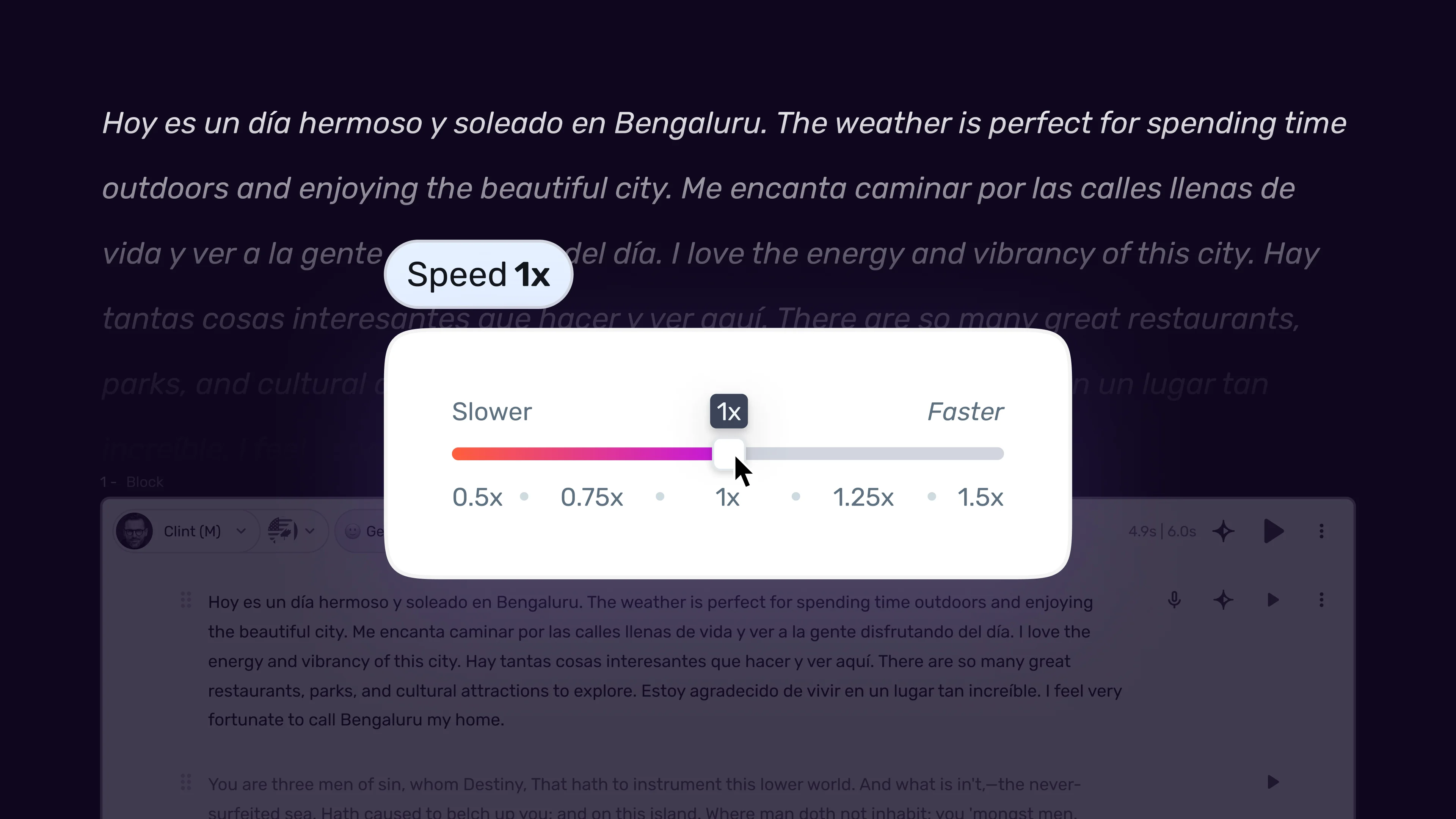
- Check the total generated audio duration against your target duration
- If the audio runs long, increase speed in 0.05x increments - most ad voiceover works well between 1.05x and 1.2x. Avoid pushing past 1.25x, which sounds rushed rather than energetic
- If the audio runs short, reduce speed in 0.05x increments to fill the slot naturally, or extend the argument section of your script
- Apply speed adjustments globally first (select all blocks) before doing block-level adjustments
- After the global adjustment, slow the CTA block by 0.05x to 0.1x relative to the body - CTA delivery that is slightly slower than the body gives the action instruction time to register
Adding strategic pauses:
The Murf pacing pauses speed tips guide provides the full pause-duration reference table.
In ad voiceover, pauses are conversion architecture. A 400 to 600 millisecond pause before your CTA is the single highest-impact fine-tuning action in this workflow. It signals to the listener that something important is coming and gives them a fraction of a second to shift from passive listening to active attention.
Place explicit pauses at three points in your script:
- After the hook - a 300 to 500 millisecond pause after the hook before the argument begins creates a natural breath that prevents the ad from sounding like one continuous sentence
- Before the CTA - a 500 to 700 millisecond pause before the action instruction. This is non-negotiable for ads running in audio-only environments (radio, podcast) where the listener needs the CTA URL or action to register clearly
- Within multi-part CTAs - if your CTA includes a URL or a multi-step instruction (“visit [URL] and use code [CODE]”), insert a 300 millisecond pause between each part so listeners can mentally note each element
Adding emphasis to key terms:
Use word-level emphasis sparingly. One or two emphasis markers per ad script. The highest-value emphasis targets are: the core benefit word in your primary message, and the action verb in your CTA (“Start,” “Get,” “Download,” “Try”).
Resist the temptation to emphasize multiple words in a 30-second script. Over-emphasized ad copy sounds like a salesperson. A single stressed benefit word surrounded by neutral delivery sounds confident.
Fixing mispronunciations:
Before finalizing, check every proper noun, brand name, URL, and technical term. URLs in particular require attention - “murf-dot-ai” sounds different than “murf.ai” and neither may be what you want. Use the pronunciation editor to define exactly how URLs, brand names, and unusual terms should be delivered - the Murf custom pronunciation guide covers Say It My Way in detail. For URLs in radio and podcast ads where the listener needs to remember the address, “murf dot ai” with a period spoken as “dot” is clearer than blending the address together.
Run a complete final listen before moving to export. Listen specifically for: does the hook land in the first three seconds, does the argument support the hook without overstaying, and does the CTA arrive with appropriate weight and enough time for the listener to absorb it.
Step 5: Export for Each Ad Platform
When you are satisfied with the complete ad audio, export in formats optimized for your ad placements. Different platforms have different audio specifications, and exporting correctly the first time avoids the quality degradation that comes from repeated compression cycles. See the Murf export formats and quality guide for the full format selection matrix.

Universal export settings (start here):
- Click the Export button in the top right of Studio
- Select “Audio Only” as the export type
- Choose WAV format as your master export - this is your lossless source file for all platform-specific conversions
- Set the sample rate to 48000 Hz - the professional standard for broadcast and digital ad audio
- Confirm “Export All Blocks” is selected so the export produces a single continuous ad audio file
Naming and organizing exports:
Use a systematic naming convention: [campaign-name]-[ad-format]-[duration]s-v1.wav. This makes it straightforward to match files to placements and track versions across campaign iterations. Keep the WAV master in a campaign source folder before any platform-specific conversion.
Platform-specific format requirements:
| Platform | Format | Sample Rate | Max File Size | Notes |
|---|---|---|---|---|
| Facebook / Instagram | MP3 or AAC | 44100 Hz | 4 GB video | Embed in video file; audio quality affects ad score |
| TikTok | MP3 | 44100 Hz | 4 GB video | Normalize to -14 LUFS for platform consistency |
| YouTube (pre-roll) | AAC | 48000 Hz | No limit | Stereo preferred; -14 LUFS target |
| Spotify Audio Ads | MP3 320 kbps | 44100 Hz | 1 MB | Stereo required; -14 LUFS normalized |
| AM/FM Radio (broadcast) | WAV or AIFF | 48000 Hz | Station-specific | Delivered per station spec; -23 LUFS typical |
| Podcast networks | MP3 192+ kbps | 44100 Hz | Network-specific | -16 to -19 LUFS typical |
Convert from your WAV master using an audio editor or free tool like Audacity or FFmpeg. Starting from WAV prevents the quality loss that occurs when platforms re-encode already-compressed MP3 files.
How Do Ad Platforms Differ for Murf Voiceover?
Social video ads. Social platforms play ads silently by default until the user opts in to sound - Meta’s video ad specifications document the silent-by-default behavior across Facebook and Instagram placements. Design your video so it conveys the core message visually without the voiceover, then treat the voiceover as the conversion layer that activates when the viewer taps sound on. For this reason, ad scripts for social video should match the on-screen text precisely - the voiceover reinforces rather than replaces the visual message. Use Murf’s 1.1x to 1.15x speed setting for social ad voiceover - the slightly faster pace matches the higher stimulation threshold of social media browsing.
Radio spots. The Murf voice selection tips guide covers broadcast-quality voice selection. Radio listeners are engaged but multi-tasking. The CTA URL must be simple enough to remember without writing it down - “murf.ai” works; “murf.ai/marketing/voiceover/free-trial” does not. If your destination URL is long, register a short redirect specifically for radio use. For 60-second radio spots, use two or three brief proof points in the argument section to fill the time without losing pace - a single unsupported claim across 60 seconds feels hollow. Murf’s “Professional” or “Authoritative” voice categories perform best for radio placement, where listeners expect broadcast-quality delivery.
Podcast ads. See the Murf podcast intro guide for podcast-specific voice and pacing patterns. Podcast audiences are among the highest-converting ad audiences because of the deep listener relationship with the host. When you are producing a non-host-read ad for podcast networks, the closest proxy to that conversion dynamic is a voice that sounds personal and knowledgeable rather than produced and polished. Use Murf’s “Conversational” voice category and a natural 1.0x to 1.05x speed. Insert 600 millisecond pauses before and after the URL in the CTA - podcast listeners often replay the CTA section once to catch the details. Generating two variants (one with a male voice and one with a female voice) gives podcast networks more placement flexibility.
Explainer videos. The Murf eLearning course narration guide covers a related long-form narration use case. Explainer video ads run longer and carry more information load than any other ad format. The key production discipline is keeping the argument section tightly structured - three supporting points maximum, each in its own script block in Murf - and ensuring the voiceover pace allows the visual content to keep up. Generate your Murf audio first, then edit the video assets to match the voiceover timing. This is faster and produces tighter sync than generating audio to match pre-edited video. Set a 0.95x speed as your baseline for explainer formats - the slightly slower pace reads as measured expertise rather than rushed selling.
Frequently Asked Questions
Does Murf AI include commercial rights for advertising use?
Commercial use - including published ad campaigns, paid placements, and client work - requires at minimum a Creator plan. The free trial and Basic plan restrict commercial use. Before any ad generated in Murf goes live in a paid placement, confirm you are on a plan that includes commercial licensing. The Murf pricing page details the commercial rights included at each tier. For agency work producing ads on behalf of clients, the Business plan’s white-label and team features are the practical choice.
How do I create multiple voice variants for A/B testing?
Duplicate your Murf project (use the project duplication option in the dashboard), change the voice or emotion setting in the duplicate, and regenerate. This preserves your script, pause markers, and emphasis settings while producing a cleanly different audio variant. Name your exports with the variant identifier: [campaign]-[adformat]-30s-voice-a.wav and [campaign]-[adformat]-30s-voice-b.wav. For systematic A/B testing, run the same script through three to five voices in parallel and generate all variants before evaluating - listening to multiple versions in a single session gives you a sharper comparative ear than evaluating each one in isolation.
What is the best Murf voice for direct response ads?
The deeper Murf voice selection tips guide walks through the audition process. There is no single best voice - the right voice is the one that matches your brand voice guidelines and your target listener. That said, voices in Murf’s “Ads & Commercial” category have been optimized for conversion-oriented delivery and are the correct starting point. Within that category, voices with natural mid-range tone (avoiding both very high pitch, which can read as anxious, and very deep pitch, which can feel overly authoritative for some audiences) tend to perform well across direct response formats. Always audition with your actual hook and CTA rather than Murf’s generic sample sentences - those two sections are where voice character has the highest conversion impact.
How do I match the voiceover length exactly to a 30-second ad slot?
Use Murf’s speed controls iteratively. Generate at default 1.0x speed first and note the total duration shown in the timeline. If the audio runs to 34 seconds, increase speed to approximately 1.12x to 1.15x - a 12 to 15 percent speed increase on 34 seconds brings it down to roughly 30 seconds. Regenerate and verify the duration. The timeline display updates after each regeneration. For slots where you need exact timing (broadcast radio has no tolerance for over-length), do a final check against a stopwatch rather than relying solely on the platform display. If you cannot hit the target duration without the pace feeling rushed, trim the argument section by one to two sentences and regenerate at a lower speed - a comfortable-sounding 28-second ad is more effective than a technically correct 30-second ad that sounds breathless.
Can I use Murf to produce ads in multiple languages for international campaigns?
Yes. Murf offers 120+ voices across 20+ languages, and the voice library covers major advertising markets including Spanish, French, German, Portuguese, Japanese, and Hindi - the Murf MultiNative multilingual guide covers cross-language workflows. The workflow for international ad production is identical to the English workflow, with one additional step: have a native speaker of the target language review the script before generating, and test the CTA URL pronunciation specifically in the target language voice. URLs and brand names that read naturally in English often require phonetic correction in other languages. Use Murf’s pronunciation editor to define the correct pronunciation for any term that does not render accurately in the target language voice. The Murf text-to-speech page lists the full language and accent coverage.
Want to learn more about Murf AI?
Related Reading
Related Guides
- Getting Started with Murf AI
- Murf Studio Interface Walkthrough
- How to Clone Your Voice with Murf AI
- Murf Text-to-Speech Tutorial
- Choosing the Right AI Voice in Murf
- Murf AI Emotion Controls
- Murf AI Pronunciation and Emphasis
- Mastering Pacing in Murf AI
- Murf MultiNative: Multilingual Voiceovers
- Murf AI Dubbing Walkthrough
- AI Voiceover for YouTube Videos: Murf Workflow
- Murf AI eLearning Narration: Educator’s Guide
- Murf AI Canva Integration
- Murf Falcon API Tutorial
- Murf AI Free Plan Tips
- Murf AI Voice Changer Guide
- Murf AI Podcast Intro Guide
- Murf AI Google Slides Voiceover
- Murf AI Voice Agent API
- Write Scripts for AI Voice: Murf Tips
- Murf AI Team Collaboration Guide
External Resources
- Murf AI Pricing Plans - Compare commercial-use tiers and licensing terms
- Murf AI Text-to-Speech Overview - Voice library, languages, and platform capabilities
- Think with Google: Video Ad Attention Research - Industry data on the first three seconds of video ads
Related Guides
- AI Voiceover Corporate Training With WellSaid Labs
- AI Voiceover for YouTube Videos: Murf Workflow Guide 2026
- AI Voiceover Tips: Making Synthetic Voices Sound Human
- ElevenLabs Getting Started: Complete Beginners Guide
- ElevenLabs Voice Cloning Tutorial: Complete 2026 Guide
- Luma Dream Machine Video Tutorial 2026: Text-to-Video & Ray3
- Murf AI Canva Integration: Add Voiceovers to Designs
- Murf AI Custom Pronunciation: Say It My Way Guide (2026)
- Murf AI Dubbing: Complete Walkthrough | Complete Guide 2026
- Murf AI eLearning Narration: Educator's Guide | Review 2026