
Most people write scripts for AI voice Murf the same way they approach writing for the page - they type what they want to say, paste it in, and click Generate. The result sounds mechanical. Sentences run together. The emphasis lands on the wrong word. Numbers come out awkwardly. The voice reads like a voice, not like a person. Our getting started with Murf AI guide covers the basics if you are brand new to the platform.
The problem is not the AI. It is the script. AI voices interpret text differently than human readers do, and the habits that make writing clear on the page actually work against you when a machine reads it aloud. Once you understand why this happens, fixing it is straightforward - you write for the ear, not the eye, and you give the AI the structural signals it needs to deliver your script well.
These tips will help you write scripts for ai voice murf that sound natural, professional, and deliberate from the first generation - without spending hours on edits and regenerations.
Why AI Voices Read Scripts Differently Than Humans
When a human reads a script, they bring enormous amounts of implicit knowledge to it. They know that a sentence starting with “But wait” signals excitement and should be delivered quickly. They know that “In conclusion” is a cue to slow down. They slow through technical terms, speed up through lists of qualifications, and pause instinctively before a punchline or a call to action.
AI voices do not have that implicit knowledge. Murf AI is far more capable than older text-to-speech systems - its Speech Gen 2 engine reads context, infers emotion from sentence structure, and handles most scripts competently out of the box. But the AI still depends heavily on what is actually written on the page. It cannot read your intent. It reads your text.
This creates a specific set of failure modes that show up again and again in AI-generated voiceovers:
- Sentences that are too long - The AI reads them at a consistent pace and the listener loses the thread before the sentence ends. The PlainLanguage.gov sentence-length guidance applies to spoken delivery as well as written prose.
- Numbers and symbols read incorrectly - “10%” becomes “ten percent” unpredictably, or “$1,200” becomes “one thousand two hundred” when you wanted “twelve hundred dollars”
- Commas ignored - Written commas often produce no audible pause, so lists blur together
- Emphasis on the wrong word - Without markers, the AI emphasizes based on its best guess, which frequently does not match what you meant
- Tricky words mispronounced - Brand names, technical terms, and foreign words trip up AI voices regularly
Every tip in this guide addresses one of these failure modes directly. Apply them, and the gap between what you write and what the AI delivers narrows significantly. The six principles below distill what we have learned about how to write scripts for ai voice murf reliably across hundreds of generations.
How to write scripts for ai voice murf: Core Principles
Before the specific tips, three principles underpin all of them.
Write for the ear, not the eye. Reading and listening are different cognitive experiences. Readers can pause, re-read, scan ahead. Listeners cannot. Every sentence needs to deliver its meaning in a single pass, in real time. This means shorter sentences, more explicit structure, and no assumed context. The NPR ethics and style handbook documents the writing-for-the-ear conventions broadcast journalists rely on.
Give the AI explicit instructions. Humans infer pacing and emphasis from context. AI voices do not - or at least not reliably. Every structural decision you want the AI to make (pause here, slow down, emphasize this word) needs to be expressed through the text itself or through Murf’s control features. Do not assume the AI will figure it out.
Test before you commit. Murf’s preview feature lets you hear how a sentence will sound before you generate the full script. Use it aggressively on any sentence with a number, a proper noun, a complex abbreviation, or unusual phrasing. Catching problems in preview costs nothing. Catching them after generating five minutes of audio costs time and regeneration. The Murf text-to-speech editor exposes the preview button next to every text block.
Tip 1: Write Short, Declarative Sentences
This is the highest-impact change most writers can make. Long, complex sentences that work perfectly in written content become comprehension problems when spoken aloud. By the time the AI reaches the end of a 40-word sentence, the listener has lost track of how it started.
A useful target is 15 to 20 words per sentence for informational content. Conversational scripts can go shorter. Technical walkthroughs should go shorter still - listeners who are following along step by step need each instruction to land completely before the next one arrives. The Hemingway Editor is a useful free tool for flagging long, complex sentences before you paste them into Murf.
The principle: One idea per sentence. If a sentence contains a comma connecting two independent clauses, consider splitting it into two sentences. If it contains a parenthetical, move that information to its own sentence.
Before:
Murf AI offers over 120 voices across 20 languages, which includes a variety of accents, tones, and character types that can be matched to almost any content format, from corporate training to social media ads.
After:
Murf AI offers over 120 voices across 20 languages. The library covers a wide range of accents, tones, and character types. Whether you need a polished corporate narrator or a casual social media voice, there is an option that fits.
The second version delivers the same information. But because each idea has its own sentence, the AI can pace and deliver each one cleanly. The listener absorbs the information as they go rather than holding a long sentence in working memory. Research on working memory limits consistently shows that listeners can hold only 4-7 chunks of new information at a time.
Declarative sentences - subject, verb, object, done - also tend to generate better voiceover than sentences that open with dependent clauses. “Start with a short sentence” sounds natural. “Because starting with a short sentence is important, you should do that” sounds like a machine reading a bureaucratic memo. The Economist style guide documents declarative-first conventions that translate well to voiceover scripts.
Tip 2: Spell Out Numbers, Abbreviations, and Symbols
AI voices are inconsistent with numbers, abbreviations, and symbols. The inconsistency is not random - it follows patterns - but the patterns are hard to predict without testing, and getting it wrong in a professional voiceover sounds careless.
The safest approach is to spell out any value you care about how it is delivered. Do not leave the interpretation to the AI.
Numbers:
| Written in Script | What You Might Get | Safer Alternative |
|---|---|---|
| 10% | “ten percent” or “ten per cent" | "ten percent” |
| $1,200 | ”one thousand two hundred dollars” or “twelve hundred dollars" | "twelve hundred dollars” |
| 3x | ”three x” or “three times" | "three times” |
| 2026 | ”two thousand twenty-six” or “twenty twenty-six” | Write out the version you want |
| Step 3 | ”step three” (usually fine) | “step three” |
| 1/2 | ”one half,” “January second,” or “one slash two" | "one half” or “half” |
Abbreviations:
Whether an abbreviation is read as individual letters or as a word depends on the AI’s training and the context around the abbreviation. “API” is reliably read as “A-P-I” in most cases. “SQL” may come out as “sequel” or “S-Q-L” depending on the voice. “e.g.” may be read as “ee gee” or skipped. Spell out any abbreviation where the spoken form matters to comprehension.
Symbols:
For background on how text-to-speech engines normalize numbers and symbols before reading them aloud, the W3C Speech Synthesis Markup Language specification covers the standards Murf and other vendors implement under the hood.
Avoid symbols in scripts wherever possible. Percent signs, ampersands, degree symbols, and currency symbols behave unpredictably. “30% faster” may sound right. ”&” may be skipped entirely. “100°C” may generate silence or an error. Write “thirty percent faster,” “and,” and “one hundred degrees Celsius” instead.
This applies to units of measure, mathematical expressions, and any notation that exists primarily as a visual shorthand rather than a spoken form. If you would not say the symbol aloud, do not write it in your Murf script.
Tip 3: Use Punctuation to Control Pacing
Punctuation in AI scripts does not work exactly the way it does in written prose. In writing, commas serve grammatical functions - they separate clauses, signal list items, and indicate parenthetical phrases. In AI voice scripts, commas are pacing signals - they tell the voice to pause briefly.
This is the same function commas serve in speech, but the relationship is less reliable in AI voice than with human readers. Some AI voices respect all commas. Some treat them inconsistently. The way to take control of this is to use punctuation deliberately as a pacing tool rather than purely as a grammar device.
Commas as micro-pauses. A comma where a brief breath would naturally occur prompts the AI voice to pause slightly. Use commas generously in instructional content to create breathing room between items: “Open the editor, select your voice, and click Generate.” The comma before “and” in a list is not just grammatically optional - for voiceover, it produces a cleaner delivery.
Periods as hard stops. Periods produce the most reliable and consistent pauses. If you want a sentence to land before the next one begins, a period does the job. Semicolons and colons are less predictable - some AI voices pause on them, others do not. When in doubt, use a period and start a new sentence. The Merriam-Webster punctuation guide covers the conventions that AI engines lean on most reliably.
Ellipses for dramatic effect. An ellipsis - three periods in a row - often produces a longer pause than a single period in AI voices. Use this sparingly, but it is a useful tool for dramatic reveals, storytelling beats, or any moment where you want the AI to slow down and let a thought breathe.
Exclamation marks. These can add energy to a sentence, but they are easy to overuse. One exclamation mark in a script reads as enthusiasm. Three reads as shouting. Reserve them for genuine emphasis moments.
Question marks. These reliably signal the AI to inflect upward at the end of a sentence. Use rhetorical questions where that rising inflection serves the content - it creates natural variation in delivery. Follow a rhetorical question with a slightly longer pause (Tip 4 covers this) for best effect. Our Murf pacing, pauses, and speed tips guide goes deeper on tuning rhythm at the sentence level, and the Murf studio walkthrough covers where these controls live in the editor UI.
Tip 4: Mark Pause Points Explicitly
Punctuation creates micro-pauses. For longer, more deliberate pauses - before key reveals, between major sections, after rhetorical questions - you need Murf’s explicit pause insertion feature. This is one of the most powerful tools in the platform for making AI voiceover sound natural, and most beginners never use it.
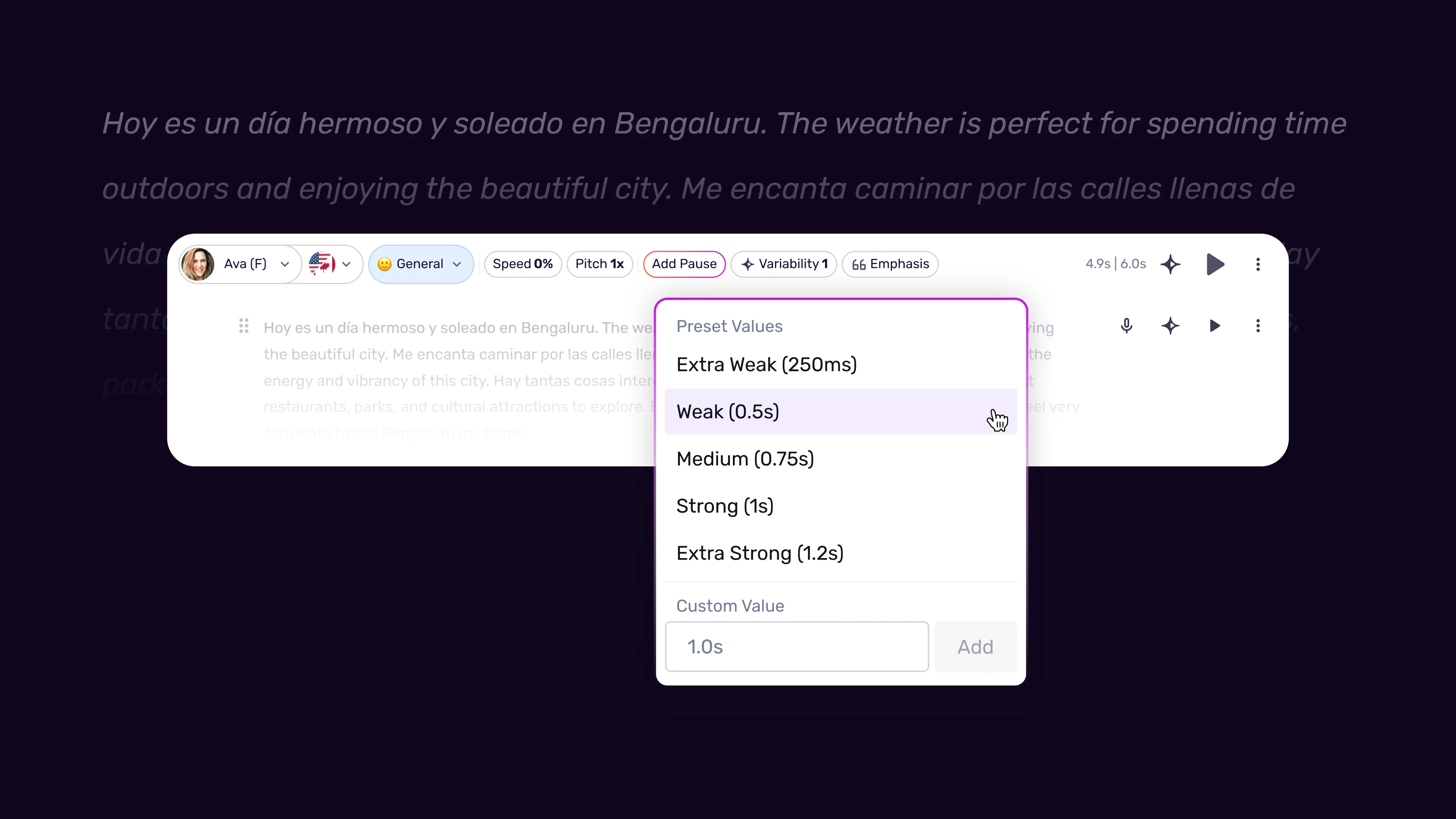
Where to add explicit pauses:
Before your key point. A 500 to 800 millisecond pause before the most important sentence in a paragraph creates anticipation. The listener’s attention sharpens when the voice goes quiet for half a second. This technique is standard in professional voiceover and works equally well in AI-generated audio.
After a rhetorical question. “What would you do with two extra hours every day?” lands differently with a 400 to 600 millisecond pause afterward than without one. The pause gives the listener a moment to actually think about the question before you answer it. Without the pause, the rhetorical effect is lost - a finding consistent with the cognitive science of speech perception.
At topic transitions. When your script moves from one section to another, a longer pause of 800 to 1200 milliseconds acts like an audible paragraph break. This is especially useful for e-learning content (see our Murf eLearning narration guide) and long-form narration where listeners need to mentally close one topic before opening the next.
How to add pauses in Murf Studio:
- Place your cursor at the exact point in the script where you want the pause
- Use the pause insertion tool in the toolbar
- Select a duration or enter a custom value in milliseconds
- The pause appears as a visible marker in the editor
- Preview the section to verify the pause duration feels right in context
A practical planning approach: read your script aloud before you open Murf. Notice naturally where you pause, and for how long. Those instinctive pauses are the ones to replicate in the editor. Most people pause 300 to 500 milliseconds between sentences and 800 to 1200 milliseconds between topics without realizing it. The official Murf best-practices article covers similar territory if you want a vendor reference.
Tip 5: Write Phonetically for Tricky Words
AI voices achieve high accuracy on standard vocabulary. But proper nouns, brand names, technical terms, foreign words, and unusual spellings create consistent problems. The solution is either to write the word phonetically in your script or to use Murf’s pronunciation control tools to define the correct pronunciation once for your entire project.
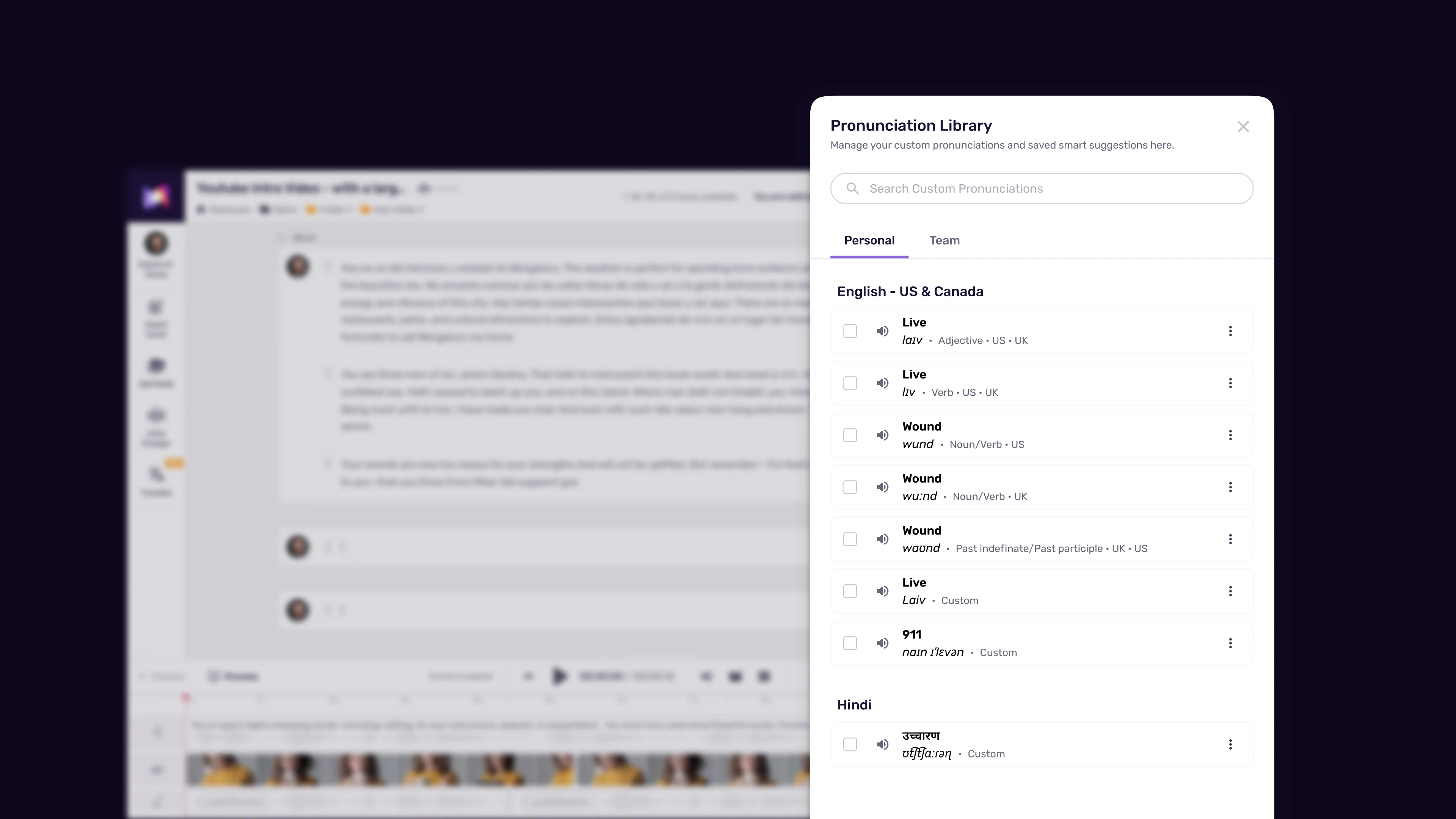
Categories of words that need attention:
Brand names. Unless a brand name happens to be a common English word, the AI guesses at the pronunciation - and frequently guesses wrong. “Figma” may come out as “fig-mah” instead of “fig-muh.” “Canva” may get a hard A. If your script mentions product names or company names that are not standard dictionary words, plan to handle pronunciation explicitly.
Technical acronyms. “SQL” is pronounced “sequel” by some developers and “S-Q-L” by others - the AI picks one and may pick the wrong one for your audience. “API,” “KPI,” “SaaS,” “UI,” “UX,” and dozens of other common tech abbreviations have conventions that vary by context. Spell out how you want them read.
Names from other languages. Personal names, place names, and borrowed words from other languages are consistently challenging for AI voices trained primarily on English. “Nguyen,” “Mbeki,” “Bjork,” “croissant” - these need explicit guidance. The English IPA reference on Wikipedia is a quick way to find phonetic spellings for unfamiliar names.
Two approaches in Murf:
The quick fix is to write the word phonetically in your script. If you want “Figma” pronounced “fig-muh,” write “fig-muh” in the script text. This is immediate but leaves phonetic spellings visible in your script, which can be messy if you need a clean written version.
The better approach for anything you use regularly is Murf’s Say It My Way feature - covered in detail in our Murf pronunciation and emphasis guide. You define the correct pronunciation once - by typing a phonetic version, recording yourself saying the word, or entering IPA notation - and Murf applies it consistently every time that word appears in the project. For agency work, client brand names, or any technical terminology you use repeatedly, a pronunciation dictionary built through Say It My Way saves significant time across projects. The International Phonetic Association IPA chart is the canonical reference for entering IPA notation correctly.
Practical tip: Scan your script for every proper noun and technical term before generating. Add each one to your pronunciation settings in Murf before you hit Generate for the first time. This front-loaded approach prevents the frustrating scenario where everything sounds great except for one mispronounced name that requires regeneration.
Tip 6: Use Emphasis Markers for Key Terms
When a human reads a script, they naturally stress the word that carries the most meaning in each sentence. An AI voice makes its best guess at this, and it is often right. But when the AI emphasizes the wrong word - “We NEED to focus on quality” when you meant “We need to focus on QUALITY” - the meaning shifts entirely.
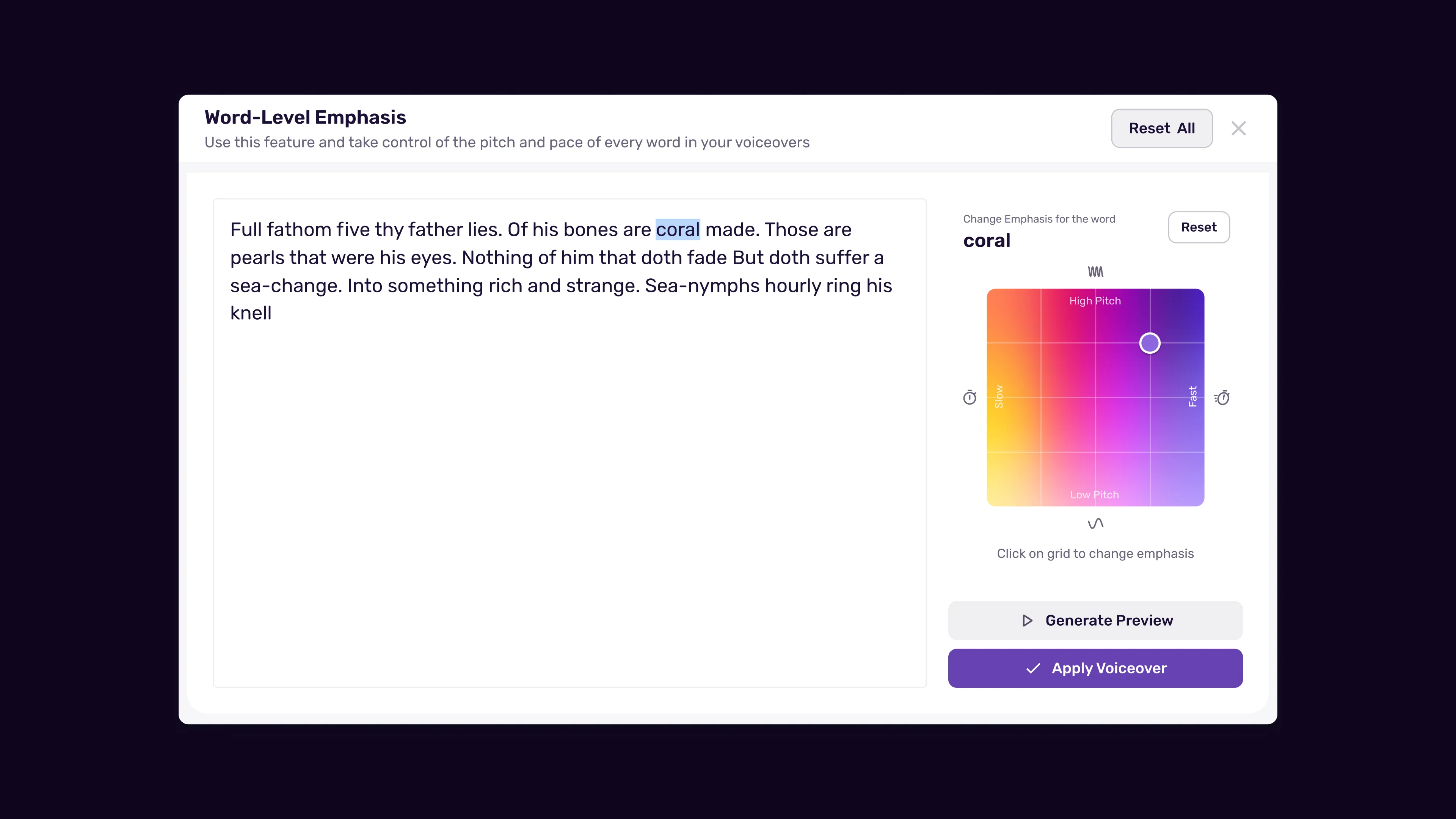
Murf’s word-level emphasis controls let you click on individual words in your script and tell the AI to stress them more or less strongly. This is available on all Murf plans, including the free tier - see the Murf free plan tips guide for what fits within free-tier limits.
How to use emphasis effectively:
Identify the load-bearing word in each key sentence. Read the sentence aloud and notice which word you naturally emphasize. The word that carries the core meaning - the verb, the key noun, the adjective that distinguishes this thing from alternatives - is almost always the right word to emphasize. Linguists call this prosodic stress, and the same principles apply whether a human or an AI is reading the line.
Use it sparingly. Emphasis works because it creates contrast. A voice that emphasizes every third word sounds strained and exhausting. A voice that emphasizes one word in five sounds intentional and clear. If you are considering adding emphasis to more than one word per sentence, pick the most important one and let the rest read naturally. Voice cloning users should also reference our Murf voice cloning setup for emphasis settings unique to cloned voices.
Combine emphasis with a brief pause before the word. A 200 to 300 millisecond pause immediately before an emphasized word creates a natural setup for the stress. It is the same technique professional voice actors use instinctively - the slight silence draws attention to what comes next. In Murf, you can place a custom pause marker right before an emphasized word to produce this effect (also covered in our Murf pacing, pauses, and speed tips guide).
Test with the specific voice you are using. Different Murf voices respond to emphasis markers with different intensity. Some voices produce a dramatic stress change. Others produce a subtle lift. Preview emphasis changes with your chosen voice before committing to a full generation run - you may need to adjust the emphasis level based on how reactive that particular voice is. Our Murf voice selection tips guide covers how to evaluate voices for expressiveness.
Emphasis versus emotion settings. Emphasis controls how individual words are stressed within sentences. Emotion controls affect the overall tone and energy of the entire delivery. These are different tools - the Murf emotion controls guide covers when to reach for each one. Use emphasis for meaning - to guide the listener’s comprehension. Use emotion settings for tone - to set the register of the whole piece. Reaching for emotion settings when you just need a single word to land harder is a common mistake.
Before/After Script Examples
The difference these tips make is easiest to see in a direct comparison. Here are two versions of the same script section - one written for the page and one written for AI voice in Murf.
Before - written for the page:
Murf AI is a leading text-to-speech platform that offers 120+ voices in 20 languages, making it ideal for creators, marketers, and businesses who need professional voiceovers without studio equipment or recording expertise; paid plans start at $29/month, with a free tier available for personal use & evaluation purposes.
What goes wrong when the AI reads this: The sentence is 52 words long. The AI reads it at a constant pace with no natural pause points. The semicolon may or may not produce a pause depending on the voice. The “120+” may be read as “one hundred twenty plus” or “one hundred and twenty” or “one-twenty plus.” The ”&” may be skipped or read as “ampersand.” The overall effect is a single long machine-read sentence that loses the listener before the end.
After - written for AI voice in Murf:
Murf AI gives you access to over 120 voices across 20 languages. No studio. No microphone. No recording experience required. It is built for creators, marketers, and businesses that need professional voiceovers fast. Plans start at twenty-nine dollars per month. There is also a free tier for personal use and evaluation.
What works: Six sentences instead of one. Each idea lands before the next begins. The key selling points - no studio, no mic, no experience - are each their own sentence, delivered with clean separation. The price is spelled out so it reads correctly. “And” instead of ”&.” The free tier gets its own sentence with natural emphasis.
This version is easier to read, easier to generate, easier to adjust if one sentence needs to change, and far more likely to sound natural out of the box. The same pattern applies whenever you write scripts for ai voice murf at any length.
One more example - a call to action:
Before:
Click the link in the description below to start your free trial and see how Murf AI can transform your content production workflow today!
After:
Ready to try it? Click the link below to start your free trial. See what Murf AI can do for your content workflow.
The second version gives the rhetorical question its own sentence (pair it with a 400ms pause in Murf). The CTA is short and direct. The final sentence lands as a clean close. The exclamation mark is gone - the AI does not need it to add energy here, and removing it keeps the delivery measured. For more advanced variability tuning, see our Murf natural sounding voice tips guide.
Frequently Asked Questions
How long should a Murf AI script be for a typical two-minute voiceover?
A two-minute voiceover at default speed (1.0x) requires approximately 300 words. At 1.1x speed, which works well for conversational content, you can fit roughly 330 words in two minutes. For planning purposes, use 150 words per minute at 1.0x as your baseline and adjust up or down based on your target speed setting. Always check the estimated duration shown in the Murf Studio editor as you write - it updates in real time and is more accurate than word count estimates.
Should I write my script in Murf or draft it externally first?
Draft externally first. Writing directly in the Murf editor is tempting because you can preview immediately, but it encourages generating before the script is fully polished - which wastes generation minutes. Write your script in a separate document, read it aloud yourself, fix all the issues you catch, and then paste the final version into Murf. The editor is where you handle pronunciation, pauses, and emphasis settings. The writing happens before you open the platform.
Do I need to use all six tips on every script, or can I pick and choose?
Tips 1 (short sentences), 2 (spell out numbers), and 3 (use punctuation for pacing) apply to almost every script and should be defaults. Tips 4 (explicit pauses) and 6 (emphasis markers) matter most for longer, more complex scripts where you need fine control over delivery. Tip 5 (phonetic spelling) applies whenever your script contains proper nouns, technical terms, or unusual words. For a simple 30-second social media voiceover, Tips 1, 2, and 3 may be all you need. For a 10-minute training narration, all six apply.
Why does the AI sometimes ignore commas in my script?
Different Murf voices handle commas with different sensitivity. Some voices produce a clear micro-pause on every comma. Others treat commas inconsistently, especially in longer lists or compound sentences. If you need a reliable pause at a specific point in a sentence, use Murf’s explicit pause insertion tool rather than relying on punctuation. For simple list separation, commas are usually sufficient. For any pause that genuinely matters to the delivery - before a key point, after a question - insert a pause marker instead.
Want to learn more about Murf AI?
Related Reading
Related Guides
- Getting Started with Murf AI
- Murf Studio Interface Walkthrough
- How to Clone Your Voice with Murf AI
- Murf Text-to-Speech Tutorial
- Choosing the Right AI Voice in Murf
- Murf AI Emotion Controls
- Murf AI Pronunciation and Emphasis
- Mastering Pacing in Murf AI
- Murf MultiNative: Multilingual Voiceovers
- Murf AI Dubbing Walkthrough
- AI Voiceover for YouTube Videos: Murf Workflow
- Murf AI eLearning Narration: Educator’s Guide
- Murf AI Canva Integration
- Murf Falcon API Tutorial
- Murf AI Free Plan Tips
- Murf AI Voice Changer Guide
- Murf AI Podcast Intro Guide
- Murf AI Google Slides Voiceover
- Murf AI Voice Agent API
External Resources
- Murf AI Help Center - Official documentation for the studio editor, pronunciation tools, and script optimization features
- Murf Voiceover Best Practices - Vendor reference covering script structure, pacing, and delivery
- W3C SSML 1.1 Specification - The underlying standard for how speech engines normalize text and emphasis
Related Guides
- AI Voiceover Corporate Training With WellSaid Labs
- AI Voiceover for YouTube Videos: Murf Workflow Guide 2026
- AI Voiceover Tips: Making Synthetic Voices Sound Human
- ElevenLabs Getting Started: Complete Beginners Guide
- ElevenLabs Voice Cloning Tutorial: Complete 2026 Guide
- Luma Dream Machine Video Tutorial 2026: Text-to-Video & Ray3
- Murf AI Canva Integration: Add Voiceovers to Designs
- Murf AI Custom Pronunciation: Say It My Way Guide (2026)
- Murf AI Dubbing: Complete Walkthrough | Complete Guide 2026
- Murf AI eLearning Narration: Educator's Guide | Review 2026